6 Best Monochrome Laser Printers with Dual Paper Trays (November 2026)
The best monochrome laser printers with dual trays include the Brother HL-L5210DWT Business Monochrome Laser Printer for busy offices, the Brother HL-L6210DWT Business Monochrome Laser Printer for high-volume workgroups, and the HP LaserJet Pro 3101fdw for small teams needing an all-in-one.
On this page (9 sections)
- The best monochrome laser printers with dual trays for busy offices
- How the best monochrome laser printer with dual tray picks compare
- How we compared these printers
- What does a dual tray actually buy you?
- What is a monochrome laser printer and when is it enough?
- How does a laser printer fuse toner to paper?
- Which dual tray printer is best for a notary or legal office?
- Which brand is best: Brother or HP for dual trays?
- Verdict: which monochrome laser printer with dual tray should you buy?
The best monochrome laser printer with dual tray for most busy offices is the Brother HL-L5210DWT, because it combines 48ppm speed with 250-sheet and 520-sheet trays.
The Brother HL-L6210DWT steps up to 50ppm and two 520-sheet trays for heavier volume.
If you also need scanning and fax, the Canon MF462dw II and HP LaserJet Pro 3101fdw cover more jobs in one device.
Our score weighs specs, features and buyer feedback against what you are shopping for.
We compared paper capacity, print speed, duplex printing, toner yield, connectivity and security across these six models.
Our picks at a glance
-
1
 Best for busy offices
Brother HL-L5210DWT Business Monochrome Laser Printer
9.7/10 our score
See it on Amazon -
2
 Best for high-volume workgroups
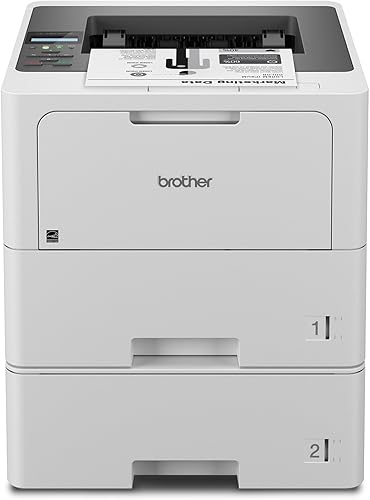
Brother HL-L6210DWT Business Monochrome Laser Printer
9.5/10 our score
See it on Amazon -
3

The best monochrome laser printers with dual trays for busy offices
Two Brother models lead because they are the only picks here with true dual-tray paper handling as standard.
The HP and Canon models below win on scanning, copying or desk size, so choose by the work you do most.
Brother HL-L5210DWT Business Monochrome Laser Printer: Best for busy offices
- Up to 48ppm
- Dual trays: 250-sheet and 520-sheet
- 100-sheet multipurpose tray
- Automatic duplex
- Gigabit Ethernet and dual-band wireless
Fast, high-capacity, print-only Brother for offices that refill trays too often. It pairs dual trays with high-yield toner and strong network security.
Pros
- Dual trays reduce refill stops
- 48ppm for shared office workloads
- Expandable to 1,390 sheets with optional tray
Cons
- Print-only, so no scanner or copier
- Large footprint at 15.3 x 14.7 x 15.3 in
The Brother HL-L5210DWT suits a busy office or small workgroup that prints professional documents all day.
Its 48ppm speed keeps shared queues moving, and duplex printing is automatic by default to save paper.
Paper handling is the main reason it leads this guide.
You get a 250-sheet tray and a 520-sheet tray, plus a 100-sheet multipurpose tray for envelopes or custom media.
Total capacity can expand to 1,390 sheets with an optional tray.
Toner cost matters at this volume.
Brother includes a 3,000-page cartridge and supports the TN920XXL super high-yield cartridge at 11,000 pages.
Gigabit Ethernet and dual-band wireless make sharing straightforward on a wired or wireless network.
Triple Layer Security helps limit document and device access and protect against network intrusions.
The trade-off is that this is print-only.
If you need to scan or copy, look at the all-in-one picks below.
At 32.7 lb and about 15 inches in each dimension, it also needs real desk or stand space.
An initial page print time of 6.7 seconds means the first sheet is not instant, so short jobs feel slower than the headline speed suggests.
Brother HL-L6210DWT Business Monochrome Laser Printer: Best for high-volume workgroups
- Up to 50ppm
- Dual 520-sheet paper trays
- 100-sheet multipurpose tray
- Automatic duplex
- Gigabit Ethernet and dual-band wireless
The fastest and largest standard paper setup here, built for workgroups that print in bulk. Two 520-sheet trays keep letter paper flowing without constant refills.
Pros
- Two 520-sheet trays as standard
- 50ppm print speed
- 18,000-page ultra high-yield toner option
Cons
- Print-only model
- Heavier at 35.4 lb and taller than the HL-L5210DWT
The Brother HL-L6210DWT suits workgroups with higher print volume that want the most paper capacity as standard.
It prints at up to 50ppm, the fastest speed in this group, with automatic duplex printing.
Its paper setup is larger than the HL-L5210DWT.
You get two 520-sheet trays, plus a 100-sheet multipurpose tray for custom media or envelopes.
Capacity can expand to 1,660 sheets with an optional tray.
Running costs are a focus here too.
Brother includes a 3,000-page cartridge and supports the TN920UXXL ultra high-yield cartridge at 18,000 pages.
That long yield helps teams that replace toner often.
Like the HL-L5210DWT, this model is print-only and built for shared networks, with Gigabit Ethernet, dual-band wireless and Triple Layer Security.
It also works with Alexa and prints from a wide range of mobile devices, which helps in shared rooms.
It is heavier at 35.4 lb and taller at 16.6 inches, so check your printer stand before choosing it over the slightly smaller Brother.
Maximum media size reaches 8.5 x 14 inches, which covers legal size work that some smaller models do not.
HP LaserJet Pro 3101fdw: Best for small teams needing an all-in-one
- Up to 35ppm
- Print, scan, copy and fax
- Automatic 2-sided printing
- Auto document feeder
- Wi-Fi, Ethernet and Bluetooth
A compact all-in-one for teams up to 7 people that need scanning and fax in one device. It trades dual-tray capacity for broader job handling.
Pros
- Print, scan, copy and fax in one unit
- 35ppm with auto 2-sided printing
- HP Wolf Pro Security
Cons
- No dual-tray paper setup listed
- Maximum media size is letter
The HP LaserJet Pro 3101fdw suits a small team of up to 7 people that needs print, scan, copy and fax in one device.
It prints at up to 35ppm with automatic 2-sided printing and an auto document feeder for scan and copy jobs.
This is not a dual-tray printer, and that is the honest trade-off.
You gain broad job handling, including fax, HP Wolf Pro Security and Intelligent Wi-Fi that looks for the best connection.
You lose the separate paper supplies that help with long, uninterrupted print runs.
For daily office documents, reports and forms, the mix of functions often matters more than tray count.
It supports wireless printing from any mobile device, PC or tablet, plus Ethernet and Bluetooth.
Copy resolution reaches 1200 x 1200 dpi, which suits office copies where text clarity matters more than photo detail.
Choose it when one all-in-one must sit in a shared space and handle mixed tasks.
Check media size before you buy, because maximum media size is listed as letter only.
Choose a Brother dual-tray model instead when plain-paper volume and fewer refills are your top priority.
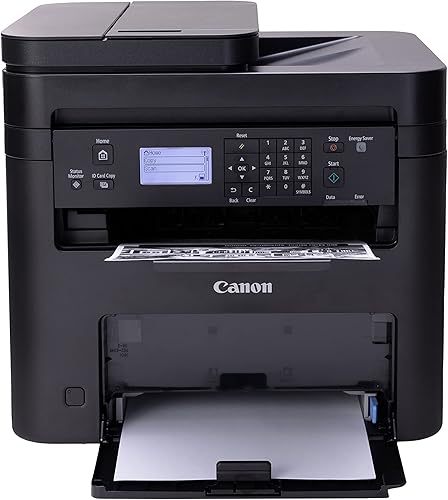
Canon imageCLASS MF273dw: Best for home offices on a budget
- Up to 30ppm
- Print, copy and scan
- Auto document feeder
- Auto 2-sided printing
- Wireless printing
A simpler 3-in-1 for home and small offices that print black and white documents daily. It suits light to moderate use where ease matters more than tray count.
Pros
- Print, copy and scan in one device
- Fast first print at about 5.3 seconds
- Auto 2-sided printing
Cons
- No dual tray listed
- 30ppm is slower than the office picks
The Canon imageCLASS MF273dw suits a home office or small office that needs print, copy and scan without extra complexity.
It prints at up to 30ppm and produces a first page in about 5.3 seconds.
Auto 2-sided printing and an auto document feeder help with everyday documents and forms.
The machine uses Toner 071, with a high-capacity option for heavier use.
Paper handling is simpler here.
There is no dual tray listed, so long jobs will need refills more often than the Brother picks.
That matters less for a home office printing a few dozen pages a day.
The trade-off is speed and capacity against simplicity.
If your work is mostly short documents, invoices and occasional copies, this format can be enough.
It comes with a starter cartridge at 700 yield and a 1 year limited warranty.
Print and copy resolution goes up to 2400 x 600 dpi, which is sharp for text work.
If you share the printer with a team, the dual-tray Brothers will interrupt your day less.
HP LaserJet M207dw: Best for small desks and light office use

- Up to 28ppm
- Automatic duplex
- Dual-band Wi-Fi with self-reset
- Ethernet and USB
- 150-sheet maximum sheet capacity
A small, print-only duplex printer for 1 to 5 people with modest daily volume. Its compact size helps tight spaces, but paper capacity is the clear trade-off.
Pros
- Compact at 11 x 13.98 x 8.07 in
- Fast two-sided printing in its class
- Dual-band Wi-Fi with self-reset
Cons
- 150-sheet capacity, no dual tray
- 28ppm is the slowest here
The HP LaserJet M207dw suits 1 to 5 people in a small office or home office with light daily volume.
It prints at up to 28ppm single-sided, with automatic duplex as standard.
Its main advantage is size.
At 11 x 13.98 x 8.07 in and 12.4 lb, it fits desks and shelves where the larger office models do not.
Dual-band Wi-Fi with self-reset helps fix connectivity issues automatically.
The clear trade-off is paper capacity.
Maximum sheet capacity is 150 sheets, and there is no dual tray.
A long report will need a refill partway through, unlike the Brother models with 770 or 1,040 sheets in their main trays.
Choose it for compact placement and basic duplex printing.
Print resolution is up to 600 x 600 dpi, so fine line work is less refined than the 1200 dpi models here.
Auto-On and Auto-Off technology helps save energy when the printer sits idle between short jobs.
Skip it for a shared office where refills and queues are already a daily annoyance.
Canon imageCLASS MF462dw II: Best for hybrid offices needing scan and fax

- Up to 37ppm
- Print, scan, copy and fax
- 250-sheet cassette plus 100-sheet tray
- 50-sheet duplex ADF
- 5-inch color touchscreen
A 4-in-1 with expandable paper capacity and a 50-sheet duplex scanner. It is the pick when one device must cover printing, scanning, copying and fax.
Pros
- 37ppm with quick first print
- 50-sheet duplex ADF for scanning
- Expandable with optional 550-sheet cassette
Cons
- No dual tray as standard
- Largest and heaviest at 46.6 lb
The Canon imageCLASS MF462dw II suits a small or hybrid office that needs print, scan, copy and fax in one device.
It prints at up to 37ppm, with a first print in about 5 seconds.
Paper capacity is 250 sheets in the standard cassette plus a 100-sheet multipurpose tray, and it can expand with an optional 550-sheet cassette.
That is generous for an all-in-one, though not a true dual-tray setup as standard.
Its 50-sheet duplex ADF scans both sides in one pass, which saves time on multi-page documents.
A 5-inch color touchscreen and mobile printing through the Canon PRINT app, AirPrint and Mopria help in shared spaces.
Toner 070 high-capacity yields about 10,200 pages, which helps keep running costs down.
The trade-off is size and weight at 46.6 lb and 18.1 x 16.6 x 14.8 inches.
Choose it for the 4-in-1 feature set, not for maximum tray capacity.
Print resolution reaches 1200 x 1200 dpi, which matches the sharper office models for text and simple graphics.
How the best monochrome laser printer with dual tray picks compare
The two Brother models are the only true dual-tray picks, so they lead for paper handling.
The Canon MF462dw II offers the widest feature set, while the HP M207dw is the smallest.
| Product | Best for | Print speed | Paper capacity | Duplex | Our score |
|---|---|---|---|---|---|
| Brother HL-L5210DWT Business Monochrome Laser Printer | busy offices | 48 ppm | 250 + 520 sheets, plus 100-sheet tray | Automatic | 9.7 |
| Brother HL-L6210DWT Business Monochrome Laser Printer | high-volume workgroups | 50 ppm | 520 + 520 sheets, plus 100-sheet tray | Automatic | 9.5 |
| HP LaserJet Pro 3101fdw | small teams needing an all-in-one | 35 ppm | Automatic | 9.4 | |
| Canon imageCLASS MF273dw | home offices on a budget | 30 ppm | Automatic | 9.2 | |
| HP LaserJet M207dw | small desks and light office use | 28 ppm | 150 sheets | Automatic | 8.8 |
| Canon imageCLASS MF462dw II | hybrid offices needing scan and fax | 37 ppm | 250 sheets plus 100-sheet tray | Automatic | 8.7 |
How we compared these printers
We compared each model on paper capacity, print speed, duplex printing, toner yield, connectivity, security and the jobs it can handle.
Print-only models were judged on office throughput, while all-in-ones were judged on scanning and copying features.
We checked specs for tray counts and sheet capacity, because that decides how often you stop to refill.
We also checked toner cartridge yields, since a high-yield cartridge changes the cost of long print runs.
We did not test these printers.
Speeds, yields and capacities are maker figures, so treat them as guides for comparing models rather than promises for your exact documents.
What the headline specs mean in practice
Print speed in pages per minute is usually a one-sided figure for letter paper.
A model rated at 50ppm will not duplex at that same rate, so long two-sided jobs take longer than a quick calculation suggests.
Paper capacity figures also assume standard paper and a full tray.
Envelopes and heavier stock in a multipurpose tray reduce the usable count and can slow feeding.
Toner yield is based on standard coverage, so dense pages with charts or dark text use toner faster.
That is why a high-yield cartridge matters more for a busy office than a small speed gap between models.
What does a dual tray actually buy you?
A dual tray buys you two separately loaded paper supplies, so you can keep plain letter paper in one tray and a different size or stock in the other.
That setup cuts refill stops during long jobs.
It also helps with mixed work.
Load letter paper in the large tray and envelopes or heavier stock in the multipurpose tray, then send each job to the right source.
For most offices, the benefit is simple: fewer interruptions.
The Brother HL-L5210DWT holds 770 sheets across its two main trays, while the HL-L6210DWT holds 1,040 sheets.
How tray capacity changes your day
A single tray forces you to watch paper levels during a long print run.
Two trays give you a buffer, so a job can finish while you refill the empty tray later.
That buffer matters most for shared printers.
One person printing a 200-page report should not leave the next person with an empty tray.
A second tray also gives you a place for legal size paper or preprinted forms.
You can leave the main tray loaded with letter paper and switch sources in the print dialog.
That saves the swap that often causes jams when paper is changed mid job.
What is a monochrome laser printer and when is it enough?
A monochrome laser printer prints black and white only, which suits text documents, invoices, forms and reports.
If color is not a job requirement, monochrome often gives you faster speeds and lower toner costs.
Our guide to what is a monochrome laser printer explains the basics in more detail.
Read it if you are new to laser printers or switching from inkjet.
Monochrome is enough when your documents are text-first and you print often.
It is not enough when charts, photos or branding need color, no matter how good the tray setup is.
Resolution also matters for text work.
Models here range from 600 x 600 dpi on the HP M207dw to 1200 x 1200 dpi on the Brothers, HP 3101fdw and Canon MF462dw II.
Higher resolution gives smoother small text and cleaner lines on forms and tables.
For plain memos the difference is minor, but for dense reports it is noticeable on close inspection.
How does a laser printer fuse toner to paper?
A laser printer uses heat and pressure to fuse toner to paper, which is why output comes out warm and stays dry to the touch.
The fuser is a key part of the printing process.
Our explainer on how a laser printer fuses toner to paper walks through the steps.
It helps if you are curious about jams, print quality or maintenance.
For buying, the practical point is this: laser printing is built for speed and text volume.
That is why these models focus on pages per minute and toner yield rather than photo quality.
Drum life also affects cost over time.
The Brother HL-L6210DWT lists a DR920 drum unit at 45,000 pages, so the drum is replaced far less often than toner.
A long-life drum helps offices that print thousands of pages each month.
Check drum yield alongside toner yield when you compare running costs.
Which dual tray printer is best for a notary or legal office?
A notary or legal office needs reliable paper handling for forms, journals and certificates.
The best dual tray laser printer for notary guide covers that specific use case.
In this roundup, the Brother HL-L5210DWT is the safer general pick for that work.
Its dual trays plus multipurpose tray handle plain paper and special stock without constant swapping.
When legal-size paper matters
Some offices also print legal-size pages.
The best legal size laser printer guide helps if your forms run longer than letter paper.
Check maximum media size before you buy.
The HP 3101fdw lists letter as its maximum media size, while several other models here list 8.5 x 14 in.
The Canon MF462dw II also lists legal size, and its 250-sheet cassette plus multipurpose tray gives you a place for longer sheets.
Legal size jobs can fill a tray faster because each sheet uses more paper area.
A larger tray capacity therefore helps more than it first appears for legal work.
Which brand is best: Brother or HP for dual trays?
Brother leads this list for dual trays because both Brother models include two main trays as standard.
Our best Brother laser printer dual tray guide covers that lineup in more depth.
HP is stronger here for compact and all-in-one options.
The best HP LaserJet printer with two trays guide helps if you want to compare HP paper setups more closely.
Thick paper and special stock
Dual trays help, but stock type matters too.
Our best laser printer for thick paper guide covers feeding and paper path questions.
Use the multipurpose tray for envelopes and customer media on the Brother models.
Check your stock weight against the model's limits before a large run.
A multipurpose tray usually gives a straighter path than a cassette tray.
That straighter path helps with envelopes, labels and heavier card stock.
Send special stock to that tray and keep plain paper in the main trays.
That habit reduces jams and keeps the main paper supply clean for everyday jobs.
Verdict: which monochrome laser printer with dual tray should you buy?
Buy the Brother HL-L5210DWT for most busy offices, the Brother HL-L6210DWT for higher volume, and the Canon MF462dw II when you need a 4-in-1.
The HP 3101fdw is the pick for small teams that need fax and scanning, while the HP M207dw suits small desks with light use.
Decide by your main bottleneck first.
If refills interrupt you, choose a dual tray.
If scanning and copying interrupt you, choose an all-in-one.
For brand-specific comparisons, start with our Brother and HP dual tray guides above.
Our top 3 picks at a glance
-
1
Best for busy offices
Brother HL-L5210DWT Business Monochrome Laser Printer
9.7/10 our score
See it on Amazon -
2
Best for high-volume workgroups
Brother HL-L6210DWT Business Monochrome Laser Printer
9.5/10 our score
See it on Amazon -
3
Frequently asked questions
What is a dual tray monochrome laser printer?
A dual tray monochrome laser printer holds paper in two separate trays, so you can keep letter paper in one and another size or stock in the other. Each tray feeds on its own, which cuts refill stops during long jobs.
Is a dual tray printer worth it for a small office?
Yes, if you print long documents or refill often. Two trays let you load plain paper in one tray and labels, envelopes or heavier stock in a multipurpose tray, so you switch media without swapping the main stack.
Do dual tray laser printers print in color?
No, monochrome means black and white output only. If you need color, choose a color laser printer instead.
Monochrome models often focus on speed, toner yield and lower running costs for text documents.


