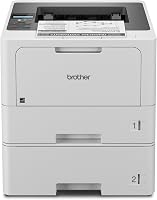
6 Best USB Laser Printers (November 2026)
The best USB laser printers include the Brother HL-L2405W Wireless Compact Monochrome Laser Printer for compact home offices, the Canon imageCLASS MF3010 VP for wired all-in-one basics, and the Brother MFC-L2820DW Wireless Compact Monochrome All-in-One Laser for small office all-in-one work.
On this page (8 sections)
- Best USB laser printers for home and small office use
- How to compare these USB laser printers
- What does a direct USB connection mean for daily printing?
- Which USB laser printer fits a laptop user?
- How much paper capacity and speed do you need?
- Print only, all-in-one or color: which type should you pick?
- What should you check for setup, toner and care?
- Verdict: which USB laser printer should you buy?
The best USB laser printer for most homes is the Brother HL-L2405W, because its 250-sheet tray and 30 ppm speed suit regular home office printing without a network. You can connect it to one computer by USB, or use wireless if your setup changes.
A wired connection is simple and predictable. You plug in the cable, install the driver and print from that computer.
That is the main reason many buyers still choose a best usb laser printer even when wireless is available.
If you want the wider trade-offs first, read What Are the Advantages of a Laser Printer? and What Are the Disadvantages of a Laser Printer?. Those guides explain toner cost, speed and maintenance in plain terms.
Our picks at a glance
-
1
 Best for compact home offices
Brother HL-L2405W Wireless Compact Monochrome Laser Printer
9.7/10 our score
See it on Amazon -
2

-
3
 Best for small office all-in-one work
Brother MFC-L2820DW Wireless Compact Monochrome All-in-One Laser
9.6/10 our score
See it on Amazon
- 4
 Check it
HP LaserJet M234sdw Monochrome Laser Printer
Best for two-sided printing - 5
 Check it
HP Laserjet MFP M140w Wireless Black
Best for very small spaces - 6
 Check it
Canon Color imageCLASS LBP646Cdw Wireless Laser Printer
Best for color printing
Best USB laser printers for home and small office use
The picks below cover print-only models, all-in-one models and one color model. Each one supports a direct USB link, so you can place it beside a desktop or laptop and print without relying on a router.
Our score weighs specs, features and buyer feedback against what you are shopping for. A higher score means a closer match for a USB-first laser printer buyer, not a test result.
Brother HL-L2405W Wireless Compact Monochrome Laser Printer: Best for compact home offices
- 30 ppm monochrome printing
- 250-sheet paper tray
- Manual feed slot
- USB 2.0 and dual-band wireless
A compact print-only laser printer for a single computer or a small home office, with a large tray and direct USB connection.
Pros
- 250-sheet tray
- Direct USB option
- Compact footprint
Cons
- Print only
- Manual duplex
The Brother HL-L2405W suits a home office where most work is black and white text, forms and invoices. It is print only, so it fits best when you already have a separate scanner or copy often by another tool.
Its 250-sheet paper tray means fewer refills during a busy week. That larger tray helps when you print a stack of bills or school forms and do not want to keep topping it up.
A manual feed slot also helps with envelopes and specialty paper that do not suit the main tray. You can load those items one by one for a short job without changing the whole setup.
Print speed reaches 30 ppm for one-sided documents. Brother says first page print time is 8.5 seconds, which helps with short jobs that come up through the day.
The compact size is a real help on a small desk. At 15.1 pounds and a modest footprint, it can sit beside a laptop or desktop without taking over the workspace.
The trade-off is manual duplex. You flip pages yourself for two-sided documents, while some all-in-one picks here do that step for you.
It also has no scanning or copying, so compare it with the Canon MF3010 VP if you need those jobs in one box. For pure printing by USB, it keeps the setup simple and focused.
Canon imageCLASS MF3010 VP: Best for wired all-in-one basics
- 19 ppm monochrome printing
- Scanner and copier
- USB cable included
- 150-sheet paper capacity
A wired monochrome all-in-one with scanner, copier and a USB cable in the box for a straightforward desk setup.
Pros
- USB cable included
- Scan and copy in one unit
- Automatic duplex
Cons
- Slower than the Brother picks
- Smaller paper capacity
The Canon imageCLASS MF3010 VP suits a desk where wired printing, scanning and copying all need to happen in one place. It comes with a USB cable, which removes one extra purchase for a first setup.
Paper capacity reaches 150 sheets. That is less than the 250-sheet models here, so it fits better for light personal use than for a busy shared office.
Print speed is 19 ppm, so it is slower than the Brother and HP picks. For a few pages at a time, that gap matters less than the all-in-one design.
Canon lists color scanning up to 600 dpi (interpolated) and an ID card copy mode for small documents. Automatic duplex is also listed, which helps when you print longer files.
Choose it for a simple wired all-in-one. Skip it if speed and tray size matter more than the included cable and copy features.
Brother MFC-L2820DW Wireless Compact Monochrome All-in-One Laser: Best for small office all-in-one work
- 34 ppm monochrome printing
- Copy, scan and fax
- 50-page document feeder
- USB, Ethernet and wireless
A faster monochrome all-in-one with a document feeder, fax, touchscreen and several connection options for a shared desk.
Pros
- Faster printing
- 50-page document feeder
- Automatic duplex
Cons
- Heavier than print-only models
- More features than some buyers need
The Brother MFC-L2820DW suits a small office that prints, copies, scans and faxes from one machine. It is the fastest monochrome model in this group at 34 ppm in its specs.
A 50-page auto document feeder helps with multi-page copy, scan and fax jobs. That feeder matters when you work with contracts, forms or packets rather than single sheets.
The 250-sheet paper tray reduces refill trips. Automatic duplex printing also helps cut paper use for longer documents.
Connection options include USB, Ethernet and dual-band wireless. That mix suits a fixed desk by cable or a shared office where several people print by network.
A 2.7 inch touchscreen makes common tasks easier to start, and Brother says you can print from and scan to popular cloud apps. You can reach stored files without going back to a computer first.
The trade-off is size and weight. At 22.5 pounds, it takes more desk room than a print-only model.
If you only print, the HL-L2405W is a simpler fit. This model earns its space when scan, copy and fax work is part of your week.
HP LaserJet M234sdw Monochrome Laser Printer: Best for two-sided printing
- 30 ppm monochrome printing
- 40-page document feeder
- Automatic two-sided printing
- USB 2.0 and Ethernet
A monochrome all-in-one built around fast two-sided printing, scanning and copying for a small team.
Pros
- Automatic two-sided printing
- Document feeder for scan and copy
- Multiple connection options
Cons
- Paper capacity not stated
- Heavier than compact print-only models
The HP LaserJet M234sdw suits a small team that prints two-sided documents often. HP lists up to 30 ppm single-sided and up to 19 images per minute two-sided.
A 40-page auto document feeder supports hands-free copying and scanning. That helps when a team shares one machine for reports and forms.
HP lists Ethernet and USB 2.0, plus dual-band Wi-Fi. You can use USB for a single computer, then switch to a network link if more people need access.
Dual-band Wi-Fi with self-reset is listed for this model. That feature helps when a router drops or a connection stalls during a busy print job.
The trade-off is that paper capacity is not stated in the data here. Measure your desk and check tray details before you order, especially if you print long daily batches.
It is an all-in-one, so it covers more jobs than a print-only model. If you want the lightest setup, the smaller HP M140w may fit a tighter shelf.
HP Laserjet MFP M140w Wireless Black: Best for very small spaces
- 21 ppm monochrome printing
- Print, scan and copy
- USB 2.0 interface
- Compact dimensions
A small monochrome all-in-one for a shelf or narrow desk, with USB wired printing and wireless options.
Pros
- Small footprint
- Print, scan and copy
- Direct USB option
Cons
- No automatic duplex
- Slower than larger picks
The HP Laserjet MFP M140w suits a very small space, such as a shelf, a narrow desk or a shared home office corner. HP describes it as the world's smallest laser in its class, and its dimensions are the smallest here.
Print speed reaches 21 ppm for black and white pages. That is fine for personal documents, forms and short reports.
It prints, scans and copies, so it covers the main jobs without a separate scanner. HP lists a USB 2.0 interface, plus wireless printing from compatible devices.
The small size makes setup on a shelf more realistic than with a larger all-in-one. At 11.9 pounds, it is also easier to move between rooms if needed.
The trade-off is no automatic duplex. Two-sided documents need a manual flip, and paper capacity is not stated in the data here.
Check that detail before you choose it for heavy printing. A busy desk may need a model with clearer tray capacity.
Choose it when space is your main limit. If you print many two-sided pages, the HP M234sdw or the Brother MFC-L2820DW will save more time.
Canon Color imageCLASS LBP646Cdw Wireless Laser Printer: Best for color printing
- 26 ppm color and monochrome
- 250-sheet cassette
- Automatic two-sided printing
- USB and Ethernet
A print-only color laser printer for buyers who need color documents and can use a direct USB connection.
Pros
- Color printing
- 250-sheet cassette
- Automatic two-sided printing
Cons
- Print only
- Largest and heaviest model here
The Canon imageCLASS LBP646Cdw is the only color model in this group. It prints up to 26 ppm in both color and monochrome, with a first print time of about 10.3 seconds.
A 250-sheet standard cassette plus a 1-sheet multipurpose tray gives you room for regular jobs and single specialty sheets. Automatic two-sided printing helps with longer color documents.
It is print only. There is no scanning, copying or faxing, so it suits a desk that already has those tools or does not need them.
USB and Ethernet are both listed, along with wireless setup. A 5-inch LCD screen helps you check settings on the machine itself.
The color output is the main reason to pick this model over the monochrome options. Charts, diagrams and documents with color photos will print in full color.
The trade-off is size and weight. At 27.6 pounds, it is the largest model here.
Choose it for color output, not for a tight shelf or a portable setup. Pair it with a separate scanner if you still need scan and copy jobs.
How to compare these USB laser printers
We compared print speed, paper capacity, duplex mode, scan and copy features, size, weight and connection options. USB was the baseline, so each model had to list a USB interface as well as any extra links.
Speed figures are maker figures for black and white pages unless color is stated. Real jobs vary by page content, paper type and driver settings, so use speed as a guide for busy desks.
Paper handling matters more than many buyers expect. A 250-sheet tray means fewer interruptions than a 150-sheet tray, especially for forms or reports.
Duplex mode also changes daily use. Automatic two-sided printing saves time and paper, while manual duplex needs you to flip and reload pages.
Our scores reflect fit for a USB-first buyer. A model can score well for speed and features even if it is not the smallest or the simplest to set up.
For brand-specific USB options, see our best brother laser printer usb guide and our best usb laserjet printer guide. Those pages narrow the choice by maker.
What does a direct USB connection mean for daily printing?
A direct USB connection means the printer and one computer talk through a cable. You do not need a router, a network name or a password to print from that computer.
That setup suits a desktop that stays in one place. It also suits a workroom where the Wi-Fi signal is weak or where you want fewer network steps.
USB printing is also helpful when a router is down. A cable link keeps printing available while you fix the network.
The limit is sharing. One cable normally serves one computer at a time, so other people cannot print until you move the cable or use another connection.
If you want to avoid wireless as a main link, our best laser printer no wifi guide covers that angle in more detail.
Which USB laser printer fits a laptop user?
Best laser printer for MacBook Air and other laptops
A laptop user often moves the computer around the room. A USB printer still works, but you need to dock the laptop or park it near the printer when you print.
For that use, choose a model with wireless as a backup. The Brother HL-L2405W and the Brother MFC-L2820DW both list USB plus wireless, so you can start wired and switch later.
Our best laser printer for macbook air link is not the right place for laptop fit, so use this section as your laptop checklist instead. Check driver support for your operating system before you order.
Portability also matters. The HP M140w is the smallest model here, while the Canon LBP646Cdw is the largest and heaviest.
Single-computer desk vs shared desk
A single-computer desk can use USB only. A shared desk needs Ethernet or wireless so more than one person can print without moving a cable.
The Brother MFC-L2820DW and HP M234sdw list Ethernet, which suits a fixed office network. Wireless suits a home where devices join and leave often.
How much paper capacity and speed do you need?
Tray size for light, medium and heavy printing
Light printing means a few pages a day. A 150-sheet tray, as on the Canon MF3010 VP, is enough for that pattern.
Medium printing means daily forms, invoices and reports. A 250-sheet tray, as on the Brother HL-L2405W and MFC-L2820DW, cuts refill trips and suits a home office.
Heavy printing means long packets or team use. Look for a document feeder, automatic duplex and a larger tray before you focus on extra apps.
Print speed by job type
Short jobs care about first page time. The Canon MF3010 VP lists 8 seconds, while the Brother models list 8.5 seconds.
Long jobs care about pages per minute. The Brother MFC-L2820DW lists 34 ppm, followed by the Brother HL-L2405W and HP M234sdw at 30 ppm.
Color jobs need a different check. The Canon LBP646Cdw lists 26 ppm in color and monochrome, which is the key figure if color is your main need.
Print only, all-in-one or color: which type should you pick?
Print-only models for a focused desk
Print-only models such as the Brother HL-L2405W and Canon LBP646Cdw keep the desk simple. They print well, but they do not scan or copy.
Choose print only if you already have a scanner or if copying is rare. You save space and avoid paying for features you will not use.
All-in-one models for scan and copy jobs
All-in-one models such as the Canon MF3010 VP, Brother MFC-L2820DW, HP M234sdw and HP M140w cover more tasks in one box.
A document feeder matters if you scan or copy multi-page files. The Brother MFC-L2820DW lists 50 pages, while the HP M234sdw lists 40 pages.
Fax support is rare now, but the Brother MFC-L2820DW lists it. That can matter for legal, medical or government forms that still use fax.
Color models for charts and photos
Color laser printing suits charts, diagrams and documents with color photos. The Canon LBP646Cdw is the color pick here, with CMYK toner listed.
Black and white models still suit most office text. If color use is rare, a monochrome model often gives you more speed and tray space for the same desk footprint.
If you need two trays for different paper types, check our best dual tray laser printer for notary guide for that specific workflow.
What should you check for setup, toner and care?
Setup starts with the cable and the driver. A USB cable in the box, as with the Canon MF3010 VP, helps on day one.
Other models may need you to confirm what is included before you order.
Toner cost matters over time. Brother lists TN830 and TN830XL for its models here, and Canon lists Genuine Toner 075 for the color model.
HP lists original HP cartridges for the HP models.
Buy the right cartridge for your model. HP says the M140w is intended to work only with cartridges with original HP chips or circuitry, so check cartridge fit before you buy replacements.
Care is mostly about paper, toner and dust. Keep the printer on a firm, level surface, use the paper types listed for the tray, and store toner in a cool, dry place.
If you want to avoid subscription toner plans, read our best laser printer no subscription guide before you choose a model with a trial offer.
Verdict: which USB laser printer should you buy?
The best USB laser printer for most buyers is the Brother HL-L2405W, because it pairs a 250-sheet tray with 30 ppm speed and a direct USB option. It is the cleanest fit for a home office that mainly prints black and white documents.
You can place it beside one computer, plug in the USB cable and print without setting up a network. That direct link suits a single desk where Wi-Fi is slow or where you want a simple setup.
Print speed is strong for home work at 30 ppm. First page print time of 8.5 seconds also helps with short jobs that come up during the day.
The trade-off is manual duplex and no scan or copy functions. If those jobs matter, a separate scanner or an all-in-one model will suit you better.
Pick the Canon MF3010 VP if you want a wired all-in-one with a USB cable in the box. It prints at 19 ppm, scans, copies and has automatic duplex for longer files.
Its 150-sheet paper capacity is smaller than the Brother picks. That suits light personal use more than a busy shared office.
Pick the Brother MFC-L2820DW if you need faster all-in-one work with fax and a 50-page feeder. It prints at 34 ppm, copies, scans and faxes from one machine.
The 250-sheet tray and automatic duplex help with long packets. Ethernet, USB and wireless give you options for a shared desk.
Pick the HP M234sdw for two-sided team printing. It prints at 30 ppm single-sided, has a 40-page feeder and supports automatic two-sided output.
Pick the HP M140w for a very small space. It is the smallest model here at 21 ppm, and it prints, scans and copies for a shelf or narrow desk.
Pick the Canon LBP646Cdw for color. It prints at 26 ppm in color and monochrome, with a 250-sheet cassette and automatic two-sided printing.
Use USB as your main link, then add Ethernet or wireless only if sharing matters. Check tray size, duplex mode and scan needs before you order, because those details shape daily use more than extra apps.
Our top 3 picks at a glance
-
1
Best for compact home offices
Brother HL-L2405W Wireless Compact Monochrome Laser Printer
9.7/10 our score
See it on Amazon -
2
-
3
Best for small office all-in-one work
Brother MFC-L2820DW Wireless Compact Monochrome All-in-One Laser
9.6/10 our score
See it on Amazon
Frequently asked questions
What is a USB laser printer?
A USB laser printer connects directly to a computer with a USB cable. That wired link suits a single desk, a shared family computer or a workroom where Wi-Fi is unreliable.
Do I need Wi-Fi if I choose a USB laser printer?
No. You can use the USB cable as the main connection.
Many models here also offer wireless, so you can start wired and add wireless later if your setup changes.
Is a USB connection faster than Wi-Fi?
A direct cable avoids router and network delays. Real speed still depends on the printer engine, document size and the computer, so check pages per minute for print speed.
Can one USB printer serve several computers?
A USB cable normally serves one computer at a time. If several people need to print, choose a model with Ethernet or wireless in addition to USB.