6 Best Laser Printers for High Volume Printing (November 2026)
The best high volume laser printers include the HP LaserJet Pro 3101sdw for compact team printing, the Brother Professional Laser Printer All-in-One with Scanner for fast office scanning, and the HP Laserjet Pro 3001dw Wireless Black for small wireless teams.
On this page (6 sections)
- Which high volume laser printer fits each workload?
- How should you compare speed and paper capacity?
- Should you choose a print-only printer or an all-in-one?
- When does color make sense for a high-volume office?
- How can you plan paper and toner for long runs?
- Which high volume laser printer should you choose?
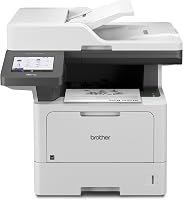
The Brother Laser Printer HL-L6210DW is the best laser printer for high volume printing when your main workload is black-and-white documents and you need substantial paper capacity. It prints up to 50 ppm, starts with a 520-sheet main tray and a 100-sheet multipurpose tray, and can expand to 1,660 sheets with optional trays.
High volume means more than a fast speed figure. Consider how many pages you print in a typical run, how often staff can refill paper, whether jobs need color, and if scanning or copying should happen at the same machine.
For a color-first workload, compare these picks with our guide to the best high volume color laser printer. If you are choosing by brand, the best HP high volume laser printer guide covers another part of the decision.
Our picks at a glance
-
1

-
2
 Best for fast office scanning
Brother Professional Laser Printer All-in-One with Scanner
9.3/10 our score
See it on Amazon -
3
 Best for small wireless teams
HP Laserjet Pro 3001dw Wireless Black
9.1/10 our score
See it on Amazon
- 4
 Best for large paper loadsCheck it
- 5
 Best for fax and paper flexibilityCheck it
- 6
 Check it
Brother MFC-L8930CDW Business Color Laser All-in-One Printer
Best for color workgroup documents
Which high volume laser printer fits each workload?
The best fit depends on the mix of print speed, paper capacity, color and all-in-one functions your office needs. The top picks below range from compact team printers to a paper-focused monochrome workhorse and a color all-in-one.
HP LaserJet Pro 3101sdw: Best for compact team printing
- Monochrome all-in-one
- Up to 35 ppm
- 250-sheet input tray
- 50-sheet auto document feeder
A small team can print, scan and copy with one monochrome machine. Its 250-sheet input tray and 50-sheet feeder suit regular office work, though the tray holds less than the high-capacity picks.
Pros
- Prints, scans and copies
- Automatic two-sided printing
- 50-sheet auto document feeder
Cons
- 250-sheet input tray is smaller than the largest capacities here
- Monochrome printing
The HP LaserJet Pro 3101sdw suits a small team that needs black-and-white printing with scanning and copying in the same machine. It prints up to 35 ppm and has a 250-sheet input tray plus a 50-sheet auto document feeder for multi-page scanning.
Automatic two-sided printing can reduce paper use for documents that read well on both sides. Its paper tray is smaller than the 520-sheet main tray on the Brother HL-6210DW, so plan for more refills if your office sends long runs throughout the day.
The printer's listed dimensions are 15.7 in deep, 16.5 in wide and 12.3 in high. Allow working space around it for loading paper and handling scanned pages.
This is a practical fit when staff value print, scan and copy in one monochrome unit more than maximum tray capacity. For a similar HP option focused on printing, compare our high volume black and white laser printer picks.
Brother Professional Laser Printer All-in-One with Scanner: Best for fast office scanning
- Monochrome all-in-one with scanner and copier
- Up to 50 ppm
- 70-page auto document feeder
- Expandable paper capacity
Its 50 ppm print speed and 70-page feeder suit workgroups that handle both long print runs and multi-page scans. The paper capacity can expand, but check the tray configuration that fits your workload.
Pros
- Up to 50 ppm printing and copying
- 70-page auto document feeder
- Wired and dual-band wireless networking
Cons
- Expandable capacity needs a tray configuration decision
- Monochrome printing
The Brother MFC-L5915DW is a faster all-in-one for teams that print and scan in volume. It prints and copies at up to 50 ppm, and its 70-page auto document feeder can scan both sides in a single pass.
That speed changes daily use when staff queue several jobs at once. A large feeder also means a set of reports can be scanned without reloading the tray every few pages.
The feeder capacity matters for offices digitizing packets as well as producing them. Built-in Gigabit Ethernet and dual-band wireless networking give teams wired and wireless connection options.
Gigabit Ethernet can suit a fixed desk where a cable is already in place. Dual band wireless gives more placement freedom where running a cable would be awkward.
Paper capacity is expandable, which makes this model worth considering when a standard tray would require too many refills. Confirm which optional tray arrangement fits your space and expected load before choosing it.
Allow extra space for any added tray and for opening covers during setup and care. Keep spare paper close so a refill does not become a trip away from the desk.
Choose this model when scanning and copying sit alongside heavy monochrome printing. The Brother HL-L5210DW review can help if you are also weighing a print-only Brother option.
HP Laserjet Pro 3001dw Wireless Black: Best for small wireless teams
- Monochrome printing
- Up to 35 ppm
- Automatic two-sided printing
- 250-sheet maximum sheet capacity
This printer suits teams that want a straightforward monochrome model with wireless printing and automatic duplexing. Its 250-sheet capacity may mean more frequent refills than the larger-tray choices.
Pros
- Automatic two-sided printing
- Wireless and Ethernet connectivity
- Designed for up to 7 people
Cons
- 250-sheet maximum capacity
- Does not list faxing among its functions
The HP Laserjet Pro 3001dw suits a small office that wants monochrome printing, automatic duplexing and wireless connectivity without prioritizing a large paper reserve. It prints up to 35 pages per minute and has a maximum sheet capacity of 250.
It is designed for up to 7 people and supports Ethernet and USB connections as well as wireless printing. The supplied functions include copy and scan, but the model is presented as a printer rather than a broad multifunction machine with faxing.
Its compact 15.7 in depth and 8.5 in height may help with placement on an office counter, though you should measure the available area and leave access to the paper tray. HP states that the printer works only with cartridges that have HP chips or circuitry.
Pick it when a small team needs routine two-sided black-and-white printing and the 250-sheet capacity matches its refill rhythm. If raw output pace is your main concern, see our best fast laser printer guide.
Brother Laser Printer: Best for large paper loads
- Monochrome print-only
- Up to 50 ppm
- 520-sheet main tray
- 100-sheet multipurpose tray
A 520-sheet main tray plus a 100-sheet multipurpose tray lets this print-only model handle larger paper loads before refilling. Optional trays can expand capacity, while its 50 ppm speed suits busy black-and-white output.
Pros
- 520-sheet main tray and 100-sheet multipurpose tray
- Expandable to 1,660 sheets with optional trays
- Up to 50 ppm
Cons
- Print only, with no built-in scan or copy function
- Optional trays are needed for expanded capacity
The Brother HL-6210DW is the strongest match here for long, black-and-white print runs where paper refills interrupt work. Its 520-sheet main tray and 100-sheet multipurpose tray provide 620 sheets at the stated starting configuration, with optional trays expanding total capacity to 1,660 sheets.
It prints up to 50 ppm and uses automatic duplex printing. This is a print-only machine, so it makes sense when scanning and copying happen elsewhere or are not part of the office workflow.
The included TN920 toner cartridge is rated for 3,000 pages, and compatible ultra high-yield toner is rated for up to 18,000 pages. Those yield figures can help estimate supply planning, though actual replacement timing depends on what you print.
The printer has built-in Gigabit Ethernet and dual-band wireless networking. For more speed-focused comparisons, look at the best fast LaserJet printer guide.
Canon imageCLASS MF465dw II: Best for fax and paper flexibility
- Monochrome print, copy, scan and fax
- Up to 42 ppm
- Expandable paper capacity
- 5-inch touchscreen
The Canon combines fax, copy and scan functions with up to 900 sheets of capacity when fitted with the optional cassette. It offers a middle ground in speed between 35 ppm and 50 ppm models.
Pros
- Prints, copies, scans and faxes
- Up to 900 sheets with optional cassette
- 5-inch touchscreen
Cons
- Maximum capacity requires an optional cassette
- Monochrome printing
The Canon imageCLASS MF465dw II is a monochrome all-in-one that combines print, copy, scan and fax functions with up to 42 ppm output. Its paper capacity can reach 900 sheets when you add the optional cassette.
The 5-inch touchscreen gives you a direct way to operate the printer, and automatic duplexing supports two-sided output. This speed sits between the 35 ppm HP models and the 50 ppm Brother models, while the fax function may matter for offices that still send documents that way.
Canon's stated standard configuration includes a 250-sheet cassette and a 100-sheet multipurpose tray. The optional cassette holds up to 550 sheets, so check that expanded capacity is worth the added equipment and floor space for your print pattern.
Choose the Canon when you want several document functions and a clear path to expand paper capacity. Laser printers are built around text and office documents; for photo output, read Which Printer Is Better for Printing Photos?.
Brother MFC-L8930CDW Business Color Laser All-in-One Printer: Best for color workgroup documents
- Color all-in-one
- Up to 33 ppm
- 80-page auto document feeder
- Automatic duplex printing
Choose this color model when workgroup documents need both black and color output, plus scanning and copying. Its stated speed is 33 ppm, and the supplied specifications do not state its paper capacity.
Pros
- Prints in black and color
- 80-page auto document feeder
- Automatic duplex printing
Cons
- 33 ppm is slower than the 50 ppm monochrome picks
- Paper capacity is not specified
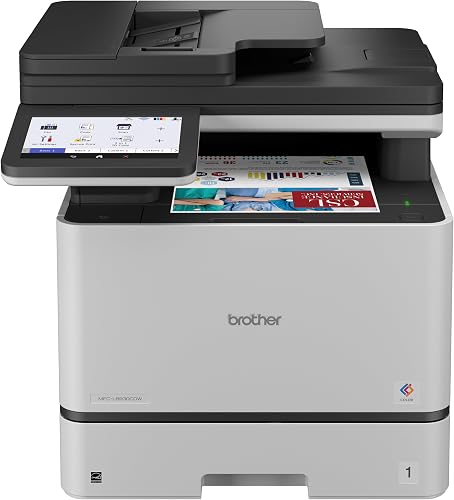
The Brother MFC-L8930CDW is the color option for workgroups that need print, scan and copy functions in one machine. It prints up to 33 ppm in black and color, with automatic duplex printing and an 80-page auto document feeder.
This is a slower speed than the 50 ppm monochrome picks, but it can produce color documents as well as black output. The 7-inch color touchscreen supports navigation and customized shortcuts, while dual-band wireless networking and Gigabit Ethernet provide connection choices.
Brother includes standard-yield toner cartridges rated for 3,000 black pages and 1,800 color pages. Its TN635XXL replacement cartridges are rated for 7,500 black pages and 6,500 color pages, which can inform supply planning for recurring color jobs.
Choose this model when color is a routine business need and scanning is part of the same workflow. If color is occasional, a monochrome printer may be simpler to match to the bulk of your pages.
How should you compare speed and paper capacity?
For high volume, compare the printer's rated pages per minute with the amount of paper it can hold before refilling. A 50 ppm printer with a small tray can still require frequent attention, while a larger tray helps keep longer jobs moving.
In this group, the Brother HL-6210DW has the clearest capacity advantage: 620 sheets in its main and multipurpose trays, expandable to 1,660 with optional trays. The Canon can reach 900 sheets with an optional cassette, while the HP models list 250-sheet capacity or input trays.
Check whether the capacity number includes the standard trays or depends on extra equipment. Make sure the expanded arrangement fits the available floor or desk space and that the team can reach every paper source.
For speed, the 50 ppm Brother models are the fastest choices here. The Canon reaches 42 ppm, the HP models up to 35 ppm, and the color Brother up to 33 ppm; these figures are useful for comparison, but your actual pace also depends on the job and printer settings.
Should you choose a print-only printer or an all-in-one?
Choose a print-only machine when the office already has a separate scanner or copier and printing is the main workload. The Brother HL-6210DW puts the emphasis on fast monochrome output and expandable paper capacity.
That focus can suit a shared print area where scanning happens in another room. It can also keep the workflow simple because staff go to one device for printing and another for capture.
An all-in-one can reduce handoffs when staff regularly scan or copy documents. The Brother MFC-L5915DW adds a 70-page feeder and high-speed two-sided scanning, while the HP 3101sdw combines printing, scanning and copying in a smaller 250-sheet tray setup.
A smaller all-in-one may fit a compact team desk better than a larger workgroup model. The trade off is that a 250 sheet tray will need refills sooner during a busy day.
The Canon adds faxing, which can matter in workflows that still require it. The color Brother provides print, scan and copy functions, and makes sense when color documents are part of regular office work.
Think about where each task happens now. If scanning is occasional, a print only printer may be enough and easier to place.
If scanning is part of every client packet, an all-in-one can save repeated walks to another machine. Measure the space first because feeder lids, output trays and paper trays all need room to open.
Avoid paying for functions that your staff will rarely use. Compare the tasks people perform each week, then decide whether a multifunction device will save enough steps to justify its extra functions and space.
Also consider setup and care in daily use. An all-in-one needs checking for paper, toner and scan destinations, while a print only model has fewer places to manage.
Choose the simpler machine when its missing functions are handled well elsewhere. Choose the all-in-one when combined tasks are routine enough that one device will make the day run more smoothly.
When does color make sense for a high-volume office?
Color makes sense when it carries information or helps finished documents do their job, such as charts, presentations or customer-facing materials. If most pages are text, forms and internal reports, monochrome can keep the choice focused on those jobs.
A short report with a chart may be clearer in color even when the words are plain text. Client facing pages may also need color to match the rest of a set of materials.
The Brother MFC-L8930CDW is the color model here, with 33 ppm black and color printing. It also includes scanning and copying, an 80-page feeder, and automatic duplex printing.
That mix suits a workgroup where color printing and scanning share the same desk. The touchscreen can also help staff find common tasks without going through longer menus.
Consider how often color pages appear in a normal week, not just whether the office sometimes needs them. If color jobs are rare, sending them to a separate printer may be more practical than making every routine print task depend on a color device.
Count a typical week of invoices, contracts and internal memos before deciding. If those pages dominate, a monochrome model may keep supply planning simpler.
Color also changes supply needs because each color adds its own cartridge to track. That is not a flaw, but it is a care task to plan for alongside paper refills.
If color jobs are rare, sending them to a separate printer may be more practical than making every routine print task depend on a color device. You can still keep the main workflow focused on black and white output.
For an office that primarily prints black text, start with the advantages of a laser printer and compare monochrome models by tray capacity, speed and required functions.
Look at refill rhythm as well as output. A larger tray can reduce stops during long runs, while color capacity should be judged by how many color pages you truly print.
Choose color when it improves the finished document or the reader experience. Choose monochrome when most pages gain nothing from color and the work is mainly text.
How can you plan paper and toner for long runs?
Plan supplies around the largest job you expect and the time available for refills. Load paper before scheduled batches, keep the correct paper size on hand, and use a multipurpose tray when a job calls for a different paper type.
Toner yield estimates offer a starting point for planning. The Brother HL-6210DW includes a 3,000-page cartridge and supports an 18,000-page ultra high-yield option, while the MFC-L5915DW supports a 3,000-page included cartridge and an 18,000-page ultra high-yield option.
The HP 3101sdw includes an introductory cartridge rated at about 1,000 pages. HP says it is intended to work with cartridges using HP chips or circuitry, so check supply compatibility and replacement options before setting up a high-volume workflow.
Use automatic duplexing for documents that remain easy to read on both sides. Keep the paper path clear, follow the printer's setup instructions, and schedule refills or supply checks around actual workload rather than waiting for a large job to stop.
Which high volume laser printer should you choose?
Choose the Brother HL-6210DW if your main need is fast monochrome printing with substantial paper capacity and you do not need scanning or copying in the same device. Pick the MFC-L5915DW if a fast all-in-one and high-volume scanning matter more.
The HL-6210DW suits long runs where refills can interrupt the day. The MFC-L5915DW suits teams that produce packets and then scan them back into systems.
The Canon MF465dw II is a good fit when you want print, copy, scan and fax with capacity that can expand to 900 sheets. Choose the Brother MFC-L8930CDW when regular color output is necessary, and consider either HP model for a small team whose 250-sheet capacity and 35 ppm speed fit its workload.
The Canon sits in the middle on speed at up to 42 ppm. Its optional cassette is worth pricing into the choice because the largest capacity depends on that extra part.
The HP models suit a smaller team with steady rather than constant printing. A 250 sheet tray can work well when someone is nearby to refill it.
Choose the color Brother when charts, presentations or client materials are regular jobs. Its 33 ppm speed is slower than the 50 ppm monochrome picks, so weigh color against raw pace.
Read the best high speed color laser printer guide if color and speed are both central to your decision. Then match the model's tray capacity and functions to your normal jobs, refill routine and available space.
Measure the desk or floor area before you buy. Some models need room for paper trays, feeder lids and output to open without blocking a walkway.
Plan for setup and care as well as speed. Keep paper and spare toner supplies close, and schedule checks around your busiest days rather than during a long job.
If scanning and copying are daily tasks, an all-in-one will save steps. If printing is the main job and other devices handle capture, a print only model may be the cleaner fit.
Start with the workload you repeat most often. The right printer should match that routine first and leave extra capacity for the busy days.
Our top 3 picks at a glance
-
1
-
2
Best for fast office scanning
Brother Professional Laser Printer All-in-One with Scanner
9.3/10 our score
See it on Amazon -
3
Best for small wireless teams
HP Laserjet Pro 3001dw Wireless Black
9.1/10 our score
See it on Amazon
Frequently asked questions
What makes a laser printer suitable for high-volume printing?
Look for a combination of print speed, paper capacity and functions that match the workload. A 50 ppm printer can produce pages quickly, while a large tray reduces refill stops.
Also consider whether the office needs scanning, copying or color.
A fast print-only model may suit a different team than a slower all-in-one.
How much paper capacity does a high-volume printer need?
Choose capacity based on how often someone can refill the printer and whether jobs use different paper types. A 250-sheet tray may suit steady team use, while a 520-sheet tray plus a 100-sheet multipurpose tray can reduce interruptions during longer runs.
Leave room to load paper safely and keep spare stock nearby.
Is a 50 ppm laser printer always better for a busy office?
No. A 50 ppm model can help with large black-and-white jobs, but it may not be the best fit if you need color, faxing or built-in scanning.
Compare the printer's functions and tray capacity with the work people actually do.
Rated speed is only one part of the decision.
Should a high-volume office choose monochrome or color?
Choose monochrome when most pages are text, forms or reports that do not need color. Choose a color laser printer when staff regularly print charts, presentations or other documents where color carries useful information.
Color output also changes supply needs, so match the choice to recurring jobs.
How can I reduce refill stops during long print jobs?
Start with a printer whose tray capacity matches the size of your usual jobs, and load paper before a scheduled run. A multipurpose tray or optional paper cassette can help when the printer supports those options.
Use automatic two-sided printing for documents that suit it, and keep the paper type consistent within a job.