Brother DCP-L2640DW vs MFC-L2750DW: Which Should You Choose? (November 2026)
Choose the DCP-L2640DW for printing, copying and scanning, or choose the MFC-L2750DW when faxing and single-pass duplex document work matter. Both print at up to 36 pages per minute and use automatic duplex printing.
On this page (8 sections)
- Brother DCP-L2640DW vs MFC-L2750DW: what is different?
- Which printer handles documents better?
- Do the print speeds and paper capacities match?
- Which printer is easier to connect and control?
- Which toner does each printer use?
- Which products fit each printer?
- How should you choose between these Brother printers?
- Final verdict on Brother DCP-L2640DW vs MFC-L2750DW
Choose the DCP-L2640DW for print, copy and scan work, or choose the MFC-L2750DW when faxing and duplex document handling matter.
Both Brother models print black-and-white pages at up to 36 pages per minute, and both include automatic duplex printing. The headline speed therefore does not separate them in daily office use.
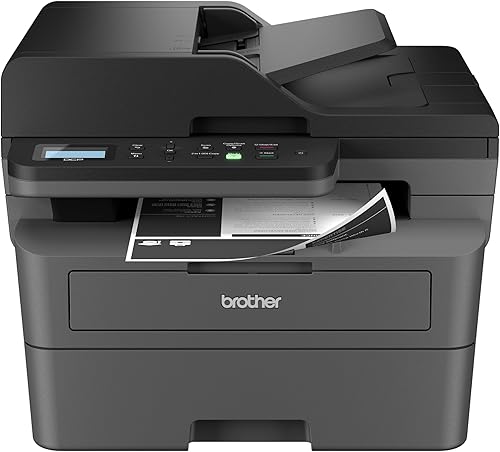
The DCP-L2640DW is a wireless compact monochrome multi-function printer with print, copy and scan functions. The MFC-L2750DW is a monochrome all-in-one with print, copy, scan and fax functions.
That difference in named functions is the starting point for the choice. Both suit a small office or home office that needs practical laser printing, and neither is aimed at colour work.
The DCP-L2640DW suits a desk or shared space where printing, copying and scanning cover most tasks. The MFC-L2750DW suits the same kind of space when fax and two-sided document handling are also part of the routine.
Both have a 50-page feeder for multi-page copy and scan work. The MFC-L2750DW adds single-pass duplex copying and scanning for two-sided originals, which matters when source documents arrive as double-sided forms, contracts or packets.
The DCP-L2640DW keeps the setup more focused for standard single-sided copy and scan jobs. Both have a 250-sheet paper tray, and that capacity can reduce refills during regular office printing.
The practical choice depends on whether faxing and single-pass duplex work justify the fuller MFC model. If fax sits unused, the extra function adds little to the working day, while routine faxing is simpler in the same machine.
Likewise, single-pass duplex handling helps most when two-sided originals are common, and ordinary feeder use may be enough for mostly single-sided work. Set-up also follows this split, because the MFC-L2750DW includes a 2.7-inch colour touchscreen for printer-side control.
The DCP-L2640DW offers dual-band wireless, Ethernet and USB connections for flexible placement. Care needs are broadly similar, since both are laser printers that need toner replacement over time.
The toner families differ, so match the supply to the exact printer model. This comparison therefore looks at functions, document handling and supplies together.
 Best for DCP-L2640DW toner value
Cool Toner TN830XL TN830 TN 830XL 830 Toner
 Best for print, copy and scan
Brother DCP-L2640DW Wireless Compact Monochrome Multi-Function Printer
Brother DCP-L2640DW vs MFC-L2750DW: what is different?
The MFC-L2750DW adds fax and single-pass duplex copy and scan, while the DCP-L2640DW keeps the core functions to print, copy and scan. That difference matters more than their matching listed print speed.
The DCP-L2640DW has a 50-page auto document feeder for multi-page scanning and copying. It also supports automatic duplex printing, so it can print both sides of a sheet without manual page flipping.
The MFC-L2750DW has a 50-sheet automatic document feeder and supports single-pass duplex copying and scanning. Its listed functions include multi-page copy, scan and fax.
If your work rarely involves fax, the DCP model covers the main paper tasks with fewer functions to manage. If fax is part of your workflow, the MFC model avoids needing a separate fax device or a different office process.
Which printer handles documents better?
Choose the MFC-L2750DW for two-sided scanning and copying, and choose the DCP-L2640DW for ordinary multi-page copy and scan jobs. Both have an automatic document feeder, but the MFC adds single-pass duplex document handling.
A 50-page feeder helps with a stack of pages that would be slow to place one sheet at a time. The DCP-L2640DW uses that feeder for multi-page scanning and copying.
The MFC-L2750DW uses its 50-sheet feeder for multi-page copy, scan and fax work. Its single-pass duplex function can scan both sides of a two-sided document in one pass, which is useful for forms, contracts and office packets.
This feature does not make every job faster. If most of your source pages are single-sided, the DCP-L2640DW's feeder and automatic duplex printing may be enough.
For another comparison in the same Brother family, see Brother DCP-L2640DW vs MFC-L2820DW when you are weighing nearby multifunction options.
Brother DCP-L2640DW vs MFC-L2750DW for faxing
The MFC-L2750DW is the clear choice if you need fax. The DCP-L2640DW's named functions are print, copy and scan, while the MFC-L2750DW includes fax with its other office functions.
Fax needs can be occasional or routine. A small office that sends signed forms or receives documents by fax may value having the function inside the same machine.
If you only exchange documents by email or cloud services, fax may add little value. In that case, the DCP-L2640DW keeps the decision focused on printing, copying and scanning.
Do the print speeds and paper capacities match?
Both printers are listed at up to 36 pages per minute, so paper handling and workflow features should guide the choice. The MFC-L2750DW has a listed 250-sheet paper capacity, while the DCP-L2640DW product data also describes a 250-sheet paper tray.
A matching speed figure means neither model has a clear advantage from the headline print rate. Actual job time can still depend on setup, page content, connection method and whether you are scanning or copying.
The 250-sheet tray on each model can reduce how often you refill paper during regular office work. Keep the tray loaded with paper that matches the job and follow the printer's instructions for supported media.
The MFC-L2750DW also has a manual feed slot for papers and sizes such as card stock and envelopes. The DCP-L2640DW's supplied product information here does not give the same media detail, so check the exact manual before planning special-paper jobs.
Which printer is easier to connect and control?
The DCP-L2640DW offers dual-band wireless, Ethernet and USB connections, while the MFC-L2750DW is described as wireless and includes Ethernet in its hardware interface. Your network setup should decide which connection options matter.
The DCP-L2640DW can connect through built-in 2.4GHz or 5GHz wireless, Ethernet or USB. It works with laptops, PCs, smartphones, tablets and iPhones, and Brother Mobile Connect can print, scan and manage the printer from a mobile device.
The MFC-L2750DW works with laptops, PCs and smartphones. It has a 2.7-inch color touchscreen for setup and navigation, and its product data identifies touch control.
A touchscreen can make printer-side tasks easier when you regularly change settings or start copy and scan jobs from the machine. The DCP-L2640DW has an LCD and app or touch control listed in its product data.
For a comparison that focuses on another nearby multifunction model, read Brother DCP-L2640DW vs MFC-L2760DW.
Which toner does each printer use?
The DCP-L2640DW uses TN830 or TN830XL toner, while the MFC-L2750DW is paired with TN730, TN760 or TN770 options in the supplied product information. Match the cartridge family to the exact printer model before ordering.
The DCP-L2640DW product data identifies Brother Genuine TN830 and TN830XL as compatible cartridges. The compatible Cool Toner TN830XL TN830 TN 830XL 830 Toner is a 2-pack for the DCP-L2640DW and has a stated yield of up to 3,000 pages per cartridge at 5% coverage on letter or A4 paper.
The MFC-L2750DW product data identifies TN730 Standard and TN760 High-Yield replacement cartridges, and it also describes compatibility with the Brother Genuine TN-770. The TN-770 cartridge has a stated yield of up to 4,500 pages and is listed for the MFC-L2750DW and MFC-L2750DWXL.
Toner choice affects replacement planning more than the printer's basic document functions. A compatible 2-pack can keep a DCP owner stocked with two cartridges, while the genuine TN-770 is a single high-yield cartridge for the MFC-L2750DW.
Which products fit each printer?
The DCP-L2640DW is the better match for a compact 3-in-1 workflow, while the MFC-L2750DW is the better match for fax and duplex document work. The related supplies should follow the same split.
Brother DCP-L2640DW
The DCP-L2640DW measures 15.7 in deep, 16.1 in wide and 12.5 in high, and weighs 25 lb. Its listed print speed is up to 36 pages per minute, with an initial page print time of 8.5 seconds.
It has a 50-page auto document feeder and a 250-sheet paper tray. Automatic duplex printing can reduce manual handling when your documents need printing on both sides.
The DCP-L2640DW also offers Ethernet and USB connections. Its black-and-white copy resolution is listed as up to 600 x 600 dpi, and its maximum copy run is 50 pages.
Choose it when your office needs a compact printer, scanner and copier. It is also a sensible fit when faxing is outside your regular document process.
Brother MFC-L2750DW
The MFC-L2750DW measures 15.7 in deep, 16.1 in wide and 12.5 in high, and weighs 26.5 lb. Its listed black-and-white print speed is up to 36 pages per minute.
It has automatic duplex printing, a 50-sheet automatic document feeder and a 250-sheet paper capacity. The feeder supports single-pass duplex copying and scanning, plus multi-page copy, scan and fax work.
The MFC-L2750DW includes a 2.7-inch color touchscreen. Its listed maximum black-and-white copy resolution is 600 x 600 dpi, while its maximum black-and-white print resolution is 2400 x 600 dpi.
Choose it when faxing is a real requirement or when two-sided source documents make up a large part of your work. If you only need print, copy and scan, the DCP-L2640DW may provide the functions you will actually use.
How should you choose between these Brother printers?
Pick the DCP-L2640DW for a focused print, copy and scan setup, and pick the MFC-L2750DW for fax and single-pass duplex document work. Their listed print speed and paper capacity are close enough that they should not decide the purchase alone.
Choose the DCP-L2640DW when:
- You need print, copy and scan but not fax.
- You want dual-band wireless, Ethernet and USB connection options.
- A 50-page feeder covers your multi-page copy and scan jobs.
- You want a compatible TN830-series 2-pack available for the printer.
Choose the MFC-L2750DW when:
- Fax is part of your office workflow.
- You often copy or scan two-sided originals.
- A 2.7-inch color touchscreen is useful for printer-side control.
- You want a Brother Genuine TN-770 cartridge with a stated yield of up to 4,500 pages.
For a simpler single-function comparison, see Brother DCP-L2640DW vs HL-L2480DW. The HL-L2480DW comparison can help if you are deciding whether you need a multifunction printer at all.
Final verdict on Brother DCP-L2640DW vs MFC-L2750DW
Choose the Brother DCP-L2640DW when print, copy and scan are enough; choose the Brother MFC-L2750DW when fax and duplex document handling are part of the job.
Both offer up to 36 pages per minute, automatic duplex printing and a 250-sheet paper tray. Those shared figures mean the extra document functions are the deciding factor.
The DCP-L2640DW keeps the setup focused and supports dual-band wireless, Ethernet and USB. That connection mix suits a home office, a small team or a single desk with mixed devices.
It connects through built-in 2.4GHz or 5GHz wireless, Ethernet or a local USB link, and Brother Mobile Connect can print, scan and manage it from a mobile device.
The MFC-L2750DW adds fax, single-pass duplex copying and scanning, a colour touchscreen and a manual feed slot for papers such as card stock and envelopes. Its 50-sheet feeder handles multi-page copy, scan and fax work, and single-pass duplex handling scans both sides of a two-sided original in one pass.
That saves handling when forms, contracts and office packets are routinely two-sided. The DCP-L2640DW still has a 50-page feeder for ordinary multi-page jobs, and it is the better fit when most source pages are single-sided.
Both printers share the same listed dimensions, while the MFC-L2750DW is heavier at 26.5 lb compared with 25 lb for the DCP-L2640DW. That small weight gap is not a major issue on a fixed desk or cabinet.
Match the supply to the printer as well. Use TN830 or TN830XL options for the DCP-L2640DW, including Brother Genuine TN830 and TN830XL cartridges and the compatible Cool Toner 2-pack with a stated yield of up to 3,000 pages per cartridge at 5 percent coverage.
For the MFC-L2750DW, consider the Brother Genuine TN-770 when its listed compatibility fits, with a stated yield of up to 4,500 pages for the MFC-L2750DW and MFC-L2750DWXL. The MFC-L2750DW data also names TN730 Standard and TN760 High-Yield options, so check the exact model before ordering.
Keeping a spare cartridge ready can reduce downtime when a load is running low, and that applies to both printers even though their cartridge families differ. Load the 250-sheet tray with paper that matches the job, follow the manual for supported media, replace toner when print quality falls, keep the feeder and tray clean, and store spare cartridges in a dry place.
The final choice still comes back to workflow. Pick the DCP-L2640DW for a focused print, copy and scan setup, or pick the MFC-L2750DW when fax and two-sided document handling are regular needs.
Frequently asked questions
What is the main difference between the Brother DCP-L2640DW and MFC-L2750DW?
The main difference is document handling and fax. The DCP-L2640DW is a 3-in-1 printer, scanner and copier, while the MFC-L2750DW adds fax and single-pass duplex copying and scanning through its automatic document feeder.
Does the Brother DCP-L2640DW have fax?
The DCP-L2640DW is described as a monochrome multi-function printer for printing, copying and scanning, and fax is not one of its named functions. Choose the MFC-L2750DW if sending or receiving faxes is part of your regular workflow.
Do both Brother printers print at the same speed?
Yes. Both the DCP-L2640DW and MFC-L2750DW have a listed black-and-white print speed of up to 36 pages per minute.
Speed alone does not separate them, so compare fax, duplex document handling and control features.
Which toner works with the Brother DCP-L2640DW?
The DCP-L2640DW uses Brother TN830 or TN830XL toner. The Cool Toner 2-pack is a compatible TN830-series option with up to 3,000 pages per cartridge, while the Brother TN-770 cartridge is listed for the MFC-L2750DW instead.
Which printer is better for multi-page documents?
The MFC-L2750DW is the better fit for multi-page documents when you need faxing or single-pass duplex copying and scanning. The DCP-L2640DW still has a 50-page automatic document feeder, so it can handle multi-page copy and scan work without the extra fax function.


