5 Best Toner for Brother MFC-L5710DW Printers (November 2026)
The best Brother MFC-L5710DW toner include the Brother Genuine Cartridge TN920XL High Yield Black for regular high volume, the Brother Genuine TN920 Standard Yield Toner Cartridge for lighter print volume, and the Downtownlyn TN920XXL Toner Cartridge Black 2-Pack High for fewer reorder cycles.
On this page (6 sections)
The Brother Genuine TN920XL is the best Brother MFC-L5710DW toner for regular business document printing, with a stated yield of up to 6,000 pages. For lighter use, the TN920 standard cartridge is rated for up to 3,000 pages; compatible multipacks offer more cartridges per order.
The MFC-L5710DW is a monochrome laser all-in-one, so the toner choices here are black cartridges from the TN920 family. We compared the stated capacities, pack sizes and compatibility information to help match a cartridge to your office's print volume.
Our picks at a glance
-
1
 Best for regular high volume
Brother Genuine Cartridge TN920XL High Yield Black
9.7/10 our score
See it on Amazon -
2
 Best for lighter print volume
Brother Genuine TN920 Standard Yield Toner Cartridge
9.6/10 our score
See it on Amazon -
3
 Best for fewer reorder cycles
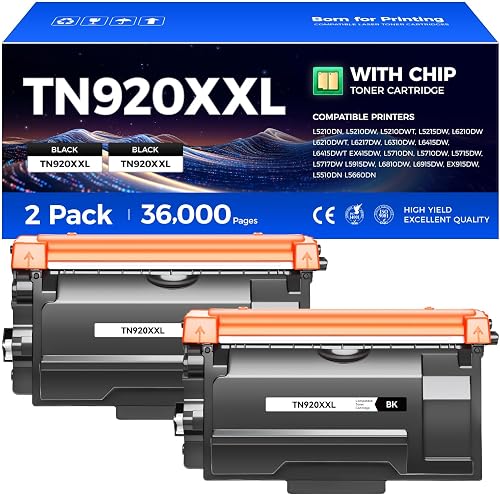
Downtownlyn TN920XXL Toner Cartridge Black 2-Pack High
9.5/10 our score
See it on Amazon
- 4
 Check it
v4ink TN920XL 920XL Toner Compatible for Brother
Best for a two-cartridge supply - 5
 Check it
TN920 TN920XL Toner for Brother Printer TN
Best for stocking four cartridges
Which Brother MFC-L5710DW toner is best for your office?
The TN920XL is the strongest fit for frequent printing because Brother rates it for twice the pages of the standard TN920. Choose by the number of pages you expect to print and whether you prefer genuine Brother toner or a compatible replacement.
The Brother cartridges name the MFC-L5710DW directly in their compatibility lists. For another Brother model, compare HL-L2380DW toner cartridges.
Compatible options also name it, but you should check the printer model and cartridge family carefully before ordering.
For a different Brother color model, compare HL-L3300CDW toner cartridges.
If you're new to laser toner, learn whether laser printers use ink or toner before choosing supplies.
| Product | Best for | Yield | Pack size | Type | Our score |
|---|---|---|---|---|---|
| Brother Genuine Cartridge TN920XL High Yield Black | regular high volume | Up to 6,000 pages | 1 cartridge | Genuine high yield | 9.7 |
| Brother Genuine TN920 Standard Yield Toner Cartridge | lighter print volume | Up to 3,000 pages | 1 cartridge | Genuine standard yield | 9.6 |
| Downtownlyn TN920XXL Toner Cartridge Black 2-Pack High | fewer reorder cycles | Up to 18,000 pages per cartridge claimed | 2 cartridges | Compatible high yield | 9.5 |
| v4ink TN920XL 920XL Toner Compatible for Brother | a two-cartridge supply | Up to 6,000 pages per cartridge | 2 cartridges | Compatible high yield | 8.7 |
| TN920 TN920XL Toner for Brother Printer TN | stocking four cartridges | Up to 6,000 pages per cartridge claimed | 4 cartridges | Compatible high yield | 8.6 |
How we compared toner capacity and compatibility
Our score weighs stated capacity, pack size and how clearly the cartridge is matched to the MFC-L5710DW. We gave genuine Brother cartridges the highest scores for their direct compatibility and clearly stated yields, while compatible multipacks may suit buyers who want several replacements available.
Page yield is an estimate rather than a promise of the exact number of pages you'll print. Text density, graphics and page coverage affect how quickly toner runs out, so use the stated figures to compare cartridge classes rather than plan an exact replacement date.
Brother Genuine Cartridge TN920XL High Yield Black: Best for regular high volume
- Up to 6,000 pages
- Genuine Brother cartridge
- Black toner
- Made for MFC-L5710DW
The TN920XL is a genuine high-yield cartridge rated for up to 6,000 pages. It is listed as compatible with the Brother MFC-L5710DW.
Pros
- Higher stated yield than TN920
- Genuine Brother toner
- MFC-L5710DW compatibility named
Cons
- Single cartridge pack
The Brother Genuine TN920XL is the best fit here for an office that prints business documents most days. Its stated capacity of up to 6,000 pages is twice the genuine TN920 standard cartridge's 3,000-page yield.
Brother lists the MFC-L5710DW among the supported printers. The cartridge is black and engineered for Brother monochrome laser printers and all-in-ones.
A single cartridge keeps the choice simple if you replace toner as needed. It also avoids storing multiple cartridges, while the higher stated yield can mean fewer replacement cycles than standard yield toner for a similar print workload.
This is the most straightforward pick if you want a genuine cartridge with a clear capacity and model match. For another MFC model in the same family, see our guide to the best Brother MFC-L5715DW toner.
Brother Genuine TN920 Standard Yield Toner Cartridge: Best for lighter print volume
- Up to 3,000 pages
- Genuine Brother cartridge
- Black toner
- Made for MFC-L5710DW
The TN920 standard-yield cartridge suits lower print volumes and is rated for up to 3,000 pages. Brother names the MFC-L5710DW among compatible printers.
Pros
- Genuine Brother toner
- Lower stated capacity than XL
- MFC-L5710DW compatibility named
Cons
- Rated yield is half the TN920XL's
The genuine TN920 standard-yield cartridge is a sensible match for offices with lighter print volume. Brother rates it for up to 3,000 pages, which is half the TN920XL's stated capacity.
The MFC-L5710DW appears in Brother's compatible printer list for this cartridge as well. Choosing it can make sense if you expect to use toner slowly or want a smaller capacity per cartridge.
Both genuine Brother options produce black prints and are engineered for Brother monochrome laser printers and all-in-ones. The main distinction in the supplied product details is capacity, so estimate your monthly print volume before deciding whether standard or high yield better suits your routine.
Choose TN920 when a 3,000-page rated cartridge fits your needs. If you print regularly, the XL cartridge's higher capacity may be more convenient.
Downtownlyn TN920XXL Toner Cartridge Black 2-Pack High: Best for fewer reorder cycles
- Two compatible cartridges
- Up to 18,000 pages per cartridge claimed
- Updated chip
- MFC-L5710DW compatibility named
Downtownlyn's compatible 2-pack claims up to 18,000 pages per cartridge. The MFC-L5710DW appears in its compatibility list.
Pros
- Two cartridges in the pack
- High yield claimed per cartridge
- MFC-L5710DW compatibility named
Cons
- Compatible rather than genuine Brother toner
Downtownlyn's compatible TN920XXL pack is aimed at buyers who want a high claimed capacity and a second cartridge ready to use. The box includes 2 cartridges, each with a claimed yield of up to 18,000 pages at 5% A4 coverage.
The brand names the MFC-L5710DW in its compatibility information and describes an updated chip for printer recognition and toner-level tracking. This is an aftermarket compatible toner, not a Brother genuine cartridge.
The claimed capacity is much higher than the genuine Brother yields in this guide. Keep in mind that page coverage and document content affect actual use, and compare the stated terms with your normal print jobs.
This pack may suit high-volume offices comfortable with compatible toner and its manufacturer's capacity claim. If you prefer a familiar TN cartridge format for another Brother machine, our guide to the best toner for Brother MFC-L5900DW covers that model.
v4ink TN920XL 920XL Toner Compatible for Brother: Best for a two-cartridge supply
- Two compatible cartridges
- Up to 6,000 pages per cartridge
- MFC-L5710DW compatibility named
- User guide included
This v4ink compatible pack includes two TN920XL cartridges, each rated for up to 6,000 pages. The MFC-L5710DW is included in the compatible printer list.
Pros
- Two cartridges included
- Yield stated per cartridge
- MFC-L5710DW compatibility named
Cons
- Compatible rather than genuine Brother toner
The v4ink compatible 2-pack gives you two TN920XL cartridges, each rated for up to 6,000 pages at 5% coverage. The MFC-L5710DW is included among the compatible printers.
The pack includes a user guide, and v4ink describes a three-step installation process. Its compatibility list also covers several related Brother HL, DCP and MFC models, which can be useful if your office uses more than one printer.
This option keeps the stated yield per cartridge in line with the genuine TN920XL while providing a spare cartridge in the same order. It is a compatible product, so choose it if you are comfortable with a third-party toner rather than buying a Brother genuine cartridge.
If you need basic installation guidance for a related machine, read how to replace toner in a Brother MFC-L2820DW. The cartridge process can differ by model, so follow the instructions for your own printer.
TN920 TN920XL Toner for Brother Printer TN: Best for stocking four cartridges
- Four compatible cartridges
- Up to 6,000 pages per cartridge claimed
- Built-in chip
- MFC-L5710DW compatibility named
This compatible 4-pack is rated for up to 6,000 pages per cartridge and includes a built-in chip. Its compatibility list names the MFC-L5710DW.
Pros
- Four cartridges in the pack
- Yield stated per cartridge
- Built-in chip
Cons
- Compatible rather than genuine Brother toner
Toner H-Party's compatible option supplies 4 cartridges and claims up to 6,000 pages per TN920XL cartridge at 5% coverage. The MFC-L5710DW appears in its compatibility list.
The brand says each cartridge has an upgraded built-in chip, so there is no need to transfer the original chip. This can appeal to an office that wants a multi-cartridge supply on hand rather than ordering replacements one at a time.
The four-cartridge pack is a larger stock commitment than the other choices in this guide. Consider your expected print volume and storage space, and confirm the cartridge family before ordering.
Its yield is a manufacturer claim, so actual pages will vary with coverage and document type.
Choose this pack if you prefer to keep several compatible cartridges available. If you'd rather compare other Brother cartridge families, see our guide to the best Brother laser printer toner TN660.
How should you choose between TN920 and TN920XL?
Choose TN920 for lower print volume and TN920XL for more frequent printing. Brother's stated yields are up to 3,000 pages for TN920 and up to 6,000 pages for TN920XL.
A higher yield can reduce how often you replace a cartridge, though it doesn't guarantee a specific number of months between replacements. Estimate how many pages your office prints each month, then compare that total with the cartridge's stated yield.
The model names are easy to mix up, so check that you have TN920 or TN920XL for the MFC-L5710DW. A toner family can include multiple capacities, and the printer model should appear in the compatibility information.
Are compatible toner multipacks worth considering?
Compatible multipacks can make sense if you print frequently and want replacement cartridges in reserve. The Downtownlyn pack claims up to 18,000 pages per cartridge, while v4ink and Toner H-Party state up to 6,000 pages per cartridge.
These are third-party products rather than genuine Brother toner. Compare the compatibility, chip information, cartridge count and stated yield, and decide whether the savings and stocked supply fit your office's needs.
Avoid treating a yield claim as a guaranteed page count for your own documents.
How does toner bond to paper?
A laser printer uses heat and pressure to fuse toner onto paper. That process explains why toner is a powder-based supply and why the printer's fuser is part of the print system.
For a plain explanation of the process, read how a laser printer fuses toner to paper. Knowing the basics can also help distinguish toner replacement from other maintenance parts.
Which toner should you pick for the MFC-L5710DW?
Pick the genuine TN920XL if you print often and want a clear 6,000-page stated capacity from Brother. Choose TN920 for lighter use, or consider a compatible multipack if keeping spare cartridges matters more than buying genuine toner.
For most business document printing, the TN920XL offers the clearest balance of capacity and model compatibility. Confirm the MFC-L5710DW and TN920XL markings before ordering, then use the printer's own replacement steps when the cartridge runs low.
Our top 3 picks at a glance
-
1
Best for regular high volume
Brother Genuine Cartridge TN920XL High Yield Black
9.7/10 our score
See it on Amazon -
2
Best for lighter print volume
Brother Genuine TN920 Standard Yield Toner Cartridge
9.6/10 our score
See it on Amazon -
3
Best for fewer reorder cycles
Downtownlyn TN920XXL Toner Cartridge Black 2-Pack High
9.5/10 our score
See it on Amazon
Frequently asked questions
Which toner fits the Brother MFC-L5710DW?
Brother names both TN920 standard yield and TN920XL high yield toner for the MFC-L5710DW. Compatible TN920 and TN920XL cartridges also name this printer, but check the exact model and cartridge family before ordering.
How many pages does TN920XL print?
Brother rates the genuine TN920XL for up to 6,000 pages. Compatible options in this comparison state different yields, including up to 6,000 or 18,000 pages per cartridge, so treat those as each brand's stated capacity and compare the pack size too.
Should I choose standard yield or high yield toner?
Choose standard yield if you print less often and prefer a cartridge rated for up to 3,000 pages. High yield makes more sense for frequent document printing, since the genuine TN920XL is rated for up to 6,000 pages and may mean fewer replacements.
Can compatible toner work in an MFC-L5710DW?
Several compatible options name the MFC-L5710DW in their printer lists. Compatibility claims vary by brand, so verify that the exact MFC-L5710DW model and TN920 or TN920XL family are stated before buying.


