Can You Share a Printer with a USB Splitter?
A printer USB cable splitter usually cannot let two computers share one printer. USB is normally a direct connection, so use a printer server, network connection, or switch designed for printer sharing instead.
On this page (7 sections)
- Can a printer USB cable splitter share one printer?
- What can you use instead of a USB splitter?
- Does a USB cable length or connector change the answer?
- Can you connect two computers with a USB printer switch?
- Is a USB hub useful for sharing a printer?
- How do you share a USB printer through a computer?
- What should you buy for a shared printer?
A printer USB cable splitter usually cannot let two computers share one printer. USB is normally a direct connection, so use a printer server, network connection, or switch designed for printer sharing instead.
The key issue is control. A passive splitter can divide or join a cable path, but it does not decide which computer is allowed to send data, manage printer drivers, or prevent two devices from transmitting at once.
Can a printer USB cable splitter share one printer?
A basic printer USB cable splitter is not a complete printer-sharing solution. It may expose one printer connection to more than one port, but that does not mean both computers can safely control the printer.
USB connections usually have a host device and a connected peripheral. The computer acts as the host, while the printer acts as the peripheral.
Two computers trying to act as hosts for one printer need a device that manages the handoff.
A passive splitter has no print queue, network address, user selection, or host switching logic. If both computers are connected, the result may be no connection, an unstable connection, or a printer that responds only to one computer.
A powered USB hub does not solve the same problem. A hub gives one computer more USB ports, while a printer-sharing switch or print server is designed to manage access from more than one host.
What can you use instead of a USB splitter?
Use a print server, printer-sharing switch, or network connection made for multiple computers. The right option depends on the printer's available ports and how many devices need access.
A print server connects the printer to a network and lets computers reach it through that network. A printer-sharing switch lets you select which connected computer has control, although you may still need to press a button or change the selected port.
If the printer has Ethernet, connect it to your network and add it from each computer. If it has Wi-Fi, use its wireless setup instead of a USB cable.
For a printer with only USB, a dedicated print server is usually more practical than experimenting with a passive splitter. Check that the server supports your printer and operating systems before buying.
Does a USB cable length or connector change the answer?
A longer or better-matched cable can improve a direct printer connection, but it cannot turn one USB printer into a shared network printer. Cable choice solves connection distance and port matching, not host control.
Most common printer cables use USB Type-A on the computer end and USB Type-B on the printer end. The printer-side Type-B port is often square, while the computer-side Type-A port is flat and rectangular.
Check the ports before ordering. A USB 2.0 Type-B connector is not the same shape as a USB 3.0 Type-B connector, and a USB-C computer may need a suitable adapter or a different cable arrangement.
For the basic setup, our guide to how to connect a printer with a USB cable covers port matching and direct connections.
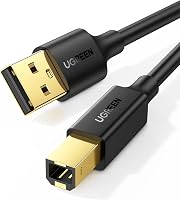
Who should choose the UGREEN USB A to B Printer Cable?
Choose the UGREEN USB A to B Printer Cable when one computer needs a 10 ft USB 2.0 Type-A to Type-B connection. It supports transfer speeds up to 480 Mbps, is backward compatible with USB 1.1 and USB 1.0, and is designed for devices with USB Type-B ports.
UGREEN lists compatibility with HP, Canon, Epson, Brother, Dell, Samsung, Lexmark, and Oki devices, along with scanners and other USB-B equipment. The cable has gold-plated connectors, foil and braid shielding, and a plug-and-play design with no driver required.
This cable suits a desk where the computer and printer are separated by several feet. It does not provide printer sharing by itself, so add a print server or sharing switch if more than one computer needs access.
Can you connect two computers with a USB printer switch?
Yes, if the device is a real printer-sharing switch with host-selection controls. That is different from a passive splitter because the switch manages which computer is connected to the printer at a given time.
A manual switch may require you to press a button when changing computers. A software-controlled switch may use an application or network connection.
Follow the switch instructions for driver setup, since the printer may need to be installed on each computer.
Do not assume a device is suitable because its title includes “USB splitter.” Look for clear support for printer sharing, multiple host computers, and the printer's USB connector type.
Who should choose the Cable Matters 3-Pack?
Choose the Cable Matters 3-Pack if you need three 10 ft USB A to B cables for spare connections, separate work areas, or several USB-B devices. Each cable supports USB 2.0 transfer speeds up to 480 Mbps and is backward compatible with USB 1.0 and USB 1.1.
The cables connect a USB Type-A computer to a USB Type-B printer, scanner, printer switch hub, printer server, MIDI controller, MIDI keyboard, or audio interface. They have gold-plated connectors, bare copper conductors, foil and braid shielding, and 24 AWG conductors for the 10 ft length.
This set can help when a printer-sharing switch needs a cable for each computer. The cables themselves still do not choose which computer controls the printer.
Is a USB hub useful for sharing a printer?
A USB hub is useful for adding USB ports to one computer, not for connecting several computers to one printer. It can let one computer use a printer and other USB devices through the same hub, subject to the computer and hub's limits.
A hub does not create a separate printer address for each computer. It also does not replace a print server, network adapter, or printer-sharing switch.
If your goal is to connect several devices in different rooms, a network connection is usually easier to manage. For printers with Ethernet support, an Ethernet-to-Wi-Fi adapter for a printer may fit better than a long USB cable, provided the adapter supports the printer and network setup.
Who should choose the PWR+ 25Ft Extra Long USB-2.0 Cable Type-A?
Choose the PWR+ 25Ft Extra Long USB-2.0 Cable Type-A when the printer must sit 25 ft from the computer and both devices use USB Type-A to Type-B connections. It supports transfer rates up to 480 Mbps and has a male-to-male connector design with 4 pins.
PWR+ identifies this cable for HP, Canon, Epson, Brother, Dell, Lexmark, Panasonic, Xerox, Fujitsu, and other compatible printer, scanner, fax, and office equipment connections. It also lists use with USB-B audio and MIDI equipment.
The long length may help when the printer cannot sit beside the computer. Measure the route first, keep the cable away from walking paths, and remember that extra length does not add printer-sharing control.
How do you share a USB printer through a computer?
You can share a USB printer through a computer that stays powered on and connected to the printer. The host computer shares the printer through its operating system, while other computers send print jobs over the local network.
This approach may work for a home office with one main computer. The drawback is that the host computer usually needs to be on, connected to the network, and ready to accept print jobs.
Install the printer on the host computer first. Enable printer sharing, give it a clear shared name, and add it from the other computers using the operating system's printer settings.
Security and network settings can affect discovery. Use a trusted home or office network, and check the computer's sharing permissions if another device cannot find the printer.
What should you buy for a shared printer?
Buy a printer-sharing device when several computers need access, and buy a USB A-to-B cable when one computer needs a direct connection. A splitter alone is the wrong tool for managing multiple hosts.
Choose a print server if you want network access without leaving one computer on. Choose a printer-sharing switch if you prefer direct connections and manual control between computers.
Choose the UGREEN cable for a 10 ft direct setup, the Cable Matters 3-Pack for spare 10 ft cables or a switch hub, and the PWR+ cable when a 25 ft run is necessary. None of these cables replaces a print server or a true printer-sharing switch.
For a direct setup, use the right printer USB cable connection. For several computers, use a device that manages access instead of relying on a passive printer USB cable splitter.
Frequently asked questions
Can two computers use one printer through a USB splitter?
Usually no. A basic USB splitter does not manage which computer controls the printer, and two computers should not send print data through the same direct USB connection at the same time.
Use a printer server, network-enabled printer, or a switch made for printer sharing.
What cable do I need to connect a printer to a computer?
Most printers with a square USB Type-B port need a USB Type-A to USB Type-B cable when the computer has a standard USB Type-A port. Check both ports first, because USB 2.0 Type B and USB 3.0 Type B connectors are different.
Is a USB hub the same as a printer USB splitter?
No. A USB hub adds ports for devices connected to one computer, but it does not automatically let multiple computers share one printer.
A printer sharing switch or print server has the control features needed to select a computer or manage network access.
What is the best way to share a USB printer?
A print server or a computer configured for printer sharing is usually more suitable than a passive USB splitter. If the printer supports Ethernet, an Ethernet-to-Wi-Fi adapter or network connection can also let several devices reach it without moving one USB cable between computers.