6 Best Clear Labels for Laser Printers (November 2026)
The best clear labels for laser printers include the Avery® Printable Shipping Labels for clear shipping labels, the Avery Printable Shipping Labels with Sure Feed for higher-volume mailing, and the Avery® Printable Round Labels for round product seals.
On this page (3 sections)
The best clear labels for laser printer use are Avery Printable Shipping Labels, thanks to their glossy crystal-clear finish, 2 x 4 in size and laser compatibility. That combination suits people who want a shipping or packaging label that does not hide the surface underneath.
Choose by label shape, finish, sheet count and the surface you plan to label. A glossy label will make color work feel brighter, while a matte label gives a softer look that can sit more quietly on paper.
Clear labels work best when the label size matches the job. A 2 x 4 in sheet fits many shipping layouts, while narrow address labels and small return labels leave more room on envelopes and packages.
Shape matters in daily use as much as size. A rectangle is easier for a full name and address block, while a round label suits a seal or logo that needs a centered design.
Sheet count matters when you label often rather than in a single run. A larger pack can make sense for a small business, while a smaller pack is easier to store when you only need labels now and then.
Finish also affects readability after the label is applied. Glossy clear material can reflect light, so test dark text and fine lines on the actual surface before you print a full sheet.
The surface you choose will shape the result more than most people expect. White or light-colored paper gives the clearest contrast, while glass, plastic or cellophane changes how the print appears once the backing is removed.
Laser compatibility should be checked early because heat in the printer can affect how a sheet feeds and how toner sits on the material. A sheet made for another printer type may not behave the same way in a laser machine.
If you need a wider overview of formats, compare these picks with our guide to best laser printer label sheets. For printer-specific setup, our Laser Printer Imaging Process: A Clear Explanation explains why fuser heat matters.
These picks cover shipping labels, address labels, round seals, packaging labels and very small return labels. That range helps you match the format to the task instead of forcing one size onto every use.
Set-up is simpler when you plan for a test print first. A plain sheet check can show orientation and margins before you use adhesive label stock.
Care is simple too, because unused sheets should stay flat and dry until you need them. That helps avoid curl or damage that can make feeding less reliable.
Our picks at a glance
-
1

-
2
 Best for higher-volume mailing
Avery Printable Shipping Labels with Sure Feed
9.2/10 our score
See it on Amazon -
3

- 4
 Check it
Avery Printable Address Labels for Laser Printers
Best for clear address labels - 5
 Check it
Craftiff 2x3 inch Clear Rectangle Stickers Labels
Best for laser-only packaging labels - 6
 Check it
Spartan Industrial 1.75x0.5 Clear Printable Labels for Inkjet
Best for small return labels
The best clear labels for laser printer projects
Avery leads this group for general clear shipping work, while the other picks serve specific label sizes, finishes and shapes. The scores weigh specs, features and buyer feedback against what you're shopping for.
Use this section to narrow the choice by job rather than by brand alone. Shipping, addresses, round seals and tiny return labels each need a different layout, so the best pick will change with the task.
Each pick below keeps the focus on practical trade-offs. Size, finish, printer fit and surface type will matter more than a long feature list when you are ready to print.
Avery® Printable Shipping Labels: Best for clear shipping labels
- 2 x 4 in
- Glossy crystal clear finish
- 100 labels
- Laser and inkjet compatible
These 2 x 4 in glossy crystal-clear labels suit shipping, product and packaging work where the surface should show through.
Pros
- Laser compatible
- Sure Feed technology
- Easy Peel with Pop-up Edge
Cons
- Not waterproof
Avery Printable Shipping Labels are the best all-around choice for clear laser printer labels. Their 2 x 4 in glossy crystal-clear format works for mailing labels, product labels, bin labels and packaging where the surface should remain visible.
The glossy finish lets color paper, envelopes and other surfaces show through. Avery describes the labels as blending with glass, plastic and cellophane, which makes them useful when an opaque white rectangle would distract from the package.
Sure Feed technology is designed to improve sheet feeding through laser or inkjet printers. The Easy Peel with Pop-up Edge feature also helps expose the label edges when you bend the sheet back.
The 100-label pack suits occasional mailing and small packaging runs. The labels use polypropylene and permanent adhesive for surfaces that include paper, cardboard, plastic, glass, film and painted metals.
Choose this pick when you want glossy clear shipping labels with a familiar 2 x 4 in layout. Avery marks this product as not waterproof, so keep it for applications that do not need water resistance.
Avery Printable Shipping Labels with Sure Feed: Best for higher-volume mailing
- 2 x 4 in
- Matte clear finish
- 250 labels
- Sure Feed technology
The 250-label pack is a practical choice for repeated address and shipping work, especially on white or light-colored surfaces.
Pros
- 250 labels
- Laser and inkjet label format
- Easy Peel with Pop-up Edge
Cons
- Optimized for inkjet printers
Avery Printable Shipping Labels with Sure Feed are the better fit for repeated mailing when you want 250 matte clear labels in the same 2 x 4 in shipping format.
The matte clear finish has a frosted look that blends into white, textured or light-colored surfaces. That makes it a natural match for envelopes, packages, product labels and promotional materials where a glossy reflection would be distracting.
Sure Feed technology is designed to reduce misalignments and printer jams. Easy Peel with Pop-up Edge helps you lift labels from the sheet without searching for each edge.
This product is optimized for inkjet printers, so check your printer instructions before using it in a laser printer. The supplied format is still relevant to laser printer shoppers who are comparing clear label layouts, but printer compatibility should decide the final choice.
Pick it for higher-volume mailing on light-colored surfaces. Choose Avery B078HHB584 instead when glossy crystal clear material and laser compatibility are the priority.
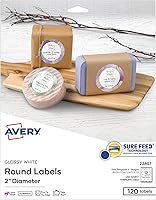
Avery® Printable Round Labels: Best for round product seals
- 2 in diameter
- Glossy clear finish
- 120 labels
- Laser and inkjet compatible
These 2 in glossy clear circles fit product labels, envelope seals, party favors and packaging that needs a round format.
Pros
- Print-to-the-edge capability
- Sure Feed technology
- Permanent adhesive
Cons
- Round shape limits address layouts
Avery Printable Round Labels are the strongest choice when your clear laser printer labels need a circular shape. Each label is 2 in in diameter, with a glossy clear polypropylene finish and compatibility with both laser and inkjet printers.
The round format suits product seals, envelope closures, party favors, soap labels and packaging. It is less useful for long addresses, but it gives jars, boxes and handmade products a consistent circular mark.
Print-to-the-edge capability lets artwork reach the edge of the round label without a visible margin. This matters for logos, colored backgrounds and other designs that should fill the circle.
Sure Feed technology helps the sheet move through the printer, while the Easy Peel with Pop-up Edge design helps you lift each label after printing. The permanent adhesive is intended for paper, cardboard, plastic, glass and metal.
Choose this pick for round product labels with full-bleed artwork. If your project needs a rectangular shipping format, use one of the Avery 2 x 4 in options instead.
Avery Printable Address Labels for Laser Printers: Best for clear address labels
- 1 x 2-5/8 in
- Matte clear finish
- Laser printer format
- Easy Peel with Pop-up Edge
The narrow 1 x 2-5/8 in format is designed for addresses and smaller mailing areas on white or light-colored surfaces.
Pros
- Designed for laser printers
- Sure Feed technology
- Matte clear appearance
Cons
- Best suited to light-colored surfaces
Avery Printable Address Labels for Laser Printers fit mailing jobs that need a narrower clear label. The 1 x 2-5/8 in size gives addresses a compact format for envelopes, packages, glassine bags and vellum envelopes.
The matte clear appearance is designed to virtually disappear on white, textured or light-colored surfaces. It creates a softer printed-on look than a glossy transparent label and works well when readability matters more than shine.
Sure Feed technology is intended to improve alignment and reduce jams in a laser printer. The Easy Peel with Pop-up Edge feature helps separate the labels from the sheet after printing.
Avery lists a permanent adhesive for paper, cardboard, plastic, glass, film and painted metals. Design and Print templates can help you create address layouts, invitations and product packaging.
Pick this product for clear address labels made for laser printers. It is less suitable when you need a bold image, dark-surface contrast or a large shipping block.
Craftiff 2x3 inch Clear Rectangle Stickers Labels: Best for laser-only packaging labels
- 2 x 3 in
- Glossy transparent finish
- 200 labels
- Laser printers only
These 2 x 3 in transparent rectangular labels give laser-printer users a packaging-focused size for jars, candles, soap and mail.
Pros
- 200 labels
- Laser-only compatibility is clearly defined
- US Letter sheets
Cons
- Only for laser printers
Craftiff 2x3 inch Clear Rectangle Stickers Labels are a good fit for laser-only packaging work. The 2 x 3 in glossy transparent rectangle gives you more room than a small address label while staying shorter than a standard 2 x 4 in shipping label.
The pack contains 200 labels on 25 US Letter sheets, with 8 labels per sheet. That layout suits jars, candles, soap, candy, tins, brochures, flyers and other packaging projects.
Craftiff states that these sheets are suitable for laser printers only. Set the printer for label media, confirm the sheet orientation and use a plain-paper test page before loading a full label sheet.
The permanent adhesive is intended for cardboard, paper, metal, plastic, glass and wood. The product information also describes the labels as smudge and water proof, but use the exact application conditions you need before placing them outdoors or in a wet area.
Choose Craftiff for 200 glossy laser-only packaging labels in a 2 x 3 in format. For inkjet flexibility, use an Avery or Spartan Industrial option instead.
Spartan Industrial 1.75x0.5 Clear Printable Labels for Inkjet: Best for small return labels
- 1.75 x 0.5 in
- 100 sheets
- 8,000 labels
- Inkjet and laser compatible
The very small format suits return addresses, file folders, storage bins and other jobs where a full-size label would be excessive.
Pros
- 8,000 labels
- Laser and inkjet compatible
- Template R032
Cons
- Not waterproof
Spartan Industrial 1.75x0.5 Clear Printable Labels for Inkjet are the best choice here for very small labels. The 1.75 x 0.5 in format suits return addresses, file folders, storage bins, price tags and compact organization labels.
The pack includes 100 sheets with 80 stickers per sheet, for 8,000 labels total. That high count makes it practical for a business or home organization system that uses many small labels rather than occasional shipping sheets.
The sheets work with inkjet and laser printers. Template R032 is included for setup, and templates are also available for PDF editors, Microsoft Word, Google Docs, Adobe Illustrator and Canva.
Spartan Industrial recommends loading sheets straight, selecting Heavyweight or Label Paper, printing at 100% or Actual Size and running a test page first. Those steps help protect alignment on the small format.
Choose this pick for large quantities of tiny clear labels. It is not waterproof, and its narrow size cannot replace a 2 x 4 in shipping label.
How to choose clear laser printer labels
The best clear labels for laser printer use depend first on the printer, then on the job. Confirm laser compatibility before you compare finish, adhesive or label count.
Laser printers use heat during the imaging and fusing process. Label sheets must be designed to pass through that path without separating, curling or creating a feed problem.
Our Laser Printer vs Inkjet vs Ink Tank: A Clear Answer explains the main differences between printer types. A product that is optimized for inkjet should not be treated as automatically suitable for a laser printer.
Which size fits your label job?
Use 2 x 4 in labels for common shipping and mailing layouts. Avery B078HHB584 and B000093KW6 use that size, but they differ in finish, count and printer emphasis.
Choose 1 x 2-5/8 in for compact addresses. Avery B000GOY6F0 is shaped around that use, so it leaves less unused space on envelopes than a larger shipping label.
Choose 2 x 3 in for packaging when you need room for a short product name, address or design. Craftiff offers that size in a laser-only format.
For file folders, bins and return addresses, the 1.75 x 0.5 in Spartan Industrial labels use less space. Their small format is useful when a larger label would cover too much of the item.
Should you choose glossy or matte clear labels?
Glossy clear labels suit color graphics, logos and product packaging. Avery's glossy crystal-clear shipping labels and round labels are the strongest choices when you want color to show through.
Glossy material gives printed color more presence on glass, plastic and other smooth surfaces. That can help a logo, a colored band or a product name stand out without a white backing behind it.
Matte clear labels suit addresses and light-colored paper when you want less shine. Avery B000093KW6 and B000GOY6F0 use matte clear finishes, with different sizes for shipping and address work.
Matte finishes can feel calmer in everyday mailing because they reduce reflection. They are often easier to read on envelopes when bright light would otherwise catch a glossy surface.
Clear material does not create the same contrast as white label stock. Test black text and fine graphics on the surface you plan to label, especially when the background is patterned, dark or reflective.
A short test run can save wasted sheets and missed alignment. Print one sheet with your real text and artwork, apply a label, then judge readability in normal light.
Think about where the labeled item will live after printing. A jar, box or envelope may sit in a cupboard, travel in a bag or face sunlight during delivery.
Glossy labels ask for a little more care with artwork choices. Pale colors and thin lines can wash out on a clear finish, so stronger colors and clearer spacing usually work better.
Matte labels suit a plainer design style when you want the text to do the work. Addresses, names and short instructions read well when the finish does not compete with the words.
Surface texture also matters because smooth paper shows print more cleanly than rough or fibrous stock. A clear label on textured paper can look softer, while a smooth surface keeps edges and lines sharper.
If you prefer a glossy format, compare these picks with our guide to best glossy labels for laser printer. For Avery formats across sizes, see best Avery labels for laser printer.
Choose glossy when packaging and branding are the main goal. Choose matte when addresses and everyday mailing need a quieter, low-shine result.
How should you prepare a laser printer for label sheets?
Start with the correct template and confirm that the page size is US Letter when the product calls for it. Set scaling to 100% or Actual Size so the design does not shift across the adhesive areas.
Load one sheet according to the printer's label-media instructions. A plain-paper test page helps you check orientation, margins and text placement before using a label sheet.
Keep unused sheets flat and dry. Do not feed a sheet that is curled, damaged or missing a label, because exposed adhesive can create a feeding problem.
After printing, allow the sheet to leave the printer completely before handling it. Fold the sheet back only when you are ready to use the Easy Peel feature on products that include it.
Are clear labels right for envelopes and shipping?
Clear labels can work well on envelopes, packages and product containers when the background is light enough for the printed text to stand out. Avery B000GOY6F0 is aimed at address work, while B078HHB584 uses a larger shipping format.
For mail pieces that need a dedicated label layout, see our guide to best shipping labels for laser printer. If you print directly on envelopes instead, compare the correct media path with our best envelopes for laser printers.
Remember that transparency is a design choice, not a guarantee of durability. The Avery B078HHB584 and Spartan Industrial labels are marked as not waterproof, so do not choose them for wet exposure without confirming a suitable alternative.
Verdict: which clear labels for laser printer should you choose?
Avery Printable Shipping Labels are the best clear labels for laser printer shoppers who want a glossy crystal-clear 2 x 4 in format for shipping and packaging. That size gives you room for a name, address and short design elements without covering the whole package.
Choose Avery B000093KW6 for a larger matte clear pack, Avery B008FKRYMO for round seals, and Avery B000GOY6F0 for compact addresses. Each one suits a different surface and layout, so the right pick depends on the job in front of you.
Choose Craftiff when you need 2 x 3 in laser-only packaging labels. That shorter rectangle fits jars, candles, soap and small boxes where a full shipping label would feel too large.
Choose Spartan Industrial when you need 8,000 very small labels for return addresses, files or storage bins. The tiny format is practical for repeated organization tasks, but it cannot carry a full shipping address block.
The right choice comes down to printer compatibility, label size, finish and surface. Match those four points before you compare adhesive features or sheet count.
Printer compatibility should come first because a label sheet must feed safely through a laser printer. A finish that looks right on screen may still be the wrong choice if the sheet is not made for your printer type.
Size comes next because it decides how much information the label can carry. A 2 x 4 in label suits shipping details, while a narrow address label leaves more of the envelope visible.
Finish affects how the finished label looks in normal light. Glossy clear labels suit color and branding, while matte clear labels suit addresses and light paper with less shine.
Surface decides whether the print will read clearly once applied. Light and smooth surfaces give the strongest contrast, while dark, patterned or reflective surfaces need a careful test before a full run.
Count matters only after those basics are settled. A larger pack is useful for steady work, but it is a poor trade if the size, finish or printer fit is wrong for your task.
Set-up should include a test print on the correct template and paper setting. That small step helps you check orientation, margins and text placement before adhesive sheets are used.
Storage is worth a mention too, so keep unused sheets flat and dry away from heat. Good storage helps the sheets feed more reliably when you return to the project later.
Our top 3 picks at a glance
-
1
-
2
Best for higher-volume mailing
Avery Printable Shipping Labels with Sure Feed
9.2/10 our score
See it on Amazon -
3
Frequently asked questions
Can you print clear labels with a laser printer?
Yes, but the label sheets must be made for laser printing. Laser printers use heat in the fuser, so choose a compatible product and follow the printer and label directions.
Craftiff is laser-only, while the Avery and Spartan Industrial picks here support laser printing.
What are the best clear labels for laser printer shipping work?
Avery Printable Shipping Labels are the strongest fit for most clear shipping work because they are 2 x 4 in, glossy crystal clear and compatible with laser printers. The Avery 250-label matte clear pack suits higher-volume mailing, while Craftiff offers a shorter 2 x 3 in format.
Are clear laser printer labels waterproof?
Do not assume clear laser printer labels are waterproof. Avery B078HHB584 and Spartan Industrial B0FWGXXLFT are specifically marked as not waterproof.
If a label may face water, check the exact product instructions and surface requirements before printing.
Should clear labels be glossy or matte?
Choose glossy clear labels when you want color and images to stand out, such as product packaging or round seals. Choose matte clear labels when you want a softer look for addresses and light-colored envelopes.
The surface and the type of artwork matter as much as the finish.