9 Best Avery Labels for Laser Printers (October 2026)
The best Avery labels for laser printers include the Avery Printable Round Labels for glossy round designs, the Avery Round Printable Labels for larger matte circles, and the KKBESTPACK Half Sheet Shipping Labels for Laser for two large labels per sheet.
On this page (4 sections)
The best Avery labels for laser printers depend on the shape, finish and job. For product packaging, choose a round format; for shipping, choose a half-sheet or rectangular label; for a light envelope, matte clear address labels can blend into the surface.
These picks include Avery labels and a few comparable laser-compatible formats for buyers who need a particular sheet layout or a larger supply. We compared the stated sizes, finishes and printer compatibility to match each format to a practical use.
For a broader look at sheet formats, see our guide to best laser printer label sheets. If you need a label for a different material, our best vinyl sticker paper for laser printer guide covers printable vinyl options.
Our picks at a glance
-
1

-
2

-
3
 Best for two large labels per sheet
KKBESTPACK Half Sheet Shipping Labels for Laser
9.6/10 our score
See it on Amazon
- 4
 Check it
Avery® Waterproof Labels with UltraHold® Permanent Adhesive
Best for water exposure - 5
 Check it
Avery® Half-Sheet Printable Shipping Labels
Best for covering old package labels - 6
 Check it
Avery Printable Address Labels for Laser Printers
Best for clear address labels - 7
 Check it
LabelChoice 100 Sheets 1000 Pcs 2”x4”
Best for a large label supply - 8
 Check it
Premium Label Supply White Sticker Address Labels
Best for 2 x 4 in address labels - 9
 Check it
Premium Label Supply White Sticker Shipping Labels
Best for four larger labels per sheet
How we chose Avery labels for laser printers
The right laser printer label starts with printer compatibility and a sheet format that matches your task. We compared label shape, size, finish, quantity and stated features such as Sure Feed or TrueBlock.
Avery's formats cover round labels, clear address labels and large shipping labels. The other picks add alternative half-sheet and multi-up layouts for people who need a particular label size or quantity.
We scored each option for how well its format and features fit common mailing, packaging and organization jobs. Our score weighs specs, features and buyer feedback against what you're shopping for.
| Product | Best for | Shape | Finish | Printer fit | Our score |
|---|---|---|---|---|---|
| Avery Printable Round Labels | glossy round designs | 2 in round | Glossy white | Laser and inkjet | 9.7 |
| Avery Round Printable Labels | larger matte circles | 2.5 in round | Matte white | Laser and inkjet | 9.6 |
| KKBESTPACK Half Sheet Shipping Labels for Laser | two large labels per sheet | Laser and inkjet | 9.6 | ||
| Avery® Waterproof Labels with UltraHold® Permanent Adhesive | water exposure | Laser printers | 9.5 | ||
| Avery® Half-Sheet Printable Shipping Labels | covering old package labels | Optimized for laser printers | 8.8 | ||
| Avery Printable Address Labels for Laser Printers | clear address labels | Matte clear | Laser printers | 8.9 | |
| LabelChoice 100 Sheets 1000 Pcs 2”x4” | a large label supply | Laser and inkjet | 8.6 | ||
| Premium Label Supply White Sticker Address Labels | 2 x 4 in address labels | Laser and inkjet | 8.3 | ||
| Premium Label Supply White Sticker Shipping Labels | four larger labels per sheet | Laser and inkjet | 8.1 |
Which Avery labels fit each job?
Avery's round labels work well for branding and sealing, while its address and shipping formats suit envelopes and parcels. Pick the label dimensions before creating a template so the text and artwork fit the printable area.
Avery labels for laser printers: round formats
The 2-inch glossy rounds suit bright designs where a reflective finish helps colors stand out. The 2.5-inch matte rounds give you more space for text or a larger graphic.
Avery Printable Round Labels: Best for glossy round designs
- 2 in diameter
- Glossy white paper
- Laser and inkjet compatible
- Sure Feed technology
Glossy 2-inch rounds suit colorful packaging, product branding and sealing labels. Sure Feed technology helps provide a more reliable feed through the printer.
Pros
- Glossy surface for bright designs
- Round format for packaging and branding
- Sure Feed technology
Cons
- Smaller diameter than the 2.5 in option
- Allow 30 to 60 seconds to dry for best print results
Avery's 2-inch glossy white circles suit product branding, packaging and sealing labels. Sure Feed technology helps create a more reliable feed, and Easy Peel with Pop-up Edge makes labels easier to remove from the sheet.
The glossy finish can make colors look more noticeable, while the smaller diameter keeps the label compact. Avery recommends allowing 30 to 60 seconds for the print to dry for best results.
Choose these when a bright, round label fits the package. For a larger matte design, the 2.5-inch option below gives you more room.
Avery Round Printable Labels: Best for larger matte circles
- 2.5 in diameter
- Matte white paper
- 300 labels
- Laser and inkjet compatible
The 2.5-inch matte circles provide more room for a logo, text or hand-applied design. Avery's Sure Feed technology is intended to help reduce misalignments and jams.
Pros
- Larger circle for more design space
- Matte surface
- 300 blank labels
Cons
- Takes more space on a package than a 2 in circle
- Round format may not suit shipping addresses
The 2.5-inch matte white circles provide more space for a logo, product name or short message. They work with laser and inkjet printers and come in a 300-label pack.
Avery's Sure Feed technology is designed to help reduce misalignment and jams. The matte finish gives text and artwork a less reflective background than the glossy 2-inch option.
Use this size for jars, candles, school supplies or packages where the larger circle fits. If your design needs a narrow strip or a small address area, compare best small labels for laser printer before choosing.
Laser printer labels from Avery for mailing
For parcels, choose between half-sheet labels and smaller rectangles based on how much information you need to print. A waterproof label can help when a package or product may face moisture.
KKBESTPACK Half Sheet Shipping Labels for Laser: Best for two large labels per sheet
- Two labels per US Letter sheet
- Each label is 8.5 x 5.5 in
- Matte white
- Laser and inkjet compatible
This half-sheet format gives each shipping label a large area for mailing information. The sheets are pre-scored and use standard paper settings.
Pros
- Large label area
- Two labels on each US Letter sheet
- Matte white surface
Cons
- Not an Avery brand label
- Large format may be excessive for small parcels
KKBESTPACK's half-sheet labels are an alternative for laser printer owners who want two large labels per US Letter sheet. Each label measures 8.5 x 5.5 inches and has a matte white surface.
The pre-scored sheets are intended for shipping and mailing information, and they work with laser and inkjet printers using standard paper settings. This format is larger than most address labels, so make sure it fits the package face.
Choose it when you want a broad label area and do not need an Avery brand. For an Avery half-sheet format with material that covers old marks, consider the next option.
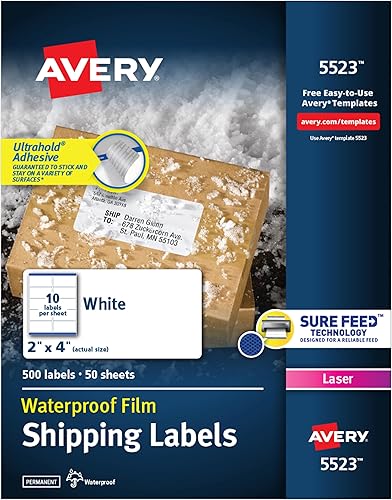
Avery® Waterproof Labels with UltraHold® Permanent Adhesive: Best for water exposure
- 2 x 4 in format
- Waterproof polypropylene
- Laser printer compatible
- TrueBlock technology
These rectangular labels are designed for shipping or product labeling where water, scuffs or cleaning matter. TrueBlock material covers old markings beneath the label.
Pros
- Waterproof and resistant to scuffing and tearing
- UltraHold permanent adhesive
- TrueBlock covers underlying marks
Cons
- Laser printers only
- Rectangular shipping format rather than a round label
Avery's 2 x 4-inch waterproof labels fit shipping and product labeling where water resistance matters. The polypropylene material is designed to resist water, scuffing, tearing and smudging, and the labels are compatible with laser printers.
TrueBlock material covers old information underneath, which can help when reusing a box. UltraHold permanent adhesive is designed to stick to surfaces including cardboard, paper, plastic, glass, tin and metal.
Pick these for a compact rectangular label that may need cleaning or moisture resistance. For a larger label area, Avery's half-sheet option has more room for shipping details.
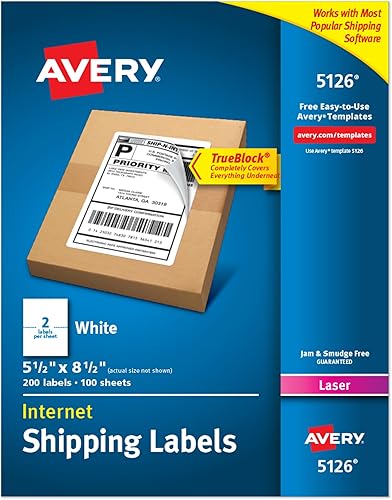
Avery® Half-Sheet Printable Shipping Labels: Best for covering old package labels
- 5.5 x 8.5 in labels
- TrueBlock technology
- Permanent adhesive
- Optimized for laser printers
Avery's half-sheet format gives shipping details a large print area, and TrueBlock technology covers old marks when reusing packaging. The labels are also suited to storage and large product labels.
Pros
- Covers old shipping information
- Large printable area
- Permanent adhesive for smooth surfaces
Cons
- Large format uses more sheet area
- Not a small address-label format
Avery's 5.5 x 8.5-inch half-sheet labels suit packages that need a large shipping label or boxes with old marks to cover. TrueBlock technology covers underlying text and markings, while the permanent adhesive is intended for smooth surfaces such as cardboard and plastic.
The format also works for storage bins, large product labels and event labels. Avery says the sheets are optimized for laser printers to help prevent smearing or smudging.
Choose this layout when a full half-sheet label is useful. If your parcel needs only an address, a smaller format uses less label area.
Avery address labels for laser printers
Avery's matte clear address labels can create a low-visibility look on light-colored envelopes. White rectangular labels are easier to distinguish when the package surface is dark or the print needs strong contrast.
Avery Printable Address Labels for Laser Printers: Best for clear address labels
- 1 x 2-5/8 in address labels
- Matte clear finish
- Sure Feed technology
- Laser printer compatible
The matte clear labels can blend into white and light-colored envelopes for a printed-on look. Sure Feed technology helps provide a more reliable feed through a laser printer.
Pros
- Clear appearance on light surfaces
- Address-label format
- Easy Peel with Pop-up Edge
Cons
- Clear labels have less contrast on dark surfaces
- Smaller area than half-sheet shipping labels
These 1 x 2-5/8-inch matte clear labels are designed for laser printers and can blend into white or light-colored envelopes. Avery's Sure Feed technology helps provide a more reliable feed, while Easy Peel with Pop-up Edge helps with label removal.
The clear finish also suits vellum, glassine and frosted glass. Since the label is less visible, check the contrast between your text and the surface before printing a full sheet.
For transparent labels in other sizes and uses, see our best clear labels for laser printer guide.
Other laser-compatible label sheets
Non-Avery labels can fill a gap when you need a particular size, layout or quantity. Compare the template and sheet dimensions with your print settings before running a full batch.
LabelChoice 100 Sheets 1000 Pcs 2”x4”: Best for a large label supply
- 2 x 4 in labels
- 10 labels per sheet
- 1,000 labels
- Laser and inkjet compatible
The 10-up layout provides a standard rectangular format for shipping and address labels. The pack includes 100 sheets with 1,000 labels total.
Pros
- Large quantity for frequent labeling
- Matte white writing surface
- Template available from LabelChoice
Cons
- Not an Avery brand label
- Check template alignment with your printer setup
LabelChoice includes 1,000 matte white 2 x 4-inch labels across 100 sheets, with 10 labels on each sheet. The format fits shipping and address tasks, and the labels are compatible with laser and inkjet printers.
The company offers a template for the layout. Use that template or confirm your own design matches the 10-up arrangement to keep addresses within the label edges.
Choose this pack if you print labels often and want a large quantity. It is not an Avery label, but its rectangular sheet layout may suit a similar mailing job.
Premium Label Supply White Sticker Address Labels: Best for 2 x 4 in address labels
- 2 x 4 in labels
- 10 labels per sheet
- 250 labels
- Laser and inkjet compatible
These white 2 x 4-inch labels can handle addresses, folder tags and home or office organization. The letter-size sheets work with laser and inkjet printers.
Pros
- Multipurpose rectangular format
- Permanent adhesive
- Smudge-proof printing
Cons
- Not an Avery brand label
- Pack contains 250 labels
Premium Label Supply's 2 x 4-inch white labels work for addresses, folder tags and organizing office or home supplies. Ten labels fit on each standard letter-size sheet, and the sheets are compatible with laser and inkjet printers.
The labels use a permanent adhesive and are described as smudge-proof. A matte white surface gives printed text a familiar paper-like look.
Choose this pack for a modest quantity of multipurpose rectangles. If you need larger individual labels for package details, the 4 x 5-inch option has fewer labels per sheet.
Premium Label Supply White Sticker Shipping Labels: Best for four larger labels per sheet
- 4 x 5 in labels
- Four labels per sheet
- 100 labels
- Laser and inkjet compatible
The 4 x 5-inch labels offer more area than a common address-label format for packages and household organization. Each letter-size sheet holds four labels.
Pros
- Larger format for package details
- Permanent adhesive
- Smudge-proof printing
Cons
- Not an Avery brand label
- Only 100 labels in the set
These 4 x 5-inch labels give each print more area for package or household information. Four labels fit on each letter-size sheet, and the format works with laser and inkjet printers.
Premium Label Supply describes the labels as smudge-proof and uses a general-purpose permanent adhesive. The 100-label set is smaller than the other alternatives here, but the larger format may suit packages that need more than an address.
Choose this layout when the extra label area is useful. For standard address-size labels, use a smaller rectangle instead.
What should you check before printing laser labels?
Match the label template to the sheet layout, then check your printer's paper path and media settings. A template for a different number of labels per page can shift text onto the backing or beyond the label edge.
Confirm whether the label is approved for laser printing, especially with specialty materials. Avery's waterproof option is laser-only, while several round and clear formats support both laser and inkjet printers.
Feed label sheets according to your printer's instructions and avoid reusing sheets with labels already removed. A partly used sheet can expose adhesive or create uneven feeding, so use fresh sheets for important batches.
Which Avery label format should you choose?
Choose Avery's 2.5-inch matte rounds for larger circular designs, the 2-inch glossy rounds for a brighter compact label, or the matte clear address labels for light envelopes. For shipping, pick a half-sheet when the large area helps, or 2 x 4-inch waterproof labels when moisture resistance matters.
If you need to keep a laser printer working well with different media, review our guides to what a print engine in laser printers does and what a corona wire for laser printers does. For routine care, see our best printer maintenance kits and best laser printer cleaning kit guides.
Our top 3 picks at a glance
-
1
-
2
-
3
Best for two large labels per sheet
KKBESTPACK Half Sheet Shipping Labels for Laser
9.6/10 our score
See it on Amazon
Frequently asked questions
Can Avery labels go through a laser printer?
Yes, if the specific label is marked for laser printers. Avery's round labels support laser and inkjet printers, while its waterproof 2 x 4-inch labels are for laser printers only.
Check the printer compatibility and sheet format before loading labels.
Which Avery labels work best for shipping?
Avery's half-sheet shipping labels suit packages that need a large address area or need old marks covered. The 2 x 4-inch waterproof labels are a better fit for smaller shipping labels that may face water or scuffing.
Choose the format based on the package and the conditions the label will face.
Are clear Avery labels easy to read?
Avery's matte clear address labels are intended to blend into white and light-colored envelopes. Their low-visibility appearance may be less useful on dark or busy surfaces, so choose white labels when contrast matters most.
Match the background and text color before printing a full sheet.
How do I avoid misaligned laser label prints?
Use a label template that matches the exact sheet layout, then select the correct paper size and feed settings for your printer. Avery's Sure Feed technology is designed to provide a more reliable feed on several of its label formats.
Print a plain-paper alignment check first when your template allows it.