Printer Stands: The Complete Buying Guide
The best printer stand matches your printer's size, the space around your desk and the storage you need. Choose a desktop riser for a compact setup, a rolling cart for flexible placement, or a cabinet or tower stand for larger equipment and supplies.
On this page (9 sections)
- What is a printer stand?
- How do you choose the right printer stand?
- Which printer stand types work best?
- What should you store on a printer stand?
- How do you set up a printer stand safely?
- How do you compare a printer table, cart and cabinet?
- What common printer stand mistakes should you avoid?
- Explore printer stands by topic
- Which printer stand should you choose?
The best printer stand matches your printer's footprint, the height you can reach comfortably and the supplies you want nearby. Measure the printer first, then choose between a desktop riser, under-desk cart, storage shelf, cabinet or large tower stand.
It should also suit the way you work each day. A stand that forces you to lift heavy paper, reach behind the machine or move the printer to open a tray will slow you down even if the top looks wide enough.
A printer stand can clear space from a crowded desk, keep paper and toner together, or make a larger office machine easier to reach. It can also give a scanner, shredder or computer tower a place outside the main work area.
The right choice depends less on appearance than on size, load capacity, storage layout and movement. Finish matters for the room, but it comes after fit, strength and access.
Start with the printer in its working state. Note its width and depth with trays closed, then check how far output trays, rear feeds and scanner lids extend when open.
Those measurements set the minimum top size.
Then check the room. A desktop riser uses desk space but saves floor space.
A floor cart uses floor space but frees the desk. A tower stand uses height, so nearby doors, chairs and shelves need clearance too.
Next, list what else needs a home. Paper reams, folders, ink, toner, cables and spare parts all compete for the same shelves.
Open shelves give quick access, while drawers and cabinets keep small items tidy and out of sight.
Movement is the last practical decision. Fixed feet suit a permanent setup and feel steady on a desk.
Locking casters suit rooms that change layout, but they need checking before printing or loading paper.
This guide compares the main printer stand types and the features that matter in daily use. We also checked 4 examples for different setups, from a compact desktop printer to a large printer with room for a computer tower or shredder.
Use the examples as starting points, not as automatic matches. Compare each top size, shelf capacity and storage layout with your own printer and room before you decide.
What is a printer stand?
A printer stand is a raised surface, shelf or cabinet designed to hold a printer and organize related supplies. Some models sit on a desk, while others stand on the floor, roll under a desk or provide several storage levels.
The main types are:
- Desktop printer stands: Small risers that raise a printer above a desk and may add compartments below.
- Printer carts: Floor stands with casters that can move between a desk, worktable or storage area.
- Printer tables: Open shelves that hold a printer, paper, files or other equipment.
- Printer cabinets: Enclosed furniture that hides supplies and gives the room a cleaner look.
- Tower stands: Tall, multi-level stands that use vertical space for printers, paper, scanners or computer equipment.
- Under-desk stands: Short carts designed to fit below a desk or counter.
The best printer stand for a small home office may be a desktop shelf. A larger office with a laser printer, shredder and extra paper may need a floor stand with multiple shelves and a wider top.
How do you choose the right printer stand?
Choose a printer stand by comparing printer size, total load, available space, storage needs and mobility. These 5 checks remove most poor matches before you compare finishes or colors.
1. Measure the printer footprint
Measure the printer's width, depth and height with its normal trays closed. Then measure again with the output tray, rear feed or scanner lid open if those parts extend during use.
The stand's top should be wider and deeper than the printer. Leave room to reach power buttons, load paper and remove printed pages without pushing the printer against a wall.
Do not rely on the printer's product class alone. A compact inkjet, office laser printer and multifunction model can have very different footprints.
2. Check the stand's weight limit
Compare the printer's weight with the stated capacity of the top shelf. If a scanner, paper stack or other device will share that shelf, add those loads before choosing.
A stand that holds a small desktop printer may not suit a heavy laser printer. For large equipment, look for a reinforced frame, a wide top and a capacity that leaves some margin.
3. Match the height to your room
A desktop riser adds storage without taking floor space, but it also raises the printer closer to your eye level. A floor cart can place the printer beside the desk or beneath it.
For under-desk use, measure the clear height from the floor to the lowest part of the desk. Include the printer's height, the stand's shelf thickness and room for paper access.
4. Decide how much storage you need
Open shelves suit paper reams, folders and larger supplies. Drawers work well for cables, pens and small accessories.
Cabinets hide clutter but need enough door clearance to open fully.
If you use the printer often, keep paper and toner close to the printer. If you use it occasionally, enclosed storage may matter more than quick access.
5. Choose fixed feet or wheels
Wheels help when the stand must move for cleaning or when you use one printer in more than one work area. Locking casters reduce movement after you place the cart.
Fixed feet are suitable for a printer that stays in one spot. Adjustable feet can also help level a stand on uneven floors.
Which printer stand types work best?
The best type depends on where the printer will sit and what else you need to store. A desktop stand saves floor space, while a rolling or tower stand gives you more room for equipment and supplies.
Desktop printer stands
Desktop stands raise the printer and create storage below it. They suit compact printers, small desks and work areas where floor space is already occupied.
The FITUEYES Large Desktop Printer Stands has a 2-tier design with 3 storage compartments. Its assembled size is 18.9 in W x 15.7 in D x 8.7 in H, and its wood enclosure has a black matte finish.
The stand has non-slip rubber feet to reduce movement and help protect the work surface from scratches and scuffs. It is stackable, and the stated shelf capacities are 90 lb, 11 lb and 22 lb.
The included hardware and installation manual support assembly in about 20 minutes. Choose it when you want organized storage on the desk and do not need a rolling floor cart.
For a lighter color scheme, compare these best white printer stands. If wood furniture fits your room better, see the best wood printer stands.
Under-desk printer carts
Under-desk carts keep the printer off the desktop and can use space that would otherwise remain empty. Measure the desk clearance carefully, especially if the printer's paper tray opens toward the front.
The HUANUO Printer Stand with Storage Drawer, Locking Wheels, Under Desk Cart has a 17.2 in x 13.2 in top platform, an adjustable maximum height of 14.1 in and a stated capacity of 38.5 lb for the tabletop and bottom shelf.
Its drawer includes dividers for office supplies and accessories. The bottom shelf can hold paper, folders and reference books, while the cable holder helps keep cords organized.
The 360-degree swivel casters can lock in place, and the wheels are optional if you want to use the stand on a desktop or shelf. The stand has a plastic enclosure and a black finish.
The product dimensions are given as 17.1 in x 13.2 in x 13.2 in in the specifications, while the detailed measurements describe a 16.92 in L x 13.38 in W x 14.17 in H setup. Measure your available space and compare the assembled dimensions before ordering.
Use an under-desk cart when the printer needs to stay close but the desktop is too valuable for a printer. Our guide to best under desk printer stands covers this layout in more detail.
Rolling printer stands
Rolling printer stands suit shared work areas, flexible rooms and printers that need occasional movement. For a brand-specific comparison, see Safco printer stands.
Look for locking casters, a stable top and enough clearance for cables.
A rolling cart is useful when you need to move a printer away from a wall to reach a power cord. Lock the wheels before printing, loading paper or opening a tray.
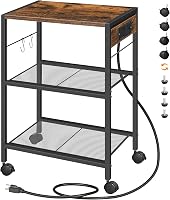
The Fannova Printer Stand with Height Adjustable Storage Shelf for Home Office has a 3-tier design in a 21.7 in W x 15.7 in D footprint. Its alloy steel and engineered wood construction has a rustic brown finish.
The middle shelf can be set at 13.3 in, 15.3 in, 17.2 in, 19.2 in or 21.1 in between the top and middle shelf. Each shelf is rated for 88 lb, and the shelves use 15 mm particle board on a steel tube frame.
The stand includes 4 casters, with 2 braking wheels, as well as adjustable foot pads for a fixed setup. The parts are numbered, the holes are pre-aligned, a complete tool set is included and one spare of each screw type is included.
Choose this model when you need several storage levels but want to keep the footprint fairly narrow. For a gray finish, compare the best gray printer stands, and for more cart options see the best rolling printer stands.
Printer stands with drawers
A drawer keeps small items from spreading across the desk. It works well for cables, pens, labels and other accessories that are easy to lose on an open shelf.
The HUANUO cart is the clearest fit in this group because its storage drawer has dividers. Its bottom shelf adds space for paper, folders and reference books.
A drawer does not replace a large paper shelf. Check the total storage layout if you keep several paper sizes or extra toner near the printer.
See more layouts in our guide to best printer stands with drawers. If you need open shelves instead, compare best printer stands with storage.
Printer cabinets
Printer cabinets hide paper, cables and toner behind doors or panels. They suit rooms where visual clutter matters, but the cabinet must still allow ventilation and access to the printer's paper path.
A cabinet can also reduce dust on stored supplies. It should not block vents or force the printer too close to the back panel.
Choose a cabinet when the printer has a permanent location and you prefer enclosed storage. Our best printer cabinets for home offices guide focuses on this furniture style.
Large and heavy-duty printer stands
Large printers need more than a top that looks wide enough. Compare the full footprint, shelf capacity, frame construction and the space needed for trays, doors and cables.
The Fannova Large Printer Stand with PC Tower Shelf for Home Office Storage has a 22 in W x 18 in D tabletop. Its PC tower slot has an internal size of 23.6 in H x 10.6 in W x 18.9 in D.
The stand uses engineered wood and alloy steel, with a rustic brown finish. The middle shelf can be reversed with the computer tower slot, giving you 2 layout options.
Both adjustable feet and rolling casters are included. Two of the 4 wheels lock, so you can choose a fixed setup or move the stand when needed.
This is the strongest space match here for a large printer combined with other office equipment. Its 23.62 in x 18.9 in x 31.89 in outside dimensions need a dedicated floor location.
Compare more options in our guide to best heavy duty printer stands. If your equipment includes a 3D printer, use the separate best 3D printer stands guide because vibration, working height and equipment shape can change the choice.
What should you store on a printer stand?
Store the supplies you use with the printer most often, but keep the top shelf clear enough for safe paper loading and output handling. Paper, toner, ink, folders and cables are common choices.
Think of the stand as an extension of the printer, not as general storage. If an item is not needed for printing, scanning or finishing pages, it probably belongs elsewhere.
Use the lowest shelf for heavier items when the stand has several levels. This keeps the center of weight lower and leaves the upper area easier to reach.
That order also helps with stability. Heavy reams, toner boxes or spare equipment low down reduce tipping risk when you pull out paper or open a drawer.
Group supplies by frequency:
- Daily items: printer paper, envelopes and labels.
- Regular replacements: ink cartridges, toner and spare cables.
- Occasional items: manuals, folders and extra paper sizes.
- Large equipment: scanners, shredders or a computer tower only when the shelf size and capacity support them.
Daily items should sit closest to the paper path. Keep the main paper stack where you can load it without lifting the printer or reaching across the output area.
Regular replacements need to be easy to find but do not need to be on the top. A middle shelf or drawer keeps ink and toner in order without cluttering the working surface.
Occasional items can go lower or toward the back. Manuals, spare folders and less used paper sizes still need to be reachable, but they should not block daily supplies.
Do not pile supplies against vents or place loose items where they can fall into the printer. Keep liquids away from paper, electronics and stored cartridges.
Also leave room for paper to leave the printer. A stack of folders or a tall box beside the output tray can jam pages, bend prints and make collection awkward.
Check the layout after a week of use. Move items that you reach for often closer to the top, and move rarely used items down, so the stand stays useful rather than just full.
How do you set up a printer stand safely?
Set up the stand on a level surface, tighten all fasteners and confirm that the printer sits fully on the top shelf. Read the assembly instructions for the exact stand before loading it.
Start with an empty stand. Check that each screw, bracket and shelf is seated firmly, then test the stand with a gentle push before any equipment goes on top.
For a floor cart, install the casters or leveling feet according to the intended use. Lock the wheels before placing the printer on top.
If you use leveling feet, adjust each corner until the stand sits still. A small wobble can become more noticeable when a scanner lid opens or a tray is pulled out.
Route the power and data cables with enough slack for normal movement, but keep them away from wheels and pinch points. Do not pull a loaded cart by its cable.
Place the printer so the paper tray, scanner lid and output area can open fully. If a wall is behind the stand, leave enough room for ventilation and cable access.
After loading the stand, check that it does not rock or lean. Recheck the fasteners after the first period of use if the stand was assembled from multiple parts.
How do you compare a printer table, cart and cabinet?
Choose a printer table for open storage, a cart for movement, and a cabinet for hidden storage. The same printer can work on all 3 styles if the top dimensions, capacity and clearances match.
| Stand type | Best fit | Main trade-off |
|---|---|---|
| Desktop riser | Small offices and compact printers | Uses desk space |
| Open printer table | Paper, folders and visible supplies | Less concealment |
| Rolling cart | Shared rooms and flexible layouts | Wheels need to be locked |
| Under-desk cart | Freeing the desktop | Limited height and clearance |
| Printer cabinet | Cleaner visual appearance | Doors need opening space |
| Tower stand | Printer plus other equipment | Takes more vertical space |
A printer table is often the simplest choice when you want paper nearby. Open shelves make supplies visible and easy to reach, which suits regular printing at home or in a small office.
A cart is better when the printer moves. Wheels help with cleaning, rearranging furniture or sharing one printer between work areas, as long as the casters lock before use.
A cabinet is better when the room needs a more finished appearance. Doors and panels hide paper, cables and small supplies, but they add door swing and can limit ventilation if the space is tight.
The main trade off is access. Tables give the most open access, carts give flexible placement, and cabinets give concealment at the cost of extra steps to reach supplies.
Capacity matters in each case. A decorative table may look suitable, yet its top size and load limit may not match a larger printer, scanner or paper stack.
For event or photo printing, check the equipment footprint and working height before choosing furniture. Our guide to best photo booth printer stands covers that special setup.
What common printer stand mistakes should you avoid?
The most common mistake is buying from the printer name alone instead of measuring the full working footprint. A stand can fit the printer body but block a rear feed, output tray or scanner lid.
Avoid these errors:
- Choosing a top that is barely wider than the printer.
- Ignoring the printer's weight and the shelf capacity.
- Forgetting under-desk height clearance.
- Placing a rolling stand on an uneven floor without leveling or locking it.
- Storing heavy equipment on a shelf not designed for it.
- Blocking vents with paper or folders.
- Leaving no room to replace toner or ink.
- Choosing a cabinet without checking door swing and cable access.
- Treating a decorative table as a printer stand without checking its load limit.
- Moving a loaded cart without locking or controlling the casters.
A few minutes with a tape measure can prevent most of these problems. Mark the stand's footprint on the floor or desk, then test the printer's open trays and doors within that outline.
Explore printer stands by topic
- Best Printer Stands for Small Spaces
Use this topic guide when floor space or desk space is tight. It focuses on compact layouts that still leave room for paper loading, output handling and cable access.
Which printer stand should you choose?
Choose the FITUEYES desktop stand if you need a compact, stackable wood organizer with 3 compartments. Its 18.9 in W x 15.7 in D top gives room for a larger desktop printer while the shelves below hold paper, files and other supplies.
It suits a desk that stays in one place. The 8.7 in height raises the printer enough to create storage below, but it also uses desk depth, so measure the desk and the printer's open trays before choosing.
Choose the HUANUO cart if you want an adjustable under-desk setup with a divided drawer, bottom shelf and optional wheels. The 17.2 in x 13.2 in top and 38.5 lb capacity suit many home office printers.
Check the desk clearance before you commit. The stand can reach 14.1 in high, and the printer adds more height on top, so the space under the desk must fit both parts with room to load paper.
Choose the Fannova height-adjustable stand if you need 3 tiers, 5 middle-shelf positions and the choice between casters and leveling feet. Its 21.7 in x 15.7 in footprint keeps storage vertical, and each shelf is rated for 88 lb.
That model fits a printer that changes height needs over time. You can set the middle shelf for a tall machine, extra paper or supplies, then move it again if the setup changes.
Choose the larger Fannova stand if the printer shares space with a computer tower, paper shredder or other bulky equipment. The 22 in x 18 in top, plus the tower slot and reversible middle shelf, give more layout options.
Measure the floor space carefully for that larger option. Its outside size is 23.62 in x 18.9 in x 31.89 in, so it needs a dedicated spot rather than a narrow gap.
The right printer stand is the one that fits the printer when it is open and in use, not only when it is switched off. Measure the printer, check the load, plan the cable route and then compare the storage style that suits your room.
Frequently asked questions
What is the best height for a printer stand?
The best printer stand height keeps the printer easy to reach without blocking your desk or making paper loading awkward. Desktop stands raise the printer a few inches, while floor carts can place it under or beside a desk.
Measure your printer's controls, paper path and the available clearance before choosing.
Should a printer stand have wheels?
Choose wheels when you need to move the printer for cleaning, cable access or room changes. Locking casters help the stand stay in place during use.
If the printer will remain in one location, fixed feet can reduce movement and keep the setup simpler.
Can a printer sit on a cabinet?
A printer can sit on a cabinet when the top is wide and deep enough, the weight stays within the cabinet's capacity and the printer's vents and paper path remain clear. Check the printer's outside dimensions before buying, then allow room to open trays and replace supplies.
What should I store in a printer stand?
Store paper, folders, toner, ink, cables and small office supplies in a printer stand. Keep heavy items on the lowest shelf when possible, and leave the printer's paper path and ventilation areas clear.
Drawers and cabinets work best for small items that otherwise spread across a desk.
How much weight can a printer stand hold?
Printer stand capacity varies widely, so compare the stand's stated shelf limit with the printer's weight and any equipment stored below it. A large laser printer, scanner or multifunction machine may need a heavy-duty stand with a reinforced shelf rather than a small desktop riser.