How to Fix Laser Printer Toner Problems
Most laser printer toner problems come from a loose cartridge, an incorrect replacement, blocked toner flow, or a worn drum. Reseat the cartridge, check compatibility, clean the printer as directed, and print a test page before buying another part.
On this page (8 sections)
- How do you fix a laser printer toner problem first?
- Why does a printer fail to recognize a toner cartridge?
- What should you do when toner is not feeding evenly?
- Why is the page faint, gray, or uneven?
- What causes black lines, spots, or repeating marks?
- What causes toner to rub off the page?
- Can old toner cause laser printer problems?
- Which toner cartridge should you choose?
Most laser printer toner problems come from a loose cartridge, an incorrect replacement, blocked toner flow, or a worn drum. Reseat the cartridge, confirm the model, check the printer settings, and print a test page before replacing more parts.
That order matters because a warning message can describe a simple seating issue rather than a failed part. Fixing the seating first can prevent an unnecessary replacement and save time.
Toner is a dry powder that the printer transfers to paper and bonds with heat. That process differs from liquid ink, so [Do Laser Printers Use Ink or Toner?
Explained](/do-laser-printers-use-ink-or-toner/) can help if you're unsure which supply your printer needs.
A loose cartridge may still sit in the compartment yet fail to make full contact with the printer. The display can then report a cartridge error even though toner remains inside.
An incorrect replacement creates a similar result because the printer cannot recognize a model made for another family. Checking the model number before installing a new cartridge avoids that problem.
Blocked toner flow can make prints look faint long before the cartridge is empty. Gently redistributing the powder, if the manual permits it, may restore even coverage.
A worn drum causes a different pattern of defect because the imaging surface no longer transfers toner cleanly. That distinction helps you decide whether you need a cartridge or a drum.
Print settings also affect dark output, so a low density setting can mimic a failing cartridge. Confirming the settings prevents a wrong diagnosis.
Paper choice matters too because damp or unsuitable paper can weaken toner adhesion. Testing with standard paper approved for the printer gives a clearer result.
Start with the simplest checks and change one thing at a time. That approach shows whether reseating, settings, or supplies fixed the fault.
A test page after each change records the result in a way you can compare. If the same defect repeats, the next step becomes easier to choose.
This guide follows that sequence from first checks through recognition errors, faint pages, marks, and loose toner. It also explains when replacement is the right answer.
Keep the printer manual close during each step because seating and reset steps vary by model. Following the manual reduces the risk of damage during the fix.
How do you fix a laser printer toner problem first?
Start by checking the cartridge installation, model number, and printer message. Turn the printer off if its instructions require it, open the toner area, and remove the cartridge carefully.
Look for packing strips, protective covers, loose paper, or spilled toner. Reinstall the cartridge until it sits firmly, then close every cover and restart the printer.
Read the exact warning on the display. “Toner low,” “replace toner,” “cartridge error,” and “replace drum” point to different fixes, so don't replace the drum when the printer only needs a cartridge.
Print a configuration or test page after each change. Changing one thing at a time makes it easier to identify the cause.
Why does a printer fail to recognize a toner cartridge?
Recognition errors usually involve the wrong model, poor seating, dirty contacts, or a cartridge reset issue. Compare the cartridge model with the printer's manual and the label inside the toner compartment.
Gently remove the cartridge and check for packing material that should have been removed before installation. Don't touch the imaging surface or exposed contacts with your fingers.
Reinstall the cartridge and restart the printer. If the warning remains, follow the printer's model-specific toner reset process rather than forcing the cartridge or repeatedly opening the cover.
A genuine cartridge made for the correct printer family can reduce compatibility uncertainty. The Brother Genuine TN420 Mono Laser Toner Cartridge is a black genuine cartridge designed for selected Brother DCP, HL, MFC, and FAX models, with an approximate 1,200-page yield.
Choose the TN420 only when your printer model matches its compatibility list. Its single-cartridge format suits a lower-volume printer that uses the TN420 model, while a high-yield cartridge may better fit a busier printer.
What should you do when toner is not feeding evenly?
Remove the cartridge and check whether toner is distributed unevenly or obstructed by packaging. If the manual permits it, gently rock the cartridge from side to side to redistribute the powder.
Do not shake a cartridge hard or touch its drum surface. Toner can spill into the printer, and scratches or fingerprints on the imaging surface can create repeating marks.
Inspect the paper path for scraps and toner buildup. Use only the cleaning method described for your printer because some internal parts are delicate and the fuser may be hot.
A high-yield cartridge can reduce how often you replace toner, but it must still match the printer. The Brother Genuine High Yield TN660 Toner Cartridge is a black genuine cartridge with an approximate yield of up to 2,600 pages for selected Brother DCP, HL, and MFC models.
The TN660 suits compatible models in its listed printer family, including DCP-L2520DW, DCP-L2540DW, HL-L2300D, and selected MFC-L2700-series models. Check the full model name before ordering because a similar-looking cartridge can still be wrong.
For storage advice, see Does Toner or Ink Last Longer in Storage?. Keep replacement supplies sealed, away from heat and moisture, and handle them by the areas allowed in the instructions.
Why is the page faint, gray, or uneven?
Faint or uneven pages usually point to low toner, uneven powder distribution, a print-density setting, unsuitable paper, or a worn drum. First print a test page and compare the defect across the page.
If the page is faint from top to bottom, check toner level and print-density settings. If the defect repeats at regular intervals, the drum or another imaging part may be involved.
A gray background can come from toner contamination, a worn drum, or the wrong paper setting. Clean the printer only as instructed, and don't use household cleaners inside the toner compartment.
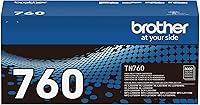
The Brother Genuine TN760 High Yield Black Toner Cartridge is a black genuine cartridge with an approximate 3,000-page yield. It is compatible with selected Brother MFC-L2710DW, MFC-L2750DW, HL-L2350DW, HL-L2370DW, HL-L2395DW, HL-L2390DW, and DCP-L2550DW models.
The TN760 is the best match of these three when your compatible printer uses TN760 and you want the highest stated page yield. It is still not interchangeable with TN420 or TN660, so confirm the exact model before replacing a cartridge.
If you want to understand why toner may appear loose before it bonds, read How Does a Laser Printer Fuse Toner to Paper?. The fuser's heat and pressure are central to a durable print.
What causes black lines, spots, or repeating marks?
Black lines and spots usually come from toner contamination, a damaged cartridge surface, paper debris, or the imaging drum. Look at whether the mark runs in the direction of paper travel or repeats at a regular interval.
Remove the cartridge and inspect it without touching the drum. If the cartridge has visible damage or spilled toner, replace it with the correct model rather than trying to clean the drum by hand.
Check the paper tray and paper path for scraps. Damp, curled, or unsuitable paper can also create feeding and print defects, so use clean paper that matches the printer's instructions.
A repeating mark that remains after a correct cartridge replacement may point to the drum or fuser. Follow the printer's service instructions, and let hot parts cool before opening areas near the fuser.
What causes toner to rub off the page?
Toner that rubs off usually means the fuser is not bonding toner correctly, the paper setting is wrong, or the paper is unsuitable. Select the correct media type in the print driver and try fresh paper approved for the printer.
Don't touch the fuser immediately after printing. It can become hot, and service steps vary by model.
If the problem affects every page, check for a fuser warning or maintenance message. If it affects only glossy, thick, damp, or unusual paper, change the media setting and test standard printer paper.
This fault is different from toner that looks faint. Faint output concerns how much toner reaches the page, while rubbing concerns how well the toner bonds after transfer.
Can old toner cause laser printer problems?
Laser printer toner does not dry out like liquid ink, but old or poorly stored toner can still create trouble. Heat, moisture, damaged seals, contamination, and long storage can affect how the cartridge performs.
Read Do Laser Printer Toner Cartridges Dry Out? for a closer look at storage and cartridge handling. Keep sealed cartridges in a clean, dry place and avoid leaving them in a hot vehicle or damp area.
Don't open a replacement cartridge until you're ready to install it. Once opened, handle it carefully and follow the printer and cartridge instructions for installation and disposal.
If you also use an inkjet printer, Does Printer Ink Dry Out? How to Prevent It explains why liquid ink needs different storage and maintenance.
Which toner cartridge should you choose?
Choose the cartridge whose model exactly matches your printer, then compare the stated page yield with your print volume. Compatibility comes before yield because a high-yield cartridge for another model won't solve a recognition error.
Choose the TN420 for compatible Brother printers that use TN420 and need an approximate 1,200-page black toner cartridge. Choose the TN660 for compatible models that use TN660 and need up to about 2,600 pages.
Choose the TN760 for compatible Brother printers that use TN760 and need an approximate 3,000-page yield. The three cartridges are all black Brother genuine supplies, but their model families are different.
Before ordering, check the full printer model, the cartridge model, and whether the message refers to toner or the drum. Correct matching is the simplest way to prevent many laser printer toner problems.
Frequently asked questions
Why does my laser printer say toner is not recognized?
A toner warning can appear when the cartridge is not seated fully, the wrong model is installed, or the printer's toner contacts are dirty. Turn off the printer, remove and reinstall the cartridge, check its model number against the printer manual, and follow the reset steps for your model.
Why is my laser printer printing faint pages?
Faint pages can result from low toner, an uneven toner supply, an incorrect print-density setting, or a worn imaging drum. Remove and gently rock the cartridge only if the manual allows it, check the print settings, and replace the cartridge or drum when the printer identifies it as exhausted.
Can laser printer toner dry out?
Laser printer toner is a dry powder, so it doesn't dry out like liquid ink. However, heat, moisture, poor storage, contamination, or a damaged cartridge can still cause print problems.
Keep replacement cartridges sealed and stored as the printer or cartridge instructions recommend.
Why does toner come off the printed page?
Toner that rubs off usually points to a fuser problem, unsuitable paper, moisture, or a printer setting that does not match the paper. Use paper approved for the printer, check the media setting, and inspect the fuser only through the service steps in the manual because it becomes hot.