5 Best USB Printer Cables (October 2026)
The best USB printer cables include the UGREEN USB A to B Printer Cable for most home printers, the Cable Matters 3-Pack USB Printer Cable for spare cables, and the TAISUSAN USB Printer Cable 30ft for long desk-to-printer runs.
On this page (6 sections)
The UGREEN USB A to B Printer Cable is the best USB printer cable for most home and office setups, with a 10 ft length and clearly specified USB 2.0 Type-B connector. Pick the TAISUSAN for a longer run, Cable Matters for three cables, or Acer for a shorter desk connection.
A printer USB cable connects a computer directly to a printer. The right choice depends on the port shape at each end, how far apart the devices sit and whether you need one cable or several.
The five picks below cover 6.6 ft to 30 ft, and packs of 1, 3 and 10. Before you choose, check whether your printer has a standard USB 2.0 Type-B port; these cables are not universal replacements for USB-C, Mini-USB or USB 3.0 Type-B connections.
Our picks at a glance
-
1
-
2

-
3
 Best for long desk-to-printer runs
TAISUSAN USB Printer Cable 30ft
9.4/10 our score
See it on Amazon
- 4
 Best for a short, tidy connectionCheck it
 - 5
 Check it
Spofit 10 Pack USB Printer Cable
Best for multiple USB-B devices
Which USB printer cable is best for most setups?
The UGREEN cable is the best fit for most setups because it combines a 10 ft length with a USB 2.0 Type-A-to-B connection. It gives you room to position a printer without jumping to a much longer cord.
We compared connector type, cable length, pack size and construction details. Our score weighs specs, features and buyer feedback against what you're shopping for.
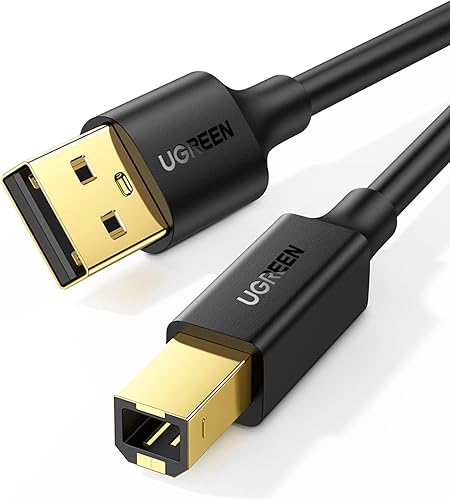
A USB-A-to-B cable has a flat, rectangular USB-A plug for the computer and a squarer USB-B plug for many printers and scanners. Confirm the port on your printer before buying, because the USB 3.0 Type-B port is wider and shaped differently.
| Product | Best for | Length | Connectors | Pack size | Our score |
|---|---|---|---|---|---|
| UGREEN USB A to B Printer Cable | most home printers | 10 ft | USB 2.0 Type-A to Type-B | 1 cable | 9.7 |
| Cable Matters 3-Pack USB Printer Cable | spare cables | 10 ft | USB 2.0 Type-A to Type-B | 3 cables | 9.6 |
| TAISUSAN USB Printer Cable 30ft | long desk-to-printer runs | 30 ft | USB Type-A to USB 2.0 Type-B | 1 cable | 9.4 |
| Acer Printer Cable 6.6ft | a short, tidy connection | 6.6 ft | USB 2.0 Type-A to Type-B | 1 cable | 9.3 |
| Spofit 10 Pack USB Printer Cable | multiple USB-B devices | 6 ft | USB 2.0 Type-A to Type-B | 10 cables | 8.8 |
What should you check before buying a printer USB cable?
Check both port shapes and measure the route before choosing a cable. A matching connector and workable length matter more than a long feature list.
Does the printer have a USB-B port?
Look at the printer's USB port or check its manual. Many standard printer cables in this roundup end in USB 2.0 Type-B, but that connector does not fit USB 3.0 Type-B, Mini-USB or Micro-USB ports.
The computer end also matters. These five cables use USB-A, so a computer with only USB-C ports needs a compatible adapter or a different cable.
For setup steps after you choose a cable, see our guide to printer USB cable connection. It covers making a direct connection and checking the computer's printer settings.
How much cable length do you need?
Measure the path from the computer to the printer, then allow enough slack so the cable does not pull at either port. A cable that's much longer than needed can leave extra loops around a desk or walkway.
The picks range from Acer's 6.6 ft cable to TAISUSAN's 30 ft option. UGREEN and Cable Matters offer 10 ft cables, while Spofit's pack contains 6 ft cables.
A longer cable can make placement easier, but the length alone does not guarantee every setup will work as expected. If you plan to run a cable through a wall or around a room, consider the path and keep it clear of places where it could be pinched or pulled.
Do you need a single cable or a multipack?
Choose a single cable for one computer and printer, a 3-pack for spares or several devices, and a 10-pack when you have many USB-B devices to connect. The multipacks make less sense if you only need one cable and have nowhere to store the extras.
Cable Matters includes three 10 ft cables. Spofit includes ten 6 ft cables, which may be more useful for a shared workroom or equipment shelf than for one home printer.
A USB splitter is not automatically the right way to share one printer between computers. Read whether a printer USB cable splitter can share a printer before choosing a hub or splitter.
Does cable construction matter?
Braid, shielding and connector materials are useful comparison points when a cable will be moved often or routed near other equipment. They do not replace checking the connector type and cable length.
UGREEN and Cable Matters specify foil and braid shielding, while TAISUSAN describes a braided exterior and multiple shielding layers. Acer lists a braided nylon exterior, an aluminum shell and gold-plated connectors; Spofit gives fewer construction details.
A direct cable can also help when you want a wired connection instead of relying on Wi-Fi. If wireless access is the main goal, compare the best Ethernet to Wi-Fi adapter for a printer to see whether a network option better fits your setup.
Which USB printer cables stand out?
UGREEN is the strongest all-purpose pick here, Cable Matters gives you three 10 ft cables, and TAISUSAN reaches farther than the other options. Acer suits a nearby printer, while Spofit is aimed at buyers who need a larger supply of short cables.
UGREEN USB A to B Printer Cable: Best for most home printers
- 10 ft length
- USB 2.0 Type-A to Type-B
- Transfer speeds up to 480 Mbps
- Foil and braid shielding
A 10 ft USB 2.0 A-to-B cable for connecting a computer to a printer, scanner or another USB-B device. It has foil and braid shielding.
Pros
- Useful middle length for many desk setups
- Type-B connector is clearly specified
- Backward compatible with USB 1.1 and 1.0
Cons
- Not for USB 3.0 Type-B ports
- One cable in the pack
UGREEN is the best choice for a typical computer-and-printer desk where a 6 ft cable may be too short and a 30 ft cable would leave excess slack. Its 10 ft length provides a useful middle ground, and the USB 2.0 Type-A-to-B connectors are clearly identified.
The cable supports transfer speeds up to 480 Mbps for USB 2.0 devices and is backward compatible with USB 1.1 and USB 1.0. UGREEN also specifies gold-plated connectors with foil and braid shielding.
Check the printer port before ordering. This cable uses USB 2.0 Type-B, which differs from USB 3.0 Type-B.
Choose UGREEN for a single printer or scanner within a modest distance of the computer. If you need several spare cables or a longer route, compare Cable Matters and TAISUSAN.
Cable Matters 3-Pack USB Printer Cable: Best for spare cables
- 3 cables
- 10 ft length
- USB 2.0 Type-A to Type-B
- Gold-plated connectors and shielding
Three 10 ft cables make this a practical choice when you need spares or want to connect multiple USB-B devices. It supports data transfer up to 480 Mbps.
Pros
- Three cables in one pack
- 10 ft length
- Backward compatible with USB 1.0 and 1.1
Cons
- USB 2.0 Type-B only
- May be more cable than a one-device setup needs
Cable Matters is the best fit if you want more than one cable without buying a large multipack. The package has three 10 ft USB-A-to-B cables, so you can keep spares or connect multiple compatible devices.
Each cable supports USB 2.0 transfer speeds up to 480 Mbps and is backward compatible with USB 1.0 and 1.1. Cable Matters specifies gold-plated connectors, bare copper conductors and foil-and-braid shielding.
The cable is meant for data transfer and device connection, not charging phones or tablets. Its USB 2.0 Type-B plug also does not fit USB-C or USB 3.0 Type-B ports.
Choose this pack if you have several USB-B devices or want replacement cables ready. For one printer in a nearby spot, a single cable may be simpler.
TAISUSAN USB Printer Cable 30ft: Best for long desk-to-printer runs
- 30 ft length
- USB 2.0 Type-A to Type-B
- Braided exterior
- Foil and other shielding layers
The 30 ft length can reach a printer set farther from the computer. Its braided exterior and multiple shielding layers are useful details for a cable that may cross a room.
Pros
- Longest cable in this group
- Braided exterior
- Backward compatible with USB 1.1 and 1.0
Cons
- Extra length can add clutter when devices are close
- Not for USB 3.0 Type-B ports
TAISUSAN is the long-reach option in this group, with a 30 ft USB-A-to-B cable. That extra length can help when the printer sits far from the computer, such as across a room or on a separate work surface.
The cable supports transfer speeds up to 480 Mbps and is backward compatible with USB 1.1 and 1.0. TAISUSAN describes a braided exterior, aluminum-alloy casing, gold-plated plugs and multiple shielding layers.
Its USB Type-B connector is USB 2.0, not USB 3.0 Type-B. Measure the route before choosing 30 ft, since extra cable can be difficult to manage in a compact desk setup.
Choose TAISUSAN when the shorter cables here won't reach. For a close printer, Acer's 6.6 ft cable or one of the 10 ft options may keep the setup neater.
Acer Printer Cable 6.6ft: Best for a short, tidy connection
- 6.6 ft length
- USB 2.0 Type-A to Type-B
- Braided nylon exterior
- Aluminum shell and gold-plated connectors
A shorter USB 2.0 A-to-B cable for a nearby printer or scanner. The nylon braid, aluminum shell and gold-plated connectors add construction details beyond a basic cable.
Pros
- Short length helps limit loose cable
- Braided nylon exterior
- 2-year warranty
Cons
- May not reach a printer across a room
- Not compatible with USB 3.0 Type-B, Mini-USB or Micro-USB
Acer is the best short-cable choice here for a printer placed near the computer. Its 6.6 ft length can reduce excess cable around a desk while leaving more reach than a very short lead.
The cable has USB 2.0 Type-A and Type-B connectors, supports transfer speeds up to 480 Mbps and is backward compatible with USB 1.1 and 1.0. Acer lists a braided nylon exterior, aluminum shell and gold-plated connectors, and backs it with a 2-year warranty.
Acer says the cable itself needs no driver, but a printer may still require its own driver or setup software. The cable carries data and does not power the printer.
Choose Acer for a nearby printer and a braided cable with a shorter run. Check the printer port carefully, since this cable does not fit USB 3.0 Type-B, Mini-USB or Micro-USB ports.
Spofit 10 Pack USB Printer Cable: Best for multiple USB-B devices
- 10 cables
- 6 ft length
- USB 2.0 Type-A to Type-B
- Compatible with USB 1.0, 1.1 and 2.0
Ten 6 ft cables suit a workplace, classroom or repair shelf that needs several standard USB-A-to-B connections. Each cable has a straightforward USB 2.0 Type-A-to-Type-B layout.
Pros
- 10 cables in one pack
- Short 6 ft length
- Supports USB 1.0, 1.1 and 2.0
Cons
- More cables than a single printer needs
- Limited construction detail
Spofit is the bulk option, with ten 6 ft USB-A-to-B cables in one pack. That quantity can suit a school, office, repair bench or shared room with several compatible printers and scanners.
The cables support USB 2.0 and are described as compatible with USB 1.0 and 1.1 as well. Their short length can help limit slack when devices sit close to their computers.
Spofit provides fewer construction details than the other picks, so focus on its main advantage: a large quantity of standard Type-A-to-Type-B cables. This is more than most single-printer setups need.
Choose Spofit when you need a supply of short cables for multiple devices. For one printer, consider a single cable with a length and construction that better match your workspace.
How do you choose a USB printer cable length?
Choose the shortest cable that reaches comfortably, with enough slack to avoid tension at the ports. For a nearby printer, Acer's 6.6 ft cable is the shortest single-cable pick here; TAISUSAN's 30 ft option is for a much longer route.
A 10 ft cable can suit a desk where the printer is set to one side or on a nearby shelf. Cable Matters offers three cables at that length, while UGREEN is a single-cable option.
Avoid routing a cable where a chair, drawer or foot can catch it. Keep the connection accessible so you can unplug it without pulling on the cord.
Can a USB printer cable fix connection problems?
A cable can help if the current cord is damaged, too short or the wrong connector type. It cannot correct every printer problem, so check the computer's settings and the printer's connection status if a replacement cable does not solve the issue.
Connect the cable firmly at both ends, then confirm that the computer recognizes the printer. If the printer appears offline or jobs remain stuck, use our guide to common problems with printers for other checks.
A direct USB connection is one way to keep a printer connected to a computer. If you mainly need to protect a printer that sits unused between jobs, our best printer dust cover guide covers a different part of keeping a desk setup in order.
For brand-specific cover options, see best printer dust cover for Brother and best Canon printer dust cover. If you are planning broader upkeep, our best printer maintenance kits guide can help you compare maintenance supplies.
Which USB printer cable should you choose?
Choose UGREEN for a single 10 ft cable that suits many common USB 2.0 Type-B printer setups. Pick Cable Matters if you want 3 cables, TAISUSAN if you need 30 ft, Acer for a shorter 6.6 ft connection, or Spofit if you need ten short cables.
Before you buy, match the plugs to the computer and printer ports, then measure the route. A USB printer cable is a straightforward direct connection when the connectors fit and the length suits your workspace.
Our top 3 picks at a glance
-
1
-
2
-
3
Best for long desk-to-printer runs
TAISUSAN USB Printer Cable 30ft
9.4/10 our score
See it on Amazon
Frequently asked questions
What type of USB cable does a printer use?
Many printers with a square USB-B port connect to a computer's USB-A port with a USB-A-to-B cable. Check the port on the printer first, since USB 3.0 Type-B, Mini-USB and Micro-USB ports need different connectors.
The printer manual can confirm its port type.
How long should a USB printer cable be?
Choose the shortest cable that reaches from the computer to the printer without pulling tight. A 6.6 ft cable can suit nearby devices, while a 10 ft option gives more room to place the printer and a 30 ft cable can reach across a larger space.
Measure the route, including slack at both ends.
Can a USB printer cable replace Wi-Fi?
Yes. A compatible USB cable creates a direct connection between one computer and one printer, which can be useful when you want a wired setup.
If more than one computer needs to print, check the printer's network options or your operating system's sharing features before choosing a cable.
Does a USB printer cable need a driver?
The cable itself generally does not need a driver, but your printer may still need its own software or driver to print. Check the printer maker's setup instructions for your computer and operating system.
A cable cannot fix a missing printer driver.
Will any USB printer cable fit my printer?
No. Match the connector at both ends to the computer and printer ports.
These picks use USB-A on one end and USB 2.0 Type-B on the other, so they won't fit every printer or a computer with only USB-C ports.
Check the port shapes before ordering.