5 Best Compact Laser Printers for Small Offices (November 2026)
The best compact laser printer for small office include the Brother HL-L2405W Wireless Compact Monochrome Laser Printer for print-only simplicity, the Brother MFC-L2820DW Wireless Compact Monochrome All-in-One Laser for copy scan and fax, and the HP LaserJet M234dw Monochrome Printer for fast two-sided printing.
On this page (10 sections)
- Best compact laser printers for small offices compared
- Compact laser printer comparison: speed, duplex and size
- How we compared these compact laser printers
- What is the best compact laser printer for a small office?
- How small is small enough for a shared office desk?
- Does a small office need automatic duplex printing?
- Print-only or all-in-one: which suits a compact laser printer for small office use?
- How fast should a compact laser printer be for 1 to 7 people?
- Which connection options matter in a small office?
- Verdict: pick by function, team size and desk space
The best compact laser printer for small office use is the Brother HL-L2405W if printing is the main job. It prints black and white documents at up to 30 pages per minute and fits a 14.2 x 14 x 7.2 inch footprint.
That mix suits a shared desk where space is tight and paper output matters more than extra functions.
Our score weighs specs, features and buyer feedback against what you are shopping for. A score reflects fit for a small office, not a lab result.
We compared speed, size, weight, duplex, paper capacity and connection options across these five models.
You can start with our best compact laser printer guide if you want the wider category view first. If you already know Brother suits your office, our best brother small laser printer page narrows that choice.
For wireless priorities, see best compact laser printer wireless options in the section below.
Our picks at a glance
-
1
 Best for print-only simplicity
Brother HL-L2405W Wireless Compact Monochrome Laser Printer
9.7/10 our score
See it on Amazon -
2
 Best for copy scan and fax
Brother MFC-L2820DW Wireless Compact Monochrome All-in-One Laser
9.6/10 our score
See it on Amazon -
3
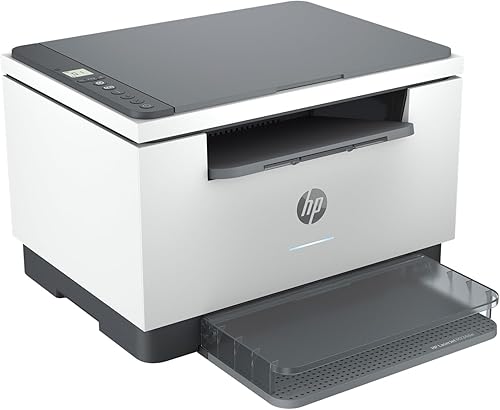 Best for fast two-sided printing
HP LaserJet M234dw Monochrome Printer
9.5/10 our score
See it on Amazon
- 4
 Check it
HP Laserjet MFP M140w Wireless Black
Best for the tightest desk space - 5
 Check it
HP Laserjet Pro 3001dw Wireless Black
Best for larger small teams
Best compact laser printers for small offices compared
The Brother HL-L2405W wins for print-only offices, while the Brother MFC-L2820DW wins when copy, scan and fax belong in the same footprint.
The HP models split the field by team size, speed and desk space.
Brother HL-L2405W Wireless Compact Monochrome Laser Printer: Best for print-only simplicity
- Up to 30 pages per minute
- 250-sheet paper tray
- Dual-band wireless and USB
- Manual duplex
- 1200 x 1200 dpi print resolution
A compact print-only Brother for shared office documents, with a 250-sheet tray and wireless connection for several devices.
Pros
- Compact footprint
- 250-sheet tray
- Dual-band wireless
Cons
- Manual duplex
- Print only, no scan or copy
The Brother HL-L2405W suits a small office where printing is the daily job and scanning or copying happen rarely. It prints one-sided black and white documents at up to 30 pages per minute at 1200 x 1200 dpi.
That speed covers shared invoices, forms and reports without a long wait between jobs.
Its 14.2 x 14 x 7.2 inch body and 15.1 lb weight make desk placement easier than larger all-in-ones. The 250-sheet paper tray reduces refills during a busy day.
A manual feed slot also handles envelopes and specialty paper.
Dual-band wireless connects several devices, while USB connects one computer directly. The Brother Mobile Connect app lets you print from a phone and track toner use.
Brother includes a 1-year limited warranty.
The trade-off is manual duplex and print-only design. If your team flips pages often, the automatic duplex models below may save more time.
If you need scanning, this is not the right pick.
Brother MFC-L2820DW Wireless Compact Monochrome All-in-One Laser: Best for copy scan and fax
- Print, copy, scan and fax
- Automatic duplex
- 50-page auto document feeder
- 2.7 inch touchscreen
- Ethernet, wireless and USB
A compact Brother all-in-one for offices that need frequent copying, scanning and faxing without a separate machine.
Pros
- Four functions in one unit
- Automatic duplex
- 50-page feeder
Cons
- Larger and heavier than print-only picks
- Taller cabinet
The Brother MFC-L2820DW suits an office that needs print, copy, scan and fax in one machine. It prints at up to 36 pages per minute and copies at up to 34 pages per minute in black and white.
The 50-page auto document feeder helps with multi-page copy, scan and fax jobs.
The 2.7 inch touchscreen makes daily tasks easier to start. You can print from and scan to cloud apps such as Google Drive, Dropbox, Evernote and OneNote.
Automatic duplex printing helps cut paper use for two-sided documents.
Its 15.7 x 16.1 x 12.5 inch body is taller than the print-only Brother. At 22.5 lb, it is also heavier, so shelf strength and lift access matter.
Dual-band wireless, Ethernet and USB give you flexible placement options.
Choose this model when one device must cover four jobs. Our best compact monochrome laser printer guide covers similar black and white models if you want more choices before you decide.
HP LaserJet M234dw Monochrome Printer: Best for fast two-sided printing
- Up to 30 pages per minute single-sided
- Up to 19 pages per minute two-sided
- Automatic duplex
- Dual-band Wi-Fi
- Ethernet and USB
An HP two-sided printer for small teams that print reports often and want wireless, Ethernet and app printing.
Pros
- Automatic duplex
- Fast two-sided output
- Ethernet included
Cons
- Copy and scan functions add bulk
- Not the smallest footprint here
The HP LaserJet M234dw suits a small team of 1 to 5 people that prints professional black and white documents and reports. It prints at up to 30 pages per minute single-sided and up to 19 pages per minute two-sided.
Automatic duplex printing helps when reports run for several pages.
Its 11.75 x 14.49 x 9.5 inch footprint is compact for a shared desk or credenza. Dual-band Wi-Fi with self-reset helps the printer reconnect when a connection drops.
Ethernet gives you a wired option for a fixed office location.
The HP Smart app supports printing and copying from a phone, plus scanning to the cloud. HP says built-in security features help protect the printer from potential attacks.
It works with Microsoft, Mac, AirPrint, Android and Chromebook.
The trade-off is added copy and scan bulk compared with a pure print-only unit. If space is very tight, the smaller HP M140w below may fit better.
If two-sided speed matters most, this model is a strong middle choice.
HP Laserjet MFP M140w Wireless Black: Best for the tightest desk space
- Print, scan and copy
- Up to 21 pages per minute
- Wireless with self-reset
- 10.4 x 14.2 x 7.8 in
- 11.9 lb
The smallest and lightest pick here, built for a 1 to 3 person team that needs print, scan and copy in very little space.
Pros
- Smallest footprint here
- Lightest model here
- Print, scan and copy
Cons
- Slower at 21 pages per minute
- No duplex
The HP Laserjet MFP M140w suits a 1 to 3 person team with the least desk space. HP calls it the world's smallest laser in its class.
At 10.4 x 14.2 x 7.8 inches and 11.9 lb, it is the smallest and lightest model in this group.
It prints, scans and copies black and white documents at up to 21 pages per minute. That speed is slower than the other picks, but it can still handle forms and short reports through the day.
Wireless with self-reset helps keep it connected.
The copy function can place both sides of an ID card or other small document on one sheet. That helps with office tasks involving identification documents and small forms.
The HP Smart app supports printing and copying from a phone and scanning to the cloud.
There is no duplex, so two-sided jobs require manual handling. If your office prints long reports often, a faster automatic duplex model will fit better.
If footprint is your first concern, this is the pick to measure first.
HP Laserjet Pro 3001dw Wireless Black: Best for larger small teams
- Up to 35 pages per minute
- Automatic duplex
- 250-sheet capacity
- Ethernet and Bluetooth
- HP Wolf Pro Security
A fast HP Pro printer for up to 7 people, with automatic two-sided printing and security settings for shared office use.
Pros
- Fastest print speed here
- Automatic duplex
- 250-sheet capacity
Cons
- Larger footprint
- Print-focused model
The HP Laserjet Pro 3001dw suits a small team of up to 7 people that shares one printer through the day. It prints at up to 35 pages per minute single-sided with automatic two-sided printing.
That makes it the fastest model here for shared office queues.
Its 15.7 x 14.4 x 8.5 inch body and 16.1 lb weight sit in the middle of this group. A 250-sheet capacity helps reduce refills when several people print in the same week.
Ethernet and Bluetooth join Wi-Fi for device connections.
HP Wolf Pro Security includes customizable settings for printer and information protection. Intelligent Wi-Fi looks for the best connection to stay online.
It works with Microsoft, Mac, AirPrint, Android and Chromebook.
The trade-off is a larger footprint than the smallest HP and Brother print-only model. If your office has room for a wider printer and needs speed for up to 7 users, this model earns its place.
If you need fax, choose the Brother all-in-one instead.
Compact laser printer comparison: speed, duplex and size
Automatic duplex matters most for report-heavy offices, while the smallest footprint matters most for shared desks with no spare surface.
Compare the table by team size before you compare extra features.
| Product | Best for | Print speed | Dimensions | Weight | Our score |
|---|---|---|---|---|---|
| Brother HL-L2405W Wireless Compact Monochrome Laser Printer | print-only simplicity | 30 pages per minute | 14.2 x 14 x 7.2 in | 15.1 lb | 9.7 |
| Brother MFC-L2820DW Wireless Compact Monochrome All-in-One Laser | copy scan and fax | 36 pages per minute | 15.7 x 16.1 x 12.5 in | 22.5 lb | 9.6 |
| HP LaserJet M234dw Monochrome Printer | fast two-sided printing | 30 pages per minute | 11.75 x 14.49 x 9.5 in | 19.4 lb | 9.5 |
| HP Laserjet MFP M140w Wireless Black | the tightest desk space | 21 pages per minute | 10.4 x 14.2 x 7.8 in | 11.9 lb | 9.2 |
| HP Laserjet Pro 3001dw Wireless Black | larger small teams | 35 pages per minute | 15.7 x 14.4 x 8.5 in | 16.1 lb | 9.1 |
How we compared these compact laser printers
We checked the specs for each model against small office needs. We looked at print speed, duplex, paper capacity, dimensions, weight and connection options.
We also checked which functions each model covers, because a print-only unit and a four-function unit solve different problems.
Our score weighs specs, features and buyer feedback against what you are shopping for. A higher score means a better overall fit for compact shared office printing.
It does not mean every office should choose the same model.
We did not test these printers. Speeds, sizes and security features are stated by Brother and HP.
Buyer patterns helped us judge fit, but we label maker claims and keep the advice tied to stated specs.
What is the best compact laser printer for a small office?
The best compact laser printer for small office use depends on whether you need one function or four. Pick the Brother HL-L2405W for print-only work.
Pick the Brother MFC-L2820DW for print, copy, scan and fax.
Print-only if scanning is already handled
A print-only printer takes less space and weighs less. That helps on a shared desk where a scanner or copier already exists.
The Brother HL-L2405W fits this use with a 250-sheet tray and up to 30 pages per minute.
All-in-one if one device must do more
An all-in-one saves desk space when copy and scan jobs are part of daily work. The Brother MFC-L2820DW adds a 50-page feeder and touchscreen.
The HP M140w adds copy and scan in the smallest body here.
How small is small enough for a shared office desk?
Measure width, depth and height with the printer ready to use. A cabinet that fits under a shelf may still block paper loading or output access.
Leave room for the tray, the output area and your hands.
Measure the surface, not just the shelf
The HP M140w is 10.4 inches deep, while the Brother MFC-L2820DW is 15.7 inches deep. That depth difference changes where the printer can sit.
Check the full dimensions before you move furniture around it.
Check weight for shelves and carts
Weight matters if the printer will move between rooms or sit on a cart. The HP M140w weighs 11.9 lb, while the Brother MFC-L2820DW weighs 22.5 lb.
A heavier all-in-one needs a stronger surface and a safer lift plan.
Does a small office need automatic duplex printing?
Automatic duplex helps when your team prints multi-page reports every week. Manual duplex can work for short documents, but it adds steps each time.
In a shared office, those steps add up fast.
Automatic duplex for reports and contracts
The HP M234dw prints two-sided at up to 19 pages per minute. The HP Pro 3001dw and Brother MFC-L2820DW also print two-sided automatically.
These models suit offices that print long documents as a routine.
Manual duplex for short or occasional jobs
The Brother HL-L2405W uses manual duplex. That is fine for one-page forms and short letters.
If two-sided printing is rare, manual duplex may not slow your day. If it is daily, choose an automatic model.
Print-only or all-in-one: which suits a compact laser printer for small office use?
Choose print-only when printing is the main job and all-in-one when copy and scan are daily jobs. A compact laser printer for small office work should match the tasks your team repeats, not every task you might need once a month.
Print-only for speed and simple setup
Print-only models keep the footprint smaller and the controls simpler. The Brother HL-L2405W and HP Pro 3001dw fit this path.
They focus on printed output, tray capacity and connection options.
All-in-one for shared copy and scan work
All-in-one models help when invoices, IDs and signed forms need copying or scanning. The Brother MFC-L2820DW adds fax and a feeder.
The HP M234dw and M140w add copy and scan for smaller teams.
Our Why Choose a Laser Printer for a Home Office? article explains why laser printing suits text-heavy work. Our What Are the Advantages of a Laser Printer? guide covers the broader case for laser over inkjet in an office.
How fast should a compact laser printer be for 1 to 7 people?
Match speed to team size and job length, not just page count. A 1 to 3 person office can often use 21 pages per minute.
A team of up to 7 people printing reports will feel the difference at 35 pages per minute.
Slower speeds for light daily printing
The HP M140w prints at up to 21 pages per minute. That fits short forms, letters and small reports.
If jobs queue up by midmorning, move to a 30 or 35 page per minute model.
Faster speeds for shared queues
The HP Pro 3001dw reaches up to 35 pages per minute. The Brother MFC-L2820DW reaches up to 36 pages per minute for printing.
Faster output helps when several people send jobs in the same hour.
Which connection options matter in a small office?
Wireless helps shared use, while Ethernet helps a fixed printer location. USB still matters for a single computer that should print without network setup.
Many small offices need more than one option because devices change over time.
Wireless for phones, laptops and tablets
Dual-band wireless helps connect several devices in the same office. The Brother models use dual-band wireless at 2.4GHz and 5GHz.
The HP models support wireless printing from phones, tablets and computers.
Ethernet for a stable shared location
Ethernet gives a fixed connection that does not depend on Wi-Fi signal strength. The Brother MFC-L2820DW, HP M234dw and HP Pro 3001dw include Ethernet.
That helps when the printer stays in one place for the whole team.
Verdict: pick by function, team size and desk space
Pick the Brother HL-L2405W for print-only simplicity, the Brother MFC-L2820DW for four functions, and the HP M140w for the smallest footprint. Pick the HP Pro 3001dw for a team of up to 7 that needs fast two-sided printing.
Pick the HP M234dw for a middle path with copy, scan and automatic duplex.
The best compact laser printer for small office use is the one that fits your desk and covers your daily jobs. Measure first, then match speed and duplex to your team.
Start with the Brother HL-L2405W if printing is the job, and move to an all-in-one only when copy and scan are part of the routine.
Our top 3 picks at a glance
-
1
Best for print-only simplicity
Brother HL-L2405W Wireless Compact Monochrome Laser Printer
9.7/10 our score
See it on Amazon -
2
Best for copy scan and fax
Brother MFC-L2820DW Wireless Compact Monochrome All-in-One Laser
9.6/10 our score
See it on Amazon -
3
Best for fast two-sided printing
HP LaserJet M234dw Monochrome Printer
9.5/10 our score
See it on Amazon
Frequently asked questions
What size should a compact laser printer be for a small office?
Look for a footprint near 14 to 16 inches wide and under 16 inches deep, then check height with paper trays and output areas in use. Measure the desk, shelf or credenza before ordering, and leave room to load paper and reach controls.
A smaller cabinet helps only if paper handling still fits your daily jobs.
Is monochrome enough for office documents?
Monochrome is enough for most office documents, including contracts, invoices, forms and reports in black and white. Color matters only when you print charts, photos or client-facing material that relies on color.
For text-heavy work, a compact monochrome laser printer often gives sharper, faster output for the tasks you repeat daily.
Do I need an all-in-one or a print-only printer?
Choose an all-in-one if you copy, scan or fax often enough that separate devices create extra steps. Choose print-only if scanning and copying are rare or already handled elsewhere.
In a shared small office, the answer depends on who uses the device each day, not on how often one person might use it.


