9 Best Small Brother Laser Printers (November 2026)
The best small Brother laser printers include the Brother HL-L2405W Wireless Compact Monochrome Laser Printer for home offices, the Brother MFC-L2820DW Wireless Compact Monochrome All-in-One Laser for small offices, and the HP LaserJet Pro 3101fdw for small teams.
On this page (7 sections)
- Small Brother laser printers compared for tight desks
- How to use the comparison table for a small desk
- How we compared these small laser printers
- Is a small Brother laser printer right for your desk?
- Which size fits a desk with limited space?
- Print only or all-in-one: which should you buy?
- Color or monochrome for everyday office printing
The best Brother small laser printer for most desks is the Brother HL-L2405W, because it pairs a 30 ppm speed with a 250-sheet tray in a 14.2 inch wide body.
You get dual-band wireless, USB and mobile printing without paying for scan or fax functions you may not use.
If you need one machine for more tasks, the Brother MFC-L2820DW adds copy, scan and fax at up to 36 ppm.
It is taller, but its 50-page feeder and automatic duplex save time on multi-page work.
We compared 9 compact models by footprint, speed, paper handling and functions.
The list includes Brother, HP and Canon models, so you can see where a Brother small laser printer wins and where a rival fits a different desk better.
Our score weighs specs, features and buyer feedback against what you're shopping for.
A print-only model can outscore an all-in-one when space is tight and you only print.
If you want a broader view first, start with our best compact laser printer guide.
It covers size categories beyond Brother models.
Small in this roundup means a printer you can place on a desk, a shelf or a side table without giving up your main work area.
That definition is why a tall all-in-one can still count as small, while a short print-only model can suit an even tighter spot.
Footprint, height and weight all matter, because a printer that fits on paper may still block a monitor or a keyboard in daily use.
Our picks at a glance
-
1
 Best for home offices
Brother HL-L2405W Wireless Compact Monochrome Laser Printer
9.7/10 our score
See it on Amazon -
2
 Best for small offices
Brother MFC-L2820DW Wireless Compact Monochrome All-in-One Laser
9.6/10 our score
See it on Amazon -
3

- 4
 Check it
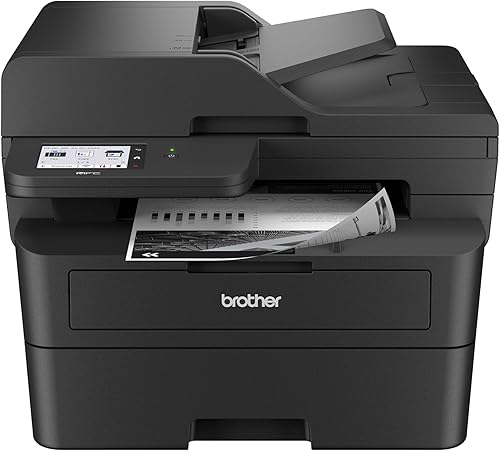
Brother Professional Laser Printer with Scanner
Best for high-volume scanning - 5
 Check it
HP Laserjet MFP M140w Wireless Black
Best for tiny desks - 6
 Check it
Canon Color imageCLASS LBP646Cdw Wireless Laser Printer
Best for color printing - 7
 Best for two-sided printingCheck it
- 8
 Check it
Brother MFC-L8930CDW Business Color Laser All-in-One Printer
Best for business color teams - 9
 Check it
Brother HL-L3300CDW Wireless Digital Color Multi-Function Printer
Best for color copy and scan
Small Brother laser printers compared for tight desks
Brother leads this list for homes and small offices, but HP and Canon appear where they solve a space problem Brother does not.
The picks below are ordered by score, with the HL-L2405W at the top for print-only simplicity.
Each write-up covers who the model suits, what the main specs mean in daily use, and the trade-off against the other picks here.
Brother HL-L2405W Wireless Compact Monochrome Laser Printer: Best for home offices
- Print only in black and white
- Up to 30 ppm
- 250-sheet paper tray
- Manual duplex
A print-only Brother that stays small on the desk while holding enough paper for regular home office use.
Pros
- Compact footprint
- 250-sheet tray
- Dual-band wireless
Cons
- Print only, no scan or copy
- Manual duplex
The HL-L2405W suits a home office where most printing is black and white text, forms and invoices.
Its 250-sheet tray means fewer refills during a busy week, and the manual feed slot handles envelopes and specialty paper.
At 14.2 x 14 x 7.2 inches and 15.1 pounds, it is the easiest Brother here to fit on a crowded desk.
You can place it almost anywhere on a desktop with room left for a laptop and paper stack.
Print speed reaches up to 30 ppm with a first page in 8.5 seconds, which feels quick for single documents.
Resolution reaches 1200 x 1200 dpi for crisp black and white output.
It connects by dual-band wireless or USB, and the Brother Mobile Connect app lets you print from a phone and track toner.
The 1-year limited warranty and ongoing Brother support help if a setting or connection needs correction.
The trade-off is clear: this is print only, with manual duplex.
If you scan often, the MFC-L2820DW below covers that job in one unit.
Brother MFC-L2820DW Wireless Compact Monochrome All-in-One Laser: Best for small offices
- Print, copy, scan and fax
- Up to 36 ppm
- 50-page auto document feeder
- Automatic duplex
A four-function Brother that adds scanning and faxing without turning a small desk into a full office station.
Pros
- Four functions in one unit
- 50-page feeder
- Automatic duplex
Cons
- Larger and heavier than print-only models
- Taller footprint
The MFC-L2820DW suits a small office that prints, copies, scans and faxes from one spot.
Its 50-page auto document feeder handles multi-page copy and scan jobs without feeding each sheet by hand.
It prints at up to 36 ppm and scans at up to 23.6 ipm in black and white.
A 250-sheet tray and automatic duplex cut down on manual tasks and paper waste.
The 2.7 inch touchscreen makes cloud printing and scanning easier to reach.
You can connect by dual-band wireless, Ethernet or USB, depending on your desk setup.
Toner Save Mode can extend cartridge life for routine text pages, and the design is ENERGY STAR compliant and EPEAT Silver rated.
It uses TN830 or TN830XL toner, with a Refresh trial option described in the product listing.
Trade-offs include size and weight.
At 15.7 x 16.1 x 12.5 inches and 22.5 pounds, it needs more desk depth than the HL-L2405W.
That extra height also matters under a shelf.
HP LaserJet Pro 3101fdw: Best for small teams
- Print, scan, copy and fax
- Up to 35 ppm
- Automatic duplex
- Auto document feeder
An HP all-in-one built for teams up to 7 people, with fast duplex printing and scanning for shared desks.
Pros
- Fast 35 ppm speed
- Automatic duplex
- Made for up to 7 people
Cons
- Not a Brother model
- Tall 15.7 inch height
This HP LaserJet Pro suits a small team of up to 7 people sharing one printer.
It prints, scans, copies and faxes, with automatic two-sided printing and an auto document feeder for fast daily work.
Speed reaches up to 35 ppm single-sided, which is among the fastest in this group.
HP Wolf Pro Security adds customizable settings for shared office use.
Wi-Fi looks for the best connection and stays online, while Ethernet and Bluetooth give you more ways to connect.
It works with Microsoft, Mac, AirPrint, Android and Chromebook devices.
Copy resolution reaches 1200 x 1200 dpi, which helps when a shared printer is also used for crisp document copies.
HP Smart shortcuts can reduce steps for common tasks on the touchscreen.
The trade-off is height and brand.
At 16.5 x 12.3 x 15.7 inches, it stands taller than most Brother picks.
If you specifically want Brother toner and support, the Brother models above may fit better.
Brother Professional Laser Printer with Scanner: Best for high-volume scanning
- Monochrome all-in-one
- 36 ppm
- 50-page auto document feeder
- 3.5 inch touchscreen
A Brother all-in-one with a larger touchscreen and single-pass duplex scanning for busy small businesses.
Pros
- 36 ppm speed
- Single-pass duplex scanning
- 3.5 inch touchscreen
Cons
- Tall 16.6 inch height
- Heavier at 11.8 kg
The Brother MFC-L2900DW suits a small business that scans as much as it prints.
Its single-pass two-sided scanning and 50-page feeder help with large multi-page jobs.
It prints at up to 36 ppm with a first page in 6.9 seconds.
The 3.5 inch touchscreen gives direct access to Google Drive, Dropbox and OneNote.
Dual-band wireless, Ethernet and USB cover most office networks.
Automatic duplex printing saves paper, and the 250-sheet tray reduces refill trips.
The enhanced fuser design is described as reducing electricity consumption by 22 percent compared to its predecessor.
That design also supports faster warm-up from sleep mode, which helps in short print bursts between other tasks.
Trade-offs include a tall 16.6 inch height and 11.8 kg weight.
It also uses a starter toner cartridge rated at 700 pages, so plan for replacement toner sooner than a high-yield cartridge would suggest.
HP Laserjet MFP M140w Wireless Black: Best for tiny desks
- Print, scan and copy
- Up to 21 ppm
- Wireless with self-reset
- HP Smart app
Described as the world's smallest laser in its class, this HP suits a desk where every inch counts.
Pros
- Very compact 10.4 inch depth
- Print, scan and copy
- Mobile printing
Cons
- Slower at 21 ppm
- No duplex
The HP M140w suits a desk where depth is the main limit, at just 10.4 inches deep.
HP describes it as the world's smallest laser in its class, and that shallow body helps on a narrow side table.
It prints, scans and copies at up to 21 ppm single-sided.
The HP Smart app helps with scanning to the cloud and printing from a phone.
Wireless with self-reset helps it stay connected.
It can also copy both sides of an ID card onto one sheet, which suits small office admin tasks.
At 14.2 inches wide and 7.8 inches tall, it leaves more room beside it for a laptop, a notebook or a paper stack.
The introductory toner cartridge included in the box gets you started for light printing.
Trade-offs are speed and duplex.
At 21 ppm it is slower than the Brother picks, and there is no automatic duplex.
If you print long reports side by side, a faster model will save more time each week.
Canon Color imageCLASS LBP646Cdw Wireless Laser Printer: Best for color printing
- Print only in color
- 26 ppm in color and monochrome
- 250-sheet cassette
- Automatic duplex
A Canon color print-only model for desks where color documents matter more than scanning.
Pros
- Color printing at 26 ppm
- Automatic duplex
- 250-sheet cassette
Cons
- Print only
- Largest width in this group
The Canon LBP646Cdw suits a home office that needs color but not scanning.
It prints in color and monochrome at up to 26 ppm, with automatic duplex to save paper.
A 250-sheet cassette plus a 1-sheet multipurpose tray gives you room for regular paper and single specialty sheets.
The 5-inch LCD screen helps you check settings at the desk.
Wireless setup takes a few steps, and mobile printing works through the Canon PRINT app, AirPrint and Mopria.
It uses Canon Genuine Toner 075, with starter yields listed at 500 pages for color and 700 pages for black.
That starter yield means you should budget for replacement toner after light early use.
It is 16.5 x 16.8 x 10.5 inches, so check width before you buy.
The printer is ENERGY STAR and EPEAT Silver rated, which may matter in a shared office.
Trade-offs include print-only functions and weight at 27.6 pounds.
If you need copy or scan, the Brother color all-in-one below handles those jobs in one machine.
HP LaserJet M207dw: Best for two-sided printing
- Print only in black and white
- 28 ppm single-sided
- Automatic duplex
- Dual-band Wi-Fi
A compact HP print-only model with fast two-sided printing for offices printing 1 to 5 person workloads.
Pros
- Fastest two-sided in its class
- Compact 11 inch depth
- Dual-band Wi-Fi
Cons
- Print only
- 150-sheet capacity
The HP M207dw suits an office printing mostly two-sided black and white reports.
It prints at up to 28 ppm single-sided, with what HP calls the fastest two-sided printing in its class.
At 11 x 13.98 x 8.07 inches, it fits a shallow desk or a shelf with limited depth.
Dual-band Wi-Fi with self-reset helps detect and resolve connection issues.
It is print only, which keeps the footprint small for 1 to 5 people.
Ethernet is included for a wired desk setup, and mobile printing works from phones and tablets.
Auto-On and Auto-Off technology can reduce energy use when the printer sits idle between jobs.
Print resolution reaches up to 600 x 600 dpi, which is suited to everyday text and simple graphics.
Trade-offs include a 150-sheet capacity, which means more refills than the 250-sheet Brother models.
If you print in batches, that smaller tray can become a daily annoyance.
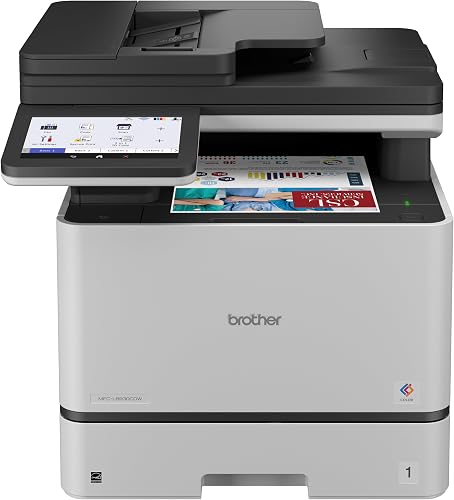
Brother MFC-L8930CDW Business Color Laser All-in-One Printer: Best for business color teams
- Color all-in-one
- 33 ppm
- 80-page auto document feeder
- 7 inch touchscreen
A larger Brother color all-in-one for business teams that need advanced scanning and security on a shared desk.
Pros
- Color all-in-one at 33 ppm
- 80-page feeder
- Advanced security features
Cons
- Much larger at 20.7 inch depth
- Heavy at 71.2 pounds
The Brother MFC-L8930CDW suits a business team that needs color, scanning and security in one device.
It prints and copies at up to 33 ppm with sharp color and black output.
Advanced scanning reaches up to 104 ipm two-sided, with an 80-page auto document feeder and legal-size glass.
The 7 inch touchscreen supports shortcuts for frequent tasks.
Triple Layer Security and an NFC card reader help with badge authentication in shared offices.
Dual-band wireless and Gigabit Ethernet cover wired and wireless networks.
Included standard yield toner is listed at 3,000 pages for black and 1,800 pages for color.
Super high yield TN635XXL cartridges are listed at 7,500 pages for black and 6,500 pages for color.
Trade-offs are size and weight.
At 20.7 x 16.1 x 21.6 inches and 71.2 pounds, it does not suit a truly small desk.
It fits better on a shared office table where the team can reach it easily.
Brother HL-L3300CDW Wireless Digital Color Multi-Function Printer: Best for color copy and scan
- Color print, copy and scan
- 19 ppm
- Automatic duplex
- Flatbed scan glass
A compact Brother color 3-in-1 for home offices that need color copies and scans without a separate scanner.
Pros
- Color print, copy and scan
- Automatic duplex
- Flatbed scan glass
Cons
- Slower at 19 ppm
- Wide 17.5 inch footprint
The Brother HL-L3300CDW suits a home office that needs color printing plus copy and scan, but not fax.
Its flatbed scan glass works well for single pages, photos and small documents.
It prints at up to 19 ppm in color and black and white, with automatic duplex.
Dual-band wireless, Wi-Fi Direct and USB give you flexible connection choices.
Copy resolution reaches 2400 x 600 dpi in black and white and 600 dpi in color.
That mix helps for forms and simple color documents copied at the desk.
It uses TN229 toner cartridges in black, cyan, magenta and yellow, with several yield options listed.
At 16.1 x 17.5 x 14 inches and 40.8 pounds, it is wider and heavier than the monochrome Brother picks.
That size matters on a desk shared with a monitor and keyboard.
Trade-offs include slower speed and no fax.
If fax matters for your office, the MFC-L2820DW covers that function.
If color matters more, this model gives you a simpler 3-in-1 setup.
How to use the comparison table for a small desk
The comparison table helps you spot the model that fits your desk before you read every detail.
Start with size, then check speed and paper capacity.
Look at width and depth first, because a printer that is too deep pushes your laptop too close.
Height matters too if it will sit under a shelf or cabinet.
Then check whether duplex is automatic or manual.
Automatic duplex saves paper and time, but manual duplex still works if you mostly print single pages.
Finally, check functions.
A print-only model saves space and cost, while an all-in-one replaces a scanner and copier.
Our best compact monochrome laser printer guide helps if black and white output is enough.
How tray design affects daily use
A bottom tray that pulls out needs clearance in front of the printer.
A manual feed slot may need you to stand beside the printer to load envelopes or thick paper.
Check where you will keep spare paper, because a 250-sheet tray still needs refills during heavy weeks.
A smaller 150-sheet tray means more frequent trips to a paper stack, even if the printer itself is compact.
| Product | Best for | Print speed | Size | Paper tray | Our score |
|---|---|---|---|---|---|
| Brother HL-L2405W Wireless Compact Monochrome Laser Printer | home offices | 30 pages per minute | 14.2 x 14 x 7.2 in | 250 sheets | 9.7 |
| Brother MFC-L2820DW Wireless Compact Monochrome All-in-One Laser | small offices | 36 pages per minute | 15.7 x 16.1 x 12.5 in | 250 sheets | 9.6 |
| HP LaserJet Pro 3101fdw | small teams | 35 pages per minute | 16.5 x 12.3 x 15.7 in | 9.4 | |
| Brother Professional Laser Printer with Scanner | high-volume scanning | 36 pages per minute | 16.1 x 12.5 x 16.6 in | 250 sheets | 9.3 |
| HP Laserjet MFP M140w Wireless Black | tiny desks | 21 pages per minute | 10.4 x 14.2 x 7.8 in | 9.2 | |
| Canon Color imageCLASS LBP646Cdw Wireless Laser Printer | color printing | 26 pages per minute | 16.5 x 16.8 x 10.5 in | 9.1 | |
| HP LaserJet M207dw | two-sided printing | 28 pages per minute | 11 x 13.98 x 8.07 in | 8.8 | |
| Brother MFC-L8930CDW Business Color Laser All-in-One Printer | business color teams | 33 pages per minute | 20.7 x 16.1 x 21.6 in | 8.7 | |
| Brother HL-L3300CDW Wireless Digital Color Multi-Function Printer | color copy and scan | 19 pages per minute | 16.1 x 17.5 x 14 in | 8.0 |
How we compared these small laser printers
We compared specs from Brother, HP and Canon, including size, weight, speed, paper capacity and duplex type.
We also checked which models print only and which add copy, scan and fax.
We looked at paper handling in detail, because a small printer with a tiny tray can slow daily work.
A 250-sheet tray appears on several picks here, while the HP M207dw holds 150 sheets.
We checked connections too, including dual-band wireless, Ethernet, Bluetooth and USB.
Mobile printing matters for phones and tablets, so we noted app support for each brand.
We also compared screens, because a touchscreen can change how quickly you reach scan, copy or cloud tasks.
A larger touchscreen, such as the 7 inch display on the Brother MFC-L8930CDW, can help in a shared office.
A smaller display, such as the 5-line LCD on the Canon LBP646Cdw, is simpler but offers fewer on-device shortcuts.
We did not test these printers.
Scores come from specs, features and buyer feedback matched to small-desk use, and maker claims are labeled as claims where they appear.
Is a small Brother laser printer right for your desk?
A small Brother laser printer suits you if most of your printing is black and white text and you want a compact footprint.
Brother models here range from print-only units to full all-in-ones.
Check the advantages and limits before you decide.
Our guide to What Are the Advantages of a Laser Printer? explains cost per page and crisp text output in plain terms.
You should also read What Are the Disadvantages of a Laser Printer? if you print mostly color photos.
Monochrome models cannot produce color images, no matter how sharp the text looks.
Best Brother small laser printer for print only
Choose the HL-L2405W if you print at home and rarely scan.
It is the smallest Brother here at 7.2 inches tall and holds 250 sheets.
Choose the HP M207dw if automatic duplex matters more than tray size.
It is also print only, but its 11 inch depth fits shallow desks well.
Best Brother small laser printer with scan and fax
Choose the MFC-L2820DW if you need four functions in a compact body.
Its 50-page feeder and automatic duplex help with office paperwork.
Choose the MFC-L2900DW if scanning speed and a larger touchscreen matter more.
It also prints at 36 ppm and supports single-pass duplex scanning.
Which size fits a desk with limited space?
Measure your desk in inches before you order any model here.
Include space for paper trays to pull out and for the output to stack without blocking your keyboard.
The HP M140w is the shallowest pick at 10.4 inches deep.
The Brother HL-L2405W is the shortest pick at 7.2 inches tall, which helps under a shelf.
The Brother MFC-L8930CDW is the largest pick at 20.7 inches deep and 21.6 inches tall.
It suits a shared table, not a tight individual desk.
Weight also affects placement, because a heavy all-in-one is harder to move between a desk and a shelf.
The Brother MFC-L8930CDW weighs 71.2 pounds, while the Brother HL-L2405W weighs 15.1 pounds.
If you work in a small office, our best compact laser printer for small office guide adds more space-saving options.
Small printer for students and dorm desks
Students often need black and white printing for essays and forms.
A compact monochrome model keeps text sharp and saves desk space.
Our best laser printers for students guide covers models chosen for study desks and shared housing.
Compare tray size there, since frequent refills can annoy during exam weeks.
Print only or all-in-one: which should you buy?
Print-only models save space, weight and cost when you only need paper output.
The HL-L2405W and HP M207dw fit this use well for home offices.
All-in-one models replace a separate scanner and copier.
The MFC-L2820DW adds fax as well, which still matters for some small offices and clinics.
Check your actual tasks for a week before you choose.
If you scan fewer than a few pages per month, a flatbed model may be enough, or print only may suit you best.
USB, wireless or Ethernet for a single desk
USB suits a single computer and avoids network setup.
Wireless suits phones and laptops shared across a room.
Ethernet suits a fixed office desk where a wired connection is more stable.
Several models here offer more than one connection type, so you can switch later if your room layout changes.
Our best usb laser printer guide helps if you prefer a direct cable connection for one computer.
Color or monochrome for everyday office printing
Monochrome printing keeps text and line drawings crisp and usually costs less per page.
It suits invoices, reports and forms that you print in black and white.
Color printing helps with charts, presentations and marketing pages.
The Canon LBP646Cdw prints color at 26 ppm, while the Brother HL-L3300CDW adds color copy and scan.
If you print on thick paper, check media support first.
Our best laser printer for cardstock guide covers models built for heavier sheets.
The best Brother small laser printer: final pick rule
Pick the HL-L2405W if you want the smallest Brother print-only model with a 250-sheet tray.
Pick the MFC-L2820DW if you need copy, scan and fax in one compact unit.
Pick the HP M140w if desk depth is under 11 inches.
Pick the Canon LBP646Cdw if color printing matters more than scanning.
Pick the Brother MFC-L8930CDW only if you have a shared table and need business color scanning.
For most tight desks, the top two Brother picks cover the best brother small laser printer search with the least wasted space.
Our top 3 picks at a glance
-
1
Best for home offices
Brother HL-L2405W Wireless Compact Monochrome Laser Printer
9.7/10 our score
See it on Amazon -
2
Best for small offices
Brother MFC-L2820DW Wireless Compact Monochrome All-in-One Laser
9.6/10 our score
See it on Amazon -
3
Frequently asked questions
What is the best Brother small laser printer for a home office?
The Brother HL-L2405W is the best fit for most home offices. It prints at up to 30 ppm, holds 250 sheets and measures 14.2 x 14 x 7.2 inches.
You get wireless and USB connections in a print-only design.
Which small Brother printer can also scan and copy?
The Brother MFC-L2820DW adds copy, scan and fax to a compact footprint. It prints at up to 36 ppm and includes a 50-page auto document feeder.
Automatic duplex helps save paper on longer jobs.
Are small laser printers good for students?
Yes, if your printing is mostly black and white documents. A compact monochrome model keeps crisp text sharp and uses a tray that cuts refills.
Check our guide to the best laser printers for students for dorm and study desk ideas.
What should I check before buying a small laser printer?
Measure your desk space first, including room to open trays and feeders. Then check print speed, duplex type and whether you need scan or copy functions.
Paper capacity matters too, since a 250-sheet tray means fewer refills.


