9 Best Brother Laser Printers (November 2026)
The best Brother laser printers include the Brother HL-L2405W Wireless Compact Monochrome Laser Printer for home offices, the Brother Monochrome Laser Printer for duplex home-office work, and the Brother MFC-L2820DW Wireless Compact Monochrome All-in-One Laser for compact all-in-one work.
On this page (9 sections)
- Which Brother laser printer is best for most people?
- How we picked the best Brother laser printers
- Best Brother laser printers compared
- How do you choose a Brother laser printer?
- Which Brother laser printer is best for wireless printing?
- Which Brother laser printer is best with fax?
- How should you set up and care for a Brother laser printer?
- Verdict: which is the best brother laser printer?
- The MFC-L5710DW suits busy teams that need speed across print, scan and copy tasks. Match the final choice to your main workload, not just the headline speed.
The best brother laser printer for most homes is the Brother HL-L2405W, a compact monochrome model with wireless printing, a 250-sheet tray and output up to 30 pages per minute. Choose the MFC-L2820DW if you need copying, scanning and faxing, or the HL-L6210DWT for faster business printing.
Brother's range covers simple print-only machines, compact all-in-ones and large business printers. This guide compares Brother laser printers by daily workload, connection needs, paper handling and document type.
If you are comparing the wider market, start with our guide to Best Laser Printers. You can also compare Best Pantum Laser Printers when a Brother alternative is worth considering.
Our picks at a glance
-
1
 Best for home offices
Brother HL-L2405W Wireless Compact Monochrome Laser Printer
9.7/10 our score
See it on Amazon -
2

-
3
 Best for compact all-in-one work
Brother MFC-L2820DW Wireless Compact Monochrome All-in-One Laser
9.6/10 our score
See it on Amazon
- 4
 Best Brother alternativeCheck it
- 5
 Check it
Brother HL-L6210DWT Business Monochrome Laser Printer
Best for high-volume offices - 6
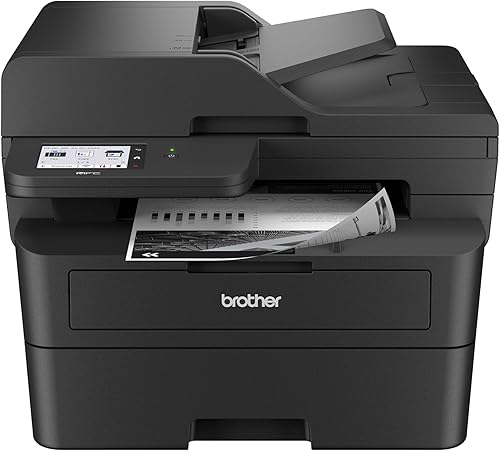 Check it
Brother Professional Laser Printer with Scanner
Best for fast document scanning - 7
 Best for fast basic printingCheck it
- 8
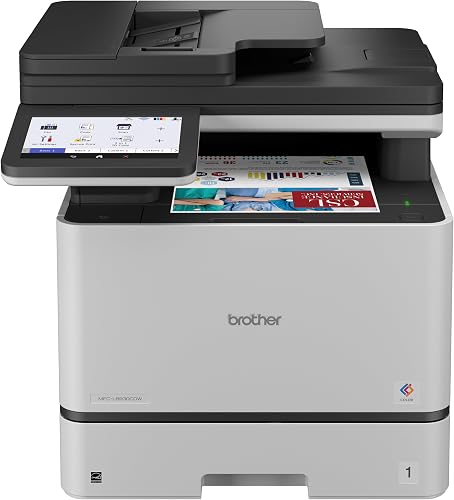 Check it
Brother MFC-L8930CDW Business Color Laser All-in-One Printer
Best for business color - 9
 Check it
Brother MFC-L5710DW Business Monochrome Laser All-in-One Printer
Best for busy monochrome teams
Which Brother laser printer is best for most people?
The Brother HL-L2405W is the best brother laser printer for a home office that mainly prints black-and-white documents. It has a compact 14.2 in deep, 14 in wide and 7.2 in high body, a 250-sheet tray, dual-band wireless and USB.
That small footprint suits a desk shared with a laptop, monitor and paperwork. It can sit near a wall or on a shelf without taking over the workspace, which matters in spare rooms and apartments.
Its print-only design keeps the workflow simple. The printer produces up to 30 pages per minute and supports mobile printing through the Brother Mobile Connect app.
The 250-sheet tray means fewer interruptions during a week of letters, invoices and forms. The manual feed slot also helps with envelopes and specialty paper that do not belong in the main tray.
The trade-off is manual duplex printing. If you regularly print long documents on both sides, an automatic-duplex model such as the MFC-L2820DW may save more time.
It is also print only, so you will need a separate scanner if you copy or scan often. For straightforward document printing, that simplicity is a benefit rather than a drawback.
How we picked the best Brother laser printers
We compared the stated functions, print speeds, paper handling, connections and document features for each model. Our score weighs specs, features and buyer feedback against what you're shopping for.
A print-only model can be the better choice when you already have a scanner and want fast document output. An all-in-one makes more sense when copying, scanning or faxing would otherwise require another device.
For a wider explanation of the technology, read What Are the Advantages of a Laser Printer? and What Are the Disadvantages of a Laser Printer?.
| Product | Best for | Print type | Paper capacity | Connections | Our score |
|---|---|---|---|---|---|
| Brother HL-L2405W Wireless Compact Monochrome Laser Printer | home offices | Monochrome print only | 250-sheet tray plus manual feed slot | Dual-band wireless and USB | 9.7 |
| Brother Monochrome Laser Printer | duplex home-office work | Wi-Fi and USB | 9.6 | ||
| Brother MFC-L2820DW Wireless Compact Monochrome All-in-One Laser | compact all-in-one work | 250-sheet tray | Wireless, Ethernet and USB | 9.6 | |
| HP LaserJet Pro 3101sdw | Brother alternative | 250-sheet input tray | Wireless, Ethernet and USB | 9.6 | |
| Brother HL-L6210DWT Business Monochrome Laser Printer | high-volume offices | Two 520-sheet trays plus 100-sheet multipurpose tray | 9.5 | ||
| Brother Professional Laser Printer with Scanner | fast document scanning | Wireless, Ethernet and USB | 9.3 | ||
| Brother Laser Printer | fast basic printing | Monochrome print only | 520-sheet main tray plus 100-sheet multipurpose tray | Wireless, Gigabit Ethernet and USB | 8.9 |
| Brother MFC-L8930CDW Business Color Laser All-in-One Printer | business color | Dual-band wireless, Gigabit Ethernet and USB | 8.7 | ||
| Brother MFC-L5710DW Business Monochrome Laser All-in-One Printer | busy monochrome teams | Dual-band wireless, Gigabit Ethernet and USB | 8.4 |
Best Brother laser printers compared
The picks below are ordered by score, with the highest-scoring model first. Each one fits a different printing pattern, so the best choice depends on whether you value compact size, document handling, color or office speed.
If price matters, compare Brother laser printer deals.
Brother HL-L2405W Wireless Compact Monochrome Laser Printer: Best for home offices
- Up to 30 pages per minute
- 250-sheet paper tray
- Dual-band wireless and USB
- Mobile printing through Brother Mobile Connect
The compact HL-L2405W keeps everyday black-and-white printing simple. Its 250-sheet tray and wireless connections fit a home office that prints often but does not need copying or scanning.
Pros
- Compact footprint
- Wireless and USB connections
- 30 pages per minute
Cons
- Print-only design
- Manual duplex printing
The Brother HL-L2405W Wireless Compact Monochrome Laser Printer is the easiest fit for a home office that needs regular black-and-white output. Its compact footprint leaves more room on a desk, while the 250-sheet tray reduces how often you reload paper.
Dual-band wireless works across 2.4GHz and 5GHz networks, and USB provides a local connection to one computer. The Brother Mobile Connect app supports mobile printing, toner tracking and supply ordering.
The printer reaches up to 30 pages per minute and has a maximum black-and-white print resolution of 1200 x 1200 dpi. It supports media up to 8.5 x 14 in and includes a manual feed slot for envelopes and specialty paper.
Choose it when you want a straightforward wireless printer for documents. Pick an automatic-duplex all-in-one instead if scanning, copying or two-sided printing is part of your normal routine.
Brother Monochrome Laser Printer: Best for duplex home-office work
- Print, copy, scan and fax
- Automatic duplex printing
- Wireless networking
- 32 pages per minute
This MFCL2710DW model adds automatic two-sided printing and four office functions. It suits a home office that wants one device for documents, copies, scans and faxing.
Pros
- Automatic duplex printing
- Four functions
- Wireless networking
Cons
- Larger 26 lb body
- Older model naming can cause confusion
The Brother Monochrome Laser Printer is an older-style all-in-one choice for home offices that need automatic duplex printing. The MFCL2710DW prints, copies, scans and faxes, so it can replace several separate pieces of equipment.
That four in one setup suits a sole trader, parent working from home or small household office. One device can handle a signed form, a scanned receipt and an outgoing fax without adding another box to the desk.
Its wireless networking supports laptops, PCs and smartphones, while the USB connection provides a direct option. The manual feed slot handles paper types and sizes such as card stock and envelopes.
Output reaches up to 32 pages per minute, and automatic duplex printing helps reduce manual page turning. The included starter toner cartridge is rated for 700 pages, and the drum is rated for 12,000 pages.
Those starter ratings are useful for planning, since the first cartridge will run out sooner than a standard replacement. Keep the drum rating in mind as well, because it is a separate part with a much longer life.
Choose this model if its four functions and automatic duplexing matter more than having the newest compact design. For newer compact all-in-one features, compare it with the MFC-L2820DW.
Brother MFC-L2820DW Wireless Compact Monochrome All-in-One Laser: Best for compact all-in-one work
- Print, copy, scan and fax
- Up to 34 pages per minute
- 50-page auto document feeder
- Automatic duplex printing
The MFC-L2820DW combines a compact body with a 50-page auto document feeder and automatic duplex printing. It is a strong fit for small offices handling multi-page paperwork.
Pros
- 50-page auto document feeder
- Automatic duplex printing
- Wireless, Ethernet and USB
Cons
- Monochrome output only
- No color printing
The Brother MFC-L2820DW Wireless Compact Monochrome All-in-One Laser is the strongest compact choice for multi-page office work. It prints, copies, scans and faxes, with automatic duplex printing and a 50-page auto document feeder.
The feeder is the key benefit for daily paperwork. It can take a stack of pages for copying, scanning or faxing, so you do not need to feed sheets one by one.
Its stated print speed reaches up to 34 pages per minute. The 250-sheet tray handles routine documents, while wireless, Ethernet and USB connections give you several ways to place it on a home or small-office network.
Ethernet can help if Wi-Fi is weak in the room where the printer sits. Wireless keeps placement flexible, and USB still works as a direct backup for a single computer.
A 2.7 in touchscreen provides access to printing and scanning workflows, including popular cloud services. The printer also supports a manual feed slot and media up to 8.5 x 14 in.
Choose it when you need one compact machine for mixed paperwork. Its monochrome output is a limitation if your work includes color charts, presentations or marketing documents.
HP LaserJet Pro 3101sdw: Best Brother alternative
- Up to 35 pages per minute
- Automatic duplex printing
- 250-sheet input tray
- 50-sheet auto document feeder
The HP LaserJet Pro 3101sdw is the non-Brother choice in this group. Its 35-page-per-minute speed, automatic duplex printing and 50-sheet feeder suit small teams.
Pros
- 35 pages per minute
- 50-sheet feeder
- Automatic duplex printing
Cons
- HP chip or circuitry required for cartridges
- Brand ecosystem differs from Brother
The HP LaserJet Pro 3101sdw is the best Brother laser printer alternative in this roundup. It gives small teams an all-in-one design, wireless printing, a 250-sheet input tray and a 50-sheet auto document feeder.
That mix suits a team that prints reports, copies contracts and scans signed pages. The feeder and tray help with multi-page jobs, so staff spend less time loading paper or feeding originals by hand.
Black-and-white output reaches up to 35 pages per minute, and automatic duplex printing handles two-sided documents. Ethernet and USB connections supplement wireless use.
The model includes an introductory black toner cartridge rated at about 1,000 pages. HP also states that the printer is intended to work with cartridges using HP chips or circuitry, so cartridge planning is part of the ownership decision.
That requirement is worth noting before you buy, since it affects which replacement cartridges you can use. Check that the supply route fits your office budget and ordering process.
Choose it when the HP ecosystem fits your office better than Brother. If you are weighing other office brands, compare Lexmark laser printers.
For more options, see our guide to Best Alternatives to Brother Laser Printers.
Brother HL-L6210DWT Business Monochrome Laser Printer: Best for high-volume offices
- Up to 50 pages per minute
- Two 520-sheet paper trays
- 100-sheet multipurpose tray
- Wireless and Gigabit Ethernet
The HL-L6210DWT is built for busy workgroups that need speed and fewer paper refills. Dual 520-sheet trays and a 100-sheet multipurpose tray support varied office jobs.
Pros
- 50 pages per minute
- Large paper capacity
- Wireless and wired networking
Cons
- 35.4 lb weight
- Print-only design
The Brother HL-L6210DWT Business Monochrome Laser Printer is built for offices that print often and do not want frequent paper refills. It includes two 520-sheet trays and a 100-sheet multipurpose tray for custom media and envelopes.
That large paper capacity suits a busy workgroup with daily batches. Two full trays can hold different sizes or brands of paper, which reduces swapping and keeps letterhead or legal paper ready.
The printer reaches up to 50 pages per minute and includes automatic duplex printing. Wireless networking and Gigabit Ethernet support shared office use, while mobile printing adds flexibility for connected devices.
Gigabit Ethernet is helpful when several people print at once from desktop computers. Dual-band wireless gives another option for laptops, tablets and phones without a cable run.
The included Brother Genuine toner cartridge is rated for 3,000 pages. The compatible TN920UXXL replacement toner is rated for 18,000 pages, which may suit a high-volume monochrome workflow.
Choose it for a busy office with several paper types or large daily batches. Its 35.4 lb body and print-only design make it less suitable for a small desk or mixed scanning work.
Brother Professional Laser Printer with Scanner: Best for fast document scanning
- Up to 36 pages per minute
- 50-page auto document feeder
- Single-pass two-sided scanning
- 3.5 in touchscreen
The MFC-L2900DW focuses on document workflows with single-pass two-sided scanning, a 50-page feeder and a 3.5 in touchscreen. It fits a small business that scans as often as it prints.
Pros
- Single-pass two-sided scanning
- 36 pages per minute
- Cloud access from touchscreen
Cons
- No color printing
- Fax is not included in the listed functions
The Brother Professional Laser Printer with Scanner suits a small business that scans multi-page documents as often as it prints them. The MFC-L2900DW reaches 36 pages per minute and includes a 50-page auto document feeder.
Single-pass two-sided scanning handles both sides of a page in one pass. Compare laser printers with duplex scanning for more models.
That feature speeds up archiving and helps when you need a digital copy of a double-sided form. You can place the originals in the feeder and send them to a chosen destination without turning each sheet manually.
Automatic duplex printing helps reduce manual work, and the 3.5 in touchscreen gives direct access to cloud functions.
Wireless, Ethernet and USB connections support different office layouts. The listed functions are print, copy and scan, so choose another model if faxing is required.
Choose it for document conversion and digital filing. Its monochrome design is best for text-heavy forms, records and reports rather than color output.
Brother Laser Printer: Best for fast basic printing
- Up to 50 pages per minute
- 520-sheet main tray
- 100-sheet multipurpose tray
- Automatic duplex printing
The HL-6210DW provides the speed and paper handling of a business printer without adding copy or scan hardware. Choose it for networked black-and-white output at up to 50 pages per minute.
Pros
- 50 pages per minute
- Large trays
- Automatic duplex printing
Cons
- Print-only design
- No second 520-sheet tray included
The Brother Laser Printer is the print-only version of the HL-6210DW business platform. It reaches up to 50 pages per minute and includes a 520-sheet main tray plus a 100-sheet multipurpose tray.
That combination suits an office that prints a lot but already has a separate scanner. The large main tray reduces refills during long runs, while the multipurpose tray takes envelopes, labels and custom sizes.
Automatic duplex printing supports two-sided office documents. Built-in Gigabit Ethernet and dual-band wireless networking make it suitable for a shared workgroup, while USB 2.0 provides a direct connection.
Ethernet is the stable choice for a fixed desk or print station. Wireless suits mixed devices, and USB can serve as a fallback if the network is unavailable.
The printer includes a Brother Genuine 3,000-page toner cartridge, and the compatible TN920UXXL cartridge is rated for up to 18,000 pages. Its maximum print resolution is up to 1200 x 1200 dpi.
Choose it when speed and paper capacity matter more than scanning or copying. The HL-L6210DWT is a better fit if you want two 520-sheet trays included.
Brother MFC-L8930CDW Business Color Laser All-in-One Printer: Best for business color
- Color and black printing
- Up to 33 pages per minute
- 80-page auto document feeder
- 7 in color touchscreen
The MFC-L8930CDW is the choice for teams that need color documents, scanning and copying in one machine. Its 80-page feeder and 7 in touchscreen support larger office workflows.
Pros
- Color printing
- 80-page feeder
- Advanced scanning features
Cons
- 71.2 lb weight
- Largest footprint in this group
The Brother MFC-L8930CDW Business Color Laser All-in-One Printer is the right pick for teams that need color documents and advanced scanning. It prints, scans and copies in color and black, with print and copy speeds up to 33 pages per minute.
An 80-page auto document feeder supports larger scanning jobs, while the 7 in color touchscreen provides menu controls and customized shortcuts. The printer supports legal-size paper up to 8.5 x 14 in.
That larger feeder helps with bundles of contracts, invoices or marketing files. Shortcuts can also reduce repeated taps for common scan destinations, which saves time in a shared office.
Dual-band wireless and Gigabit Ethernet support office networks. The machine includes standard-yield black and color toner cartridges, with compatible high-yield options for ongoing use.
Color adds flexibility for charts, photos and branded documents, but it also means managing four toner cartridges. High-yield replacements can help with cost if your team prints color often.
Choose it for presentations, marketing documents and color office work. At 71.2 lb and 20.7 in deep, it needs more floor or table space than the monochrome picks.
Brother MFC-L5710DW Business Monochrome Laser All-in-One Printer: Best for busy monochrome teams
- Up to 48 pages per minute
- 50-page auto document feeder
- Single-pass two-sided scanning
- 250-sheet tray and 100-sheet multipurpose tray
The MFC-L5710DW suits teams that need fast monochrome printing plus scanning and copying. Its 48-page-per-minute speed and single-pass scanning reduce handling on large document jobs.
Pros
- 48 pages per minute
- Fast two-sided scanning
- Expandable paper capacity
Cons
- 36 lb weight
- Monochrome output only
The Brother MFC-L5710DW Business Monochrome Laser All-in-One Printer is designed for busy teams that need fast printing plus scanning and copying. It reaches up to 48 pages per minute and includes a 50-page auto document feeder.
Single-pass, two-sided scanning reaches up to 60 images per minute. The 250-sheet tray supports letter or legal paper, and the 100-sheet multipurpose tray handles custom media and envelopes.
That scanning speed matters for teams that digitise long files. Single-pass duplex scanning means a double-sided bundle can be captured without a second pass or manual flipping.
Wireless and Gigabit Ethernet connections support shared office use. The 3.5 in color touchscreen gives access to cloud services, email, SharePoint and other scan destinations.
Direct scan destinations can shorten the path from paper to filing. Instead of scanning to a computer first, you can send files where the team already works.
Choose it when the MFC-L2900DW is not fast enough for your document volume. Its 36 lb weight and monochrome output make it more appropriate for a workgroup than a small personal desk.
How do you choose a Brother laser printer?
Choose a Brother laser printer by deciding first whether you need print-only output or an all-in-one. The HL-L2405W and HL-L6210DW focus on printing, while the MFC models add scanning and copying, with some also adding fax.
Start with the tasks you do each week. If you mainly print documents and already have a scanner, a print-only model keeps setup simple and saves desk space.
If you copy, scan or fax regularly, an all-in-one removes the need for extra devices. That can be a better fit for a small office where paperwork moves between paper and digital files.
For a home office, compare the HL-L2405W, MFCL2710DW and MFC-L2820DW. The HL-L2405W takes less space, while the two all-in-ones handle more document tasks.
Look at paper handling next, since tray size affects how often you refill. A 250-sheet tray suits light home use, while larger trays help in a busy office with daily batches.
Check connections as well. Wireless is flexible for laptops and phones, Ethernet can be more stable for shared desktops, and USB is useful as a direct link.
For A4 and legal-size documents, check the paper path and maximum media size before buying. Our guide to Best Brother Laser Printers for A4 Paper covers that choice in more detail.
Finally, match the model to your document type. Monochrome is efficient for text, while color is needed for charts, photos and branded materials.
Which Brother laser printer is best for wireless printing?
The Brother HL-L2405W is the simplest wireless pick, while the MFC-L2820DW adds wireless, Ethernet and USB alongside scanning and faxing. Both support connected home-office workflows.
The HL-L2405W suits a home office where one or two devices print from a laptop or phone. Its dual-band wireless can use 2.4GHz or 5GHz, depending on the router and room layout.
The MFC-L2820DW gives more options if the printer will sit away from the router. Ethernet provides a wired link, wireless keeps it flexible, and USB works for a single computer.
Business models add stronger network flexibility. The HL-L6210DW, HL-L6210DWT and MFC-L5710DW include dual-band wireless and Gigabit Ethernet for shared office printing.
Gigabit Ethernet can help when several users print at the same time. It is often a good choice for a fixed office desk with a wired network point nearby.
Dual-band wireless is still useful for mobile devices and guest laptops. That mix lets a workgroup share one printer without relying on a single connection method.
See Best Brother Wireless Laser Printers if wireless setup is your main concern. Keep the printer near a reliable network connection and use the supported app or operating-system print tools for mobile jobs.
Place the printer where the signal is strong, not behind metal furniture or in a closed cabinet. A stable connection makes mobile printing and app features more reliable day to day.
Which Brother laser printer is best with fax?
The MFCL2710DW and MFC-L2820DW are the clearest choices here because both include print, copy, scan and fax functions. The MFC-L2820DW is the newer compact pick with a 50-page feeder and a 2.7 in touchscreen.
The MFCL2710DW suits a home office that wants four functions with automatic duplex printing. It can replace separate machines for printing, copying, scanning and faxing.
The MFC-L2820DW adds a more compact design and a larger touchscreen for everyday tasks. Its feeder helps with multi-page faxes and scans, which can save time on longer documents.
Fax users should also confirm that the office has the required telephone connection and that the chosen workflow matches the device's controls. For a broader comparison, read Best Brother Laser Printers with Fax.
Check whether your office still uses fax for legal, medical or supplier documents. If faxing is occasional, an all-in-one with fax may still be worth it for the other functions.
Also think about where the telephone line will run. The printer needs a suitable connection point, so plan the desk layout before you buy.
How should you set up and care for a Brother laser printer?
Place the printer on a stable surface with enough room to open trays and service toner or drum parts. Connect it by wireless, Ethernet or USB according to your workflow, then install the correct print and scan software for your devices.
Load the paper size shown in the printer settings, especially when switching between letter and legal media. Keep specialty paper in the manual or multipurpose feed when the model provides one.
Use the compatible toner family listed for your model. The HL-L2405W uses TN830, TN830XL or TN830XL2PK, while the HL-L6210DW family uses TN920UXXL.
Matching the cartridge to the printer helps avoid ordering the wrong supply.
Verdict: which is the best brother laser printer?
The Brother HL-L2405W is the best brother laser printer for most home offices because it combines a compact body, wireless connections, a 250-sheet tray and 30-page-per-minute monochrome output.
It suits people who print documents often but do not need copying or scanning in the same device. Its simple print-only design keeps setup and daily use straightforward.
Pick the MFC-L2820DW for a compact all-in-one, the HL-L6210DWT for large paper capacity and 50-page-per-minute office printing, or the MFC-L8930CDW when color is essential. Choose the MFC-L5710DW when fast scanning and copying matter as much as print speed.
The MFC-L2820DW is a strong fit for mixed paperwork in a small office. The HL-L6210DWT is better for high-volume monochrome printing, while the MFC-L8930CDW covers color and scanning in one machine.
The MFC-L5710DW suits busy teams that need speed across print, scan and copy tasks. Match the final choice to your main workload, not just the headline speed.
Our top 3 picks at a glance
-
1
Best for home offices
Brother HL-L2405W Wireless Compact Monochrome Laser Printer
9.7/10 our score
See it on Amazon -
2
-
3
Best for compact all-in-one work
Brother MFC-L2820DW Wireless Compact Monochrome All-in-One Laser
9.6/10 our score
See it on Amazon


