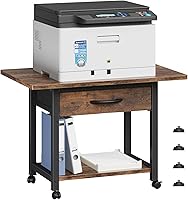
Best 3D Printer Stands: Top 9 Picks (November 2026)
The best 3d printer stands include the HOOBRO Industrial Printer Stand for compact mobile use, the GYIIYUO 2 Drawer File Cabinet 24''W for wide desktop storage, and the Anrigeail 3D Printer Stand with Filament Storage for all-in-one workstation.
On this page (10 sections)
- Our best 3d printer stand picks for stability, storage and power
- Best 3d printer stand comparison: top size, storage and power
- How we compared these 3d printer stands
- What size stand for 3d printer do you need?
- How much weight should a 3d printer stand hold?
- Do you need filament storage on your 3d printer stand?
- Should your 3d printer stand have built-in power?
- Wheels, locks or leveling feet: which is best for 3D printing?
- How do you set up and care for a 3d printer stand?
- Verdict: which 3d printer stand should you buy?
The best 3d printer stand for most makers is the HOOBRO Industrial Printer Stand, because its compact 3-tier cart, built-in power and locking casters fit small rooms without giving up storage. If you need a wide workstation, the Anrigeail 39-inch stand is the next step up.
If filament storage matters most, the tall AHOWPD rack holds up to 60 spools.
A good stand for 3D printing does three jobs at once. It keeps the printer level and steady while it runs.
It puts power, tools and filament within reach. It leaves enough free top space to remove prints and start the next job.
Our score weighs specs, features and buyer feedback against what you're shopping for.
Start with your printer size, then check weight, power and storage. A printer stand in general can work for a printer, but 3D printing adds vibration, filament and tool needs that a plain office stand may not cover.
Our picks at a glance
-
1
-
2

-
3
 Best for all-in-one workstation
Anrigeail 3D Printer Stand with Filament Storage
9.3/10 our score
See it on Amazon
- 4
 Check it
Atrastout 3D Printer Stand with Filament Storage
Best for mobile filament storage - 5
 Check it
AHOWPD 3D Printer Stand with Filament Storage
Best for tall filament racks - 6
 Check it
Fannova 23.6"x23.6"x30.1" Large Printer Stand with Adjustable
Best for heavy-duty large tops - 7
 Check it
METYERRY 24"x23.6" Large Printer Stand with Power
Best for powered large carts - 8
 Check it
AHOWPD 3D Printer Stand with Filament Storage
Best for square compact storage - 9
 Check it
BIGTREETECH BIQU Panda Station 3D Printer Working
Best for Bambu Lab setups
Our best 3d printer stand picks for stability, storage and power
Each pick below solves a different part of the 3D printing setup. Use the top size and storage type as your first filter, then check power and mobility.
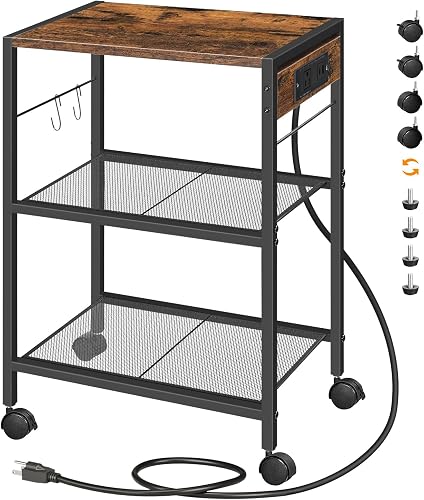
HOOBRO Industrial Printer Stand: Best for compact mobile use
- 3-tier mobile printer table
- Power outlets and USB ports
- 4 casters and 4 adjustable feet
- 16.5 x 11 x 25.2 in
A compact 3-tier rolling stand with power outlets and USB ports for a printer, tools and supplies in a small footprint.
Pros
- Compact 3-tier layout
- Built-in charging station
- Casters plus adjustable feet
Cons
- Narrow top compared with large-format stands
- Top plate holds up to 44 lb
The HOOBRO suits a maker with a compact printer and a small work area. Its 16.5 x 11 inch top and 25.2 inch height keep the footprint narrow enough for a corner, an end table spot or under a desk.
Three tiers let you store the printer on top and supplies below.
The built-in charging station adds 4 USB ports and a standard outlet. That helps you power the printer, a light or a laptop from one place instead of running a separate strip across the floor.
Two hooks hang on either side for tools or finished parts.
Mobility comes from 4 casters, with 2 that brake, plus 4 adjustable feet. Roll the cart into place, lock the casters or swap to feet on an uneven floor.
The top plate holds up to 44 lb and each mesh shelf holds 17 lb, so check your printer weight before you load it.
Trade-off: this is the smallest top here. A large-format printer or a printer plus a large spool holder may need more surface.
For a standard desktop printer and everyday supplies, the compact size is the point.
GYIIYUO 2 Drawer File Cabinet 24''W: Best for wide desktop storage
- 24 in wide desktop
- Supports up to 120 lb
- 2 drawers plus open shelf
- Casters and leveling feet
A wide 24-inch filing cabinet stand with drawers and a side bag, suited to larger printers and office-style setups.
Pros
- Wide 24 in desktop
- Deep bottom drawer for A4 and Letter folders
- Switches between casters and leveling feet
Cons
- Better as office storage than dedicated filament rack
- 120 lb top limit needs checking for heavy printers
The GYIIYUO suits a home office where the printer shares space with files and daily paperwork. Its 24-inch wide desktop is wider than many stands, so it can hold a large office printer or a 3D printer plus a notebook and tools.
The top supports up to 120 lb.
Storage is the draw here. Two drawers include a deep bottom drawer for A4 and Letter folders, plus an open shelf and a side storage bag.
That layout suits a maker who also files manuals, paper and small office items beside the printer.
You can switch between 360-degree rolling casters and leveling feet in about 30 seconds, according to GYIIYUO. Roll it for cleaning, then set it steady for a print.
The light brown wood finish and steel frame also work as an end table or nightstand in a living room.
Trade-off: this is a filing cabinet first and a 3D printing station second. It has no dedicated filament spool rack and no built-in power hub.
Choose it for wide desktop space and office storage, not for a tall spool tower.
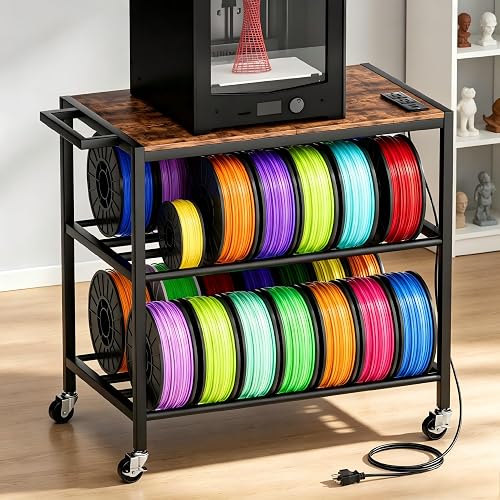
Anrigeail 3D Printer Stand with Filament Storage: Best for all-in-one workstation
- 39 x 24 x 28 in, 3-tier design
- Drawer and power hub
- 2 AC outlets and 2 USB ports
- Steel X-bracket frame
A large 3-tier metal workstation with a drawer, power hub and filament storage for printers, tools and spools.
Pros
- Large 39 in wide top
- Built-in power hub
- Drawer for tools and stationery
Cons
- Largest footprint in this group
- No casters stated for repositioning
The Anrigeail suits a maker who wants one station for the printer, filament, tools and power. Its 39 x 24 x 28 inch footprint is the widest top in this group, so you can place a printer on one side and keep tools or spools beside it.
Three tiers add storage below.
A built-in power hub gives 2 AC outlets and 2 USB ports. You can power the printer, laptop and lighting from the stand and reduce cable clutter.
A drawer holds nozzles, tools and stationery, while dual compartments store filament and accessories.
The frame is steel with X-shaped bracket reinforcement. Anrigeail says the design reduces vibration and wobble for cleaner layers, even with larger printers.
The size also fits many major printer models, from compact desktop units to larger machines.
Trade-off: a 39-inch stand needs real floor space. It also has no casters stated, so plan the spot before assembly.
If your room is tight, a narrower cart will be easier to place.
Atrastout 3D Printer Stand with Filament Storage: Best for mobile filament storage
- 25 x 14.8 in tabletop, 3-tier rack
- 2 AC outlets and 2 USB ports
- 4 swivel casters, 2 lock
- Holds filament spools
A compact mobile 3-tier cart with built-in power and filament storage that rolls to a workspace and locks for printing.
Pros
- Mobile with locking casters
- Built-in power with 55-inch cord
- 3-tier filament storage
Cons
- Narrow 25 in top for large printers
- 100 lb shelf capacity is lower than heavy-duty picks
The Atrastout suits a hobbyist or pro who moves the printer between a home studio, office or garage. Its 25 x 14.8 inch top is compact, and the 3-tier rack stores PLA, ABS or PETG spools, tools and accessories below.
The shelf weight capacity is 100 lb.
Built-in power includes 2 AC outlets and 2 USB ports with a 55-inch cord. That cord length helps you reach a wall outlet without stretching the stand's power across the room.
Four 360-degree swivel casters roll smoothly, and 2 wheels lock during printing.
Assembly is aimed at one person in about 15 minutes, with labeled parts and a manual. The metal frame and wooden top keep the cart light enough to move, while the tiered shelves keep filament off the floor.
Trade-off: the narrow top limits large printers and wide spool holders. The 100 lb capacity is also lower than the 200 lb stands here.
Choose it for mobility and compact filament storage, not for the heaviest machines.
AHOWPD 3D Printer Stand with Filament Storage: Best for tall filament racks
- 29.2 x 23.2 x 59 in tall rack
- Holds up to 60 spools
- Supports up to 300 lb
- Adjustable leveling feet
A tall 59-inch storage rack with a detachable top, leveling feet and space for up to 60 filament spools.
Pros
- Tall rack holds up to 60 spools
- 300 lb support
- Leveling feet instead of wheels
Cons
- 59 in height needs ceiling and floor space
- Large footprint for small rooms
The AHOWPD tall rack suits a maker who stores a lot of filament in one place. At 29.2 x 23.2 x 59 inches, it is the tallest stand here.
The rack holds up to 60 spools, with the top holding 10 and the bottom layers fitting 500g and 1kg spools.
The top surface is 27.5 x 23 inches of solid wood and can detach to hold filament spools. That flexibility helps you change the layout as your printer and spool count change.
The frame locks with screws and supports up to 300 lb.
Instead of wheels, this rack uses heavy-duty adjustable leveling feet. That choice favors a steady, vibration-resistant surface during high-speed printing.
AHOWPD says the feet help keep the surface flat and reduce wobble.
Trade-off: 59 inches is tall. You need headroom, wall space and a spot where a tall rack will not block light or airflow.
It is a storage tower first, so check that the top size fits your printer before you fill every shelf.
Fannova 23.6"x23.6"x30.1" Large Printer Stand with Adjustable: Best for heavy-duty large tops
- 23.6 x 23.6 in top
- 200 lb per shelf
- Adjustable middle shelf
- 4 locking casters
A heavy-duty 23.6-inch square stand with adjustable middle shelf, 200 lb per shelf and four locking casters.
Pros
- Large square top
- 200 lb per shelf
- Adjustable middle shelf and 4 locks
Cons
- No built-in power hub stated
- Needs foot pads or locks for stationary use
The Fannova suits a maker with a heavy or full-size printer who needs a strong, square top. Its 23.6 x 23.6 inch top gives room around a bulky printer, and two lower shelves each offer a 20 x 20 inch footprint.
Each shelf is rated at 200 lb.
Construction is the focus. The shelves use 15mm particle board with steel support bars, and the frame uses 0.98-inch square steel tubes.
Six horizontal crossbars tie the sides into a rigid box that helps damp vibration during high-speed printing.
The middle shelf adjusts to multiple positions, so you can set the height for filament spools, resin bottles or tools. All four casters lock independently, which is an upgrade over stands with only two locks.
Foot pads are also included as an alternative to casters.
Trade-off: there is no built-in power hub stated. You will need a separate power strip or wall outlet.
Choose this pick for load capacity and adjustable storage, then add power where it fits your room layout.
METYERRY 24"x23.6" Large Printer Stand with Power: Best for powered large carts
- 24 x 23.6 in tabletop, 200 lb capacity
- 2 AC outlets and 2 USB ports
- 5-level adjustable middle shelf
- Industrial-grade casters
A large 3-tier cart with built-in power, a 5-level adjustable shelf and industrial casters for heavy printers.
Pros
- Large top with 200 lb capacity
- Built-in power station
- 5 height positions for middle shelf
Cons
- 2 locking casters rather than 4
- Particle board top needs care with resin spills
The METYERRY suits a maker who wants a large powered cart for a heavy printer. Its 24 x 23.6 inch tabletop holds 200 lb, and two lower shelves at 20.5 x 20.5 inches each also support up to 200 lb.
That gives you room for paper, tools and supplies below.
A built-in charging station adds 2 AC outlets and 2 USB ports. The power strip can mount in 2 positions, so you can place it where your printer and accessories need power.
That flexible placement helps keep cables short.
The middle shelf is removable and adjusts to 5 height positions. Remove it for tall equipment, then install the included metal support bars at the back for stability.
Each shelf has a steel support tube underneath for load-bearing strength.
Industrial-grade casters roll under load, with 2 lockable casters and adjustable foot pads for a stationary setup. Trade-off: only 2 casters lock, so check that the stand stays steady on your floor during a print.
The particle board top also needs quick cleanup if resin or filament glue lands on it.
AHOWPD 3D Printer Stand with Filament Storage: Best for square compact storage
- 23.7 x 23.7 x 26.4 in, 3-tier
- Holds up to 28 rolls of 1kg filament
- Fabric drawers
- Each layer supports over 100 lb
A compact square 3-tier stand with fabric drawers and filament storage for up to 28 rolls of 1kg filament.
Pros
- Square 23.7 in top
- Fabric drawers for small parts
- Holds up to 28 rolls
Cons
- No built-in power stated
- Over 100 lb per layer is lower than 200 lb picks
The AHOWPD compact square stand suits a maker who wants filament storage without a tall tower. Its 23.7 x 23.7 x 26.4 inch size gives a square top for many desktop printers, and the bottom two tiers hold up to 28 rolls of 1kg filament.
Fabric drawers add a place for small parts, screws, wrenches and maintenance tools. That helps you keep the top clear for removing prints.
Each layer supports over 100 lb, and the rack loads up to 200 lb overall.
The compact size fits workshops, offices and studios where a 59-inch rack would be too tall. The wooden top layer suits enclosed, open-frame and resin printers in general terms, so check your printer base against the 23.7-inch square before you order.
Trade-off: there is no built-in power hub stated, and the per-layer limit is lower than the 200 lb stands. Choose it for a neat, square footprint with drawers, then add a power strip if your printer needs AC power at the stand.
BIGTREETECH BIQU Panda Station 3D Printer Working: Best for Bambu Lab setups
- Tool drawer 38 x 42 x 6 cm
- Dual pull-out drawers
- Holds 2 AMS units or 20 filaments
- 360 rotating wheels and drop-down feet
A Bambu Lab-focused workstation cabinet with tool and AMS storage, routing ports and lockable wheels.
Pros
- Designed for Bambu Lab printers and AMS
- Tool drawer plus dual pull-out drawers
- Wheels with drop-down rubber feet
Cons
- Best matched to Bambu Lab models
- 66.9 lb weight needs space to move
The BIGTREETECH BIQU Panda Station suits a Bambu Lab user who wants a cabinet-style workstation. The top tool storage drawer measures 38 x 42 x 6 cm and fits tools and spare parts, with room to add DIY-printed dividers.
Dual pull-out drawers below measure 38.5 x 39.5 x 26 cm each.
Those drawers hold 2 AMS units or 20 filaments. The AMS units connect to the printer on top through a routing port at the rear, which keeps cables short and organized.
Pre-positioned ports and rubber grommets help with cable routing and dust sealing.
The stand rolls on 360-degree rotating wheels, then you use drop-down rubber feet for stability while printing. It fits Bambu Lab P1P, P1S, X1C, X1E, X2D, A1, A1 Mini, H2S, H2D and H2C models, according to BIGTREETECH.
Aluminum and steel construction and a built-in hygrometer support a sealed storage space.
Trade-off: this is the most model-specific pick here. If you do not use a Bambu Lab printer or AMS units, a general stand may fit better.
At 66.9 lb, it also needs floor space to move safely.
Best 3d printer stand comparison: top size, storage and power
Use this table to narrow the field by the job you need done. Check top size first, then storage, then power and mobility.
| Product | Best for | Size | Tiers | Power | Our score |
|---|---|---|---|---|---|
| HOOBRO Industrial Printer Stand | compact mobile use | 16.5 x 11 x 25.2 in | 3 | Outlets and USB ports | 9.7 |
| GYIIYUO 2 Drawer File Cabinet 24''W | wide desktop storage | 14.96 x 23.62 x 25.59 in | 9.5 | ||
| Anrigeail 3D Printer Stand with Filament Storage | all-in-one workstation | 39.4 x 24 x 28 in | 3 | 2 AC outlets and 2 USB ports | 9.3 |
| Atrastout 3D Printer Stand with Filament Storage | mobile filament storage | 25 x 15 x 25.2 in | 3 | 9.2 | |
| AHOWPD 3D Printer Stand with Filament Storage | tall filament racks | 29.2 x 23.2 x 59 in | 8.9 | ||
| Fannova 23.6"x23.6"x30.1" Large Printer Stand with Adjustable | heavy-duty large tops | 23.62 x 23.62 x 30.12 in | 3 | 8.7 | |
| METYERRY 24"x23.6" Large Printer Stand with Power | powered large carts | 24 x 23.6 x 28.3 in | 2 AC outlets and 2 USB ports | 8.4 | |
| AHOWPD 3D Printer Stand with Filament Storage | square compact storage | 23.7 x 23.7 x 26.4 in | 3 | 8.2 | |
| BIGTREETECH BIQU Panda Station 3D Printer Working | Bambu Lab setups | 31 x 24 x 23 in package | 8.0 |
How we compared these 3d printer stands
We compared specs, features and buyer feedback against what a 3D printing buyer needs most. We looked at top size, weight capacity, stability features, filament storage, power and footprint.
A stand can be strong and still be wrong for your room. That is why we weigh the full setup, not just load capacity.
A tall rack with 60 spools is useful only if you have the height. A wide top is useful only if the printer fits and you can still reach the controls.
We also checked how each stand handles movement. Locking casters, leveling feet and foot pads matter because a printer runs for hours.
A stand that rolls easily but does not lock can move during a print, while a fixed stand may be harder to clean around.
For more detail on storage-first options, see our guide to the best 3d printer stand with storage. For load-first options, see the best heavy duty 3d printer stand.
For enclosed setups, see the best 3d printer cabinet.
What size stand for 3d printer do you need?
Measure your printer base first, then add room to reach controls and remove prints. A 23 to 24 inch square top suits many desktop printers.
A 39 inch wide top helps when tools and spools sit beside the printer.
Small printers and tight corners
A compact cart works if your printer base fits with clearance on each side. The HOOBRO top at 16.5 x 11 inches is the smallest here, so it suits the smallest printers and narrow spots.
Large printers and full-size machines
A 23.6 or 24 inch square top gives more room for bulky printers and spool holders. The Fannova and METYERRY tops are built for that job, with 200 lb per shelf.
Workstations with tools beside the printer
A wider top helps when you keep tools, filament and a laptop near the machine. The Anrigeail at 39 inches wide is built for that layout, but it needs more floor space.
If you want height instead of width, a best printer stand tall style rack may fit a narrow wall better than a wide cart.
How much weight should a 3d printer stand hold?
Pick a top limit well above your printer weight, then check each shelf separately. A 100 lb shelf suits many desktop printers, while 200 lb per shelf suits heavier or larger machines.
100 lb class stands
The Atrastout shelf capacity is 100 lb, and the compact AHOWPD square stand supports over 100 lb per layer. These picks suit lighter desktop printers and filament storage.
200 lb class stands
The Fannova and METYERRY rate each shelf at 200 lb. That headroom helps with heavy printers, large spool holders and stacked supplies.
Tall racks and total load
The tall AHOWPD rack supports up to 300 lb overall and holds up to 60 spools. Total load is not the same as top load, so check the printer top limit before you place a heavy machine on top.
For a darker finish in a living space, see the best dark wood printer stand guide for style options outside this 3D printing list.
Do you need filament storage on your 3d printer stand?
Choose filament storage if you keep several spools at hand or print in multiple colors. A simple top is enough if you store spare spools in another room.
Tall spool racks
The tall AHOWPD rack holds up to 60 spools in 59 inches of height. That suits a maker with a large filament collection and room for a tower.
Compact spool carts
The Atrastout and compact AHOWPD stands hold spools on lower tiers without taking as much height. The compact AHOWPD holds up to 28 rolls of 1kg filament.
Drawers for tools and small parts
The Anrigeail drawer, GYIIYUO drawers and BIQU Panda Station drawers help you keep nozzles, screws and tools off the top. A clear top makes it easier to remove prints and load the next job.
If you plan to cut paper or trim prints beside the printer, keep a paper cutter guide nearby for finishing steps. That small tool is easier to store in a drawer than on the printer top.
Should your 3d printer stand have built-in power?
Built-in power helps when the wall outlet is far from your printer. It keeps the printer, laptop and light in one spot and reduces loose strips on the floor.
Stands with a power hub
The HOOBRO, Anrigeail, Atrastout and METYERRY include AC outlets and USB ports. Check the number of AC outlets, because most printers need AC power while USB ports suit lights or charging.
Stands without built-in power
The GYIIYUO, Fannova, compact AHOWPD and tall AHOWPD do not state a built-in power hub. You can add a power strip, but keep it away from filament and keep cords clear of moving parts.
Cord length and placement
A 55-inch cord on the Atrastout helps reach a wall outlet. A power strip with 2 mounting positions on the METYERRY helps you place outlets where the printer needs them.
If you prefer an enclosed look with doors, see the best printer cabinet with doors guide before you add a separate strip.
Wheels, locks or leveling feet: which is best for 3D printing?
Use wheels to move the stand, then lock the casters or set feet before you print. Stability during the print matters more than easy rolling after the job starts.
Locking casters
The HOOBRO has 4 casters with 2 brakes and 4 adjustable feet. The Atrastout has 4 swivel casters with 2 locks.
The Fannova locks all 4 casters.
Leveling feet and foot pads
The tall AHOWPD uses leveling feet instead of wheels for a flat surface. The GYIIYUO switches between casters and leveling feet.
The METYERRY includes adjustable foot pads as an alternative to casters.
Fixed stands for dedicated print rooms
A fixed stand suits a dedicated print room where you will not move the printer. Level it on uneven floors and keep it clear of doors and walkways.
How do you set up and care for a 3d printer stand?
Set the stand level, lock it, then check clearance around the printer before the first print. A level top helps the printer run steady and makes spool tools easier to reach.
Set-up steps that help every printer
Place the stand where you can reach the printer controls and remove prints without twisting. Lock casters or set feet, then check that the top does not wobble when you press each corner.
Keep filament storage below the printer top when possible. That keeps spools off the work surface and leaves room for a print, a scraper and a small tray.
Care for wood tops, metal frames and drawers
Wipe wood and particle board tops with a dry or lightly damp cloth. Clean spills quickly, especially resin, so they do not stain the top or weaken the finish.
Check caster locks and leveling feet after the first week of use. Tighten loose screws on metal frames and keep fabric drawers free of filament dust and small metal parts.
Safety checks for power and weight
Keep power strips dry and away from resin bottles. Do not overload a shelf beyond its stated limit, and do not stack heavy spools on a top that is meant for the printer.
Leave space around the printer for airflow and for moving parts. A stand should support the printer, not block vents or trap heat around the machine.
Verdict: which 3d printer stand should you buy?
Buy the HOOBRO for a compact mobile setup, the Anrigeail for a wide all-in-one workstation, and the Fannova for a heavy-duty square top. Each pick wins a different job, so match the stand to your printer and room first.
Pick the HOOBRO if you need a small 3-tier cart with power and locking casters. Pick the GYIIYUO if a wide 24-inch desktop and file drawers matter more than spool storage.
Pick the Anrigeail if you want a 39-inch workstation with a drawer and power hub.
Pick the Atrastout if you move between rooms and want a compact powered cart. Pick the tall AHOWPD if you store up to 60 spools and have room for 59 inches of height.
Pick the Fannova or METYERRY if you need 200 lb per shelf on a large square top.
Pick the compact AHOWPD if you want a square top with fabric drawers and up to 28 rolls of filament. Pick the BIQU Panda Station if you use a Bambu Lab printer with AMS units and want cabinet-style storage.
Start with the printer stand guide if you are still deciding between a general printer stand and a 3D printing station. Then use the picks above to match top size, weight, power and storage to your printer.
Our top 3 picks at a glance
-
1
-
2
-
3
Best for all-in-one workstation
Anrigeail 3D Printer Stand with Filament Storage
9.3/10 our score
See it on Amazon
Frequently asked questions
What size stand does a 3D printer need?
Match the top to your printer footprint plus room to reach controls and remove prints. A 23 to 24 inch square top suits many desktop printers, while a 39 inch wide top helps when you also store tools and spools beside the printer.
Measure the printer base and add clearance on each side before you choose.
Do I need filament storage on the stand?
Filament storage helps if you print often and keep several spools at hand. A tall rack can hold many spools, while a compact cart may hold only a few.
If you use one color at a time and store spare spools elsewhere, a simple stable top with tool drawers may be enough.
Are wheels good for a 3D printer stand?
Wheels help you move a stand for cleaning or a layout change, but lock them or use feet during printing. Vibration can affect print quality on some open-frame printers.
Locking casters or adjustable leveling feet give you mobility plus a steady surface while a job runs.
How much weight should a 3D printer stand hold?
Give yourself headroom above the printer weight. Stands rated at 100 lb per shelf suit many desktop printers, while 200 lb per shelf picks suit heavier or larger machines.
Check the top limit separately, because lower shelves may carry a different load than the printer top.