8 Best Printer Maintenance Kits (November 2026)
The best printer maintenance kits include the Creality 3D Printer Tool Kit for broad 3D printer upkeep, the Best Printer Cleaning Kit for Epson for common inkjet clogs, and the Intarsio 3D Printer Tools Kit for nozzle and model finishing.
On this page (7 sections)
- How we chose these printer maintenance kits
- Printer maintenance kits for specific repair jobs
- How to match a maintenance kit to your printer
- What does a printer maintenance kit include?
- How do you know when rollers need replacement?
- How do you keep a printer clean between service jobs?
- Which printer maintenance kit should you choose?
The best printer maintenance kits depend on the printer type and the part that needs attention. For compatible HP LaserJet models, the Altru Print kits include fusers and rollers; inkjet printhead cleaners and 3D printer tool sets serve different maintenance jobs.
A printer maintenance kit can mean anything from replacement feed rollers to cleaning fluid or a set of 3D printer tools. Start with your printer model and the symptom, then check the included parts before ordering.
Our guide to what is a printer maintenance kit explains the main kit types.
Our picks at a glance
-
1

-
2

-
3

- 4
 Check it
Spaceink Printhead Cleaning kit 200mL for E
Best for a larger inkjet cleaning supply - 5
 Check it
CenDale Premium DTF Printhead Cleaning Solution
Best for DTF and DTG printheads - 6
 Check it
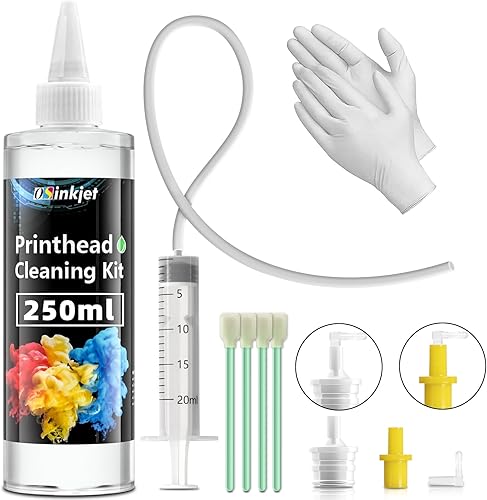
Osinkjet Printhead Cleaning Kit for Epson
Best for a high-volume inkjet cleaner - 7
 Best for HP LaserJet M601 to M603Check it
- 8
 Best for HP LaserJet M604 to M606Check it
How we chose these printer maintenance kits
These picks cover three distinct needs: mechanical parts for specific HP LaserJet series, cleaning supplies for inkjet printheads, and tools for 3D printer upkeep. We compared the stated uses, included parts, and compatibility details against those jobs.
Our score weighs specs and features against what you're shopping for.
| Product | Best for | Use | Tools | Set size | Our score |
|---|---|---|---|---|---|
| Creality 3D Printer Tool Kit | broad 3D printer upkeep | FDM 3D printer assembly, removal and finishing | Nozzle cleaners, scraper, files, pliers and screwdriver bits | 74 pieces | 9.7 |
| Best Printer Cleaning Kit for Epson | common inkjet clogs | Inkjet printhead cleaning | 9.6 | ||
| Intarsio 3D Printer Tools Kit | nozzle and model finishing | FDM and SLA 3D printer tasks | 9.4 | ||
| Spaceink Printhead Cleaning kit 200mL for E | a larger inkjet cleaning supply | Inkjet printhead cleaning | 9.3 | ||
| CenDale Premium DTF Printhead Cleaning Solution | DTF and DTG printheads | DTF and DTG printhead cleaning | 9.1 | ||
| Osinkjet Printhead Cleaning Kit for Epson | a high-volume inkjet cleaner | Inkjet printhead cleaning | 8.9 | ||
| Altru Print CF064A-DLX-AP | HP LaserJet M601 to M603 | Laser printer service parts | 8.3 | ||
| Altru Print F2G76A-AP | HP LaserJet M604 to M606 | Laser printer service parts | 8.1 |
Printer maintenance kits for specific repair jobs
Choose a kit by matching its contents to the maintenance task and confirming your exact printer model first. A kit labeled for cleaning cannot replace mechanical parts, and a roller kit won't clear an inkjet printhead.
Creality 3D Printer Tool Kit: Best for broad 3D printer upkeep
- 74-piece tool set
- Nozzle cleaning needles
- Scrapers, files and cutting tools
- Storage wrap
A broad tool assortment for FDM printer maintenance and model cleanup, including nozzle cleaners, scrapers, files and screwdriver bits.
Pros
- Includes several tool types
- Nozzle cleaners in 2 sizes
- Magnetic mat and storage wrap
Cons
- For 3D printer work, not laser printer roller replacement
- Check that each tool fits your maintenance task
The Creality 3D Printer Tool Kit is for maintaining FDM 3D printers and handling printed models. Its 74-piece assortment includes screwdriver and wrench tools, nozzle cleaners, scrapers, files, tweezers and cutting tools.
The 1.5 mm nozzle cleaner and 10 smaller 0.38 mm needles target residual filament in nozzles and extruders. A metal spatula and nipper help with print removal and trimming, while a magnetic mat and wrap help keep tools together.
This is the broadest tool set in this roundup, but it is not a replacement kit for an office laser printer. Pick it when your work involves 3D printer assembly, nozzle clearing or model finishing.
For print removal and detail work, the Intarsio kit below offers a narrower assortment with several file shapes and nozzle cleaner sizes. Choose between them by the included tools you will actually use.
Best Printer Cleaning Kit for Epson: Best for common inkjet clogs
- 20 ml syringe
- 100 ml cleaning fluid
- Attachments included
- Compatibility claims cover Epson, HP, Canon and Brother
A printhead cleaning kit with a large syringe, fluid and attachments for inkjet users addressing clogs, missing colors or streaks.
Pros
- Large syringe
- Multiple attachments
- Broad stated brand compatibility
Cons
- Not a roller or fuser replacement kit
- Confirm the method suits your printer model
The Best Printer Cleaning Kit for Epson is an inkjet printhead cleaner, not a mechanical maintenance kit. It includes 100 ml of cleaning fluid, a 20 ml syringe and multiple attachments for use with a range of Epson, HP, Canon and Brother inkjet printers.
Its intended problems include missing colors, discoloration, streaks and blank pages. Those symptoms can have other causes, so check your printer's own cleaning instructions and compatibility before trying a flush.
The kit is a fit when print quality points to a clogged printhead and you want fluid plus attachments. For regular cleaning supplies, compare the Spaceink and Osinkjet options, which include larger fluid volumes.
If you need a laser printer cleaning approach, see our guide to the best laser printer cleaning kit. Cleaning sheets address a different task, such as cleaning a paper path, so review best laser printer cleaning sheets before choosing.
Intarsio 3D Printer Tools Kit: Best for nozzle and model finishing
- 34-piece assortment
- 5 nozzle needle sizes
- 2 brass nozzles
- 5 files and removal scrapers
A compact tool assortment for nozzle cleaning, print removal and finishing, with files, brushes, scrapers and spare brass nozzles.
Pros
- Several nozzle cleaner sizes
- Includes 2 scrapers
- Canvas storage bag
Cons
- Designed for 3D printer work
- Verify nozzle fit with your printer
The Intarsio 3D Printer Tools Kit suits nozzle cleaning and finishing work on FDM or SLA prints. It includes 5 nozzle cleaner sizes, 2 brass nozzles, brushes, 2 removal scrapers, 5 files, tweezers and an engraving knife.
The different scraper sizes are useful for separating prints of different sizes from the bed, while the files can help shape and smooth printed objects. Its canvas storage bag keeps the tools together between jobs.
Choose Intarsio if nozzle sizes and finishing tools matter more than the larger assortment in the Creality kit. Confirm that the included brass nozzles fit your printer before replacing a nozzle.
Spaceink Printhead Cleaning kit 200mL for E: Best for a larger inkjet cleaning supply
- 200 ml cleaning fluid
- Syringe, tube and rubber stoppers
- Cotton swabs and wipes
- Compatibility claims cover several inkjet brands
A larger fluid supply with cleaning accessories for inkjet printhead maintenance across several printer brands.
Pros
- 200 ml of cleaning fluid
- Includes a syringe and tube
- Accessories for wiping and handling
Cons
- Not a laser printer service-parts kit
- Confirm model compatibility and cleaning steps
Spaceink provides 200 ml of printhead cleaning fluid with a syringe, silicone tube, rubber stoppers, cotton swabs, gloves and wipes. Its stated compatibility covers several inkjet brands, including Epson, HP, Canon and Brother.
This is a fluid-based cleaner for inkjet printhead issues, not an answer to worn feed rollers or a failing fuser. The accessories support cleaning work, but you should follow the instructions for your printer model and keep liquid away from electrical parts.
Choose it if you want more fluid than the 100 ml kit above and need printhead cleaning accessories. Check that your exact model and ink type are supported before using it.
CenDale Premium DTF Printhead Cleaning Solution: Best for DTF and DTG printheads
- 100 ml solution
- Nozzles for Epson and DTF or DTG ports
- Syringe, tubes, swabs and gloves
- Compatibility claims include selected Epson models
A specialized cleaning solution for DTF and DTG printheads, with separate nozzle attachments and cleaning accessories.
Pros
- Focused on DTF and DTG ink
- Includes 2 nozzle types
- Instructions included
Cons
- Not a roller or fuser kit
- Confirm fit and procedure for your printer
CenDale is aimed at DTF and DTG printhead cleaning, including certain Epson models. Its 100 ml solution comes with a syringe, cleaning tubes, 2 nozzle attachments, cotton swabs, gloves and instructions.
The separate yellow and white nozzles are intended for different printer connection types. CenDale describes the cleaner for DTF and DTG inks, so it is a more focused choice than a general inkjet kit.
Pick it when your setup uses compatible DTF or DTG ink and the included fittings match your printer. Avoid treating it as a general mechanical service kit.
Osinkjet Printhead Cleaning Kit for Epson: Best for a high-volume inkjet cleaner
- 250 ml cleaning solution
- Syringe, swabs and connectors
- Compatibility claims cover Epson, HP, Canon and Brother
A 250 ml cleaning kit for inkjet users who want a larger volume of solution and accessories for printhead maintenance.
Pros
- Largest fluid amount among the inkjet cleaners here
- Includes 3 connectors
- Names several major printer brands
Cons
- Not a mechanical service-parts kit
- Check exact printer fit before use
Osinkjet offers 250 ml of cleaning solution plus a syringe, swabs, connectors and gloves. Its stated compatibility includes Epson, HP, Canon and Brother inkjet printers.
The larger fluid amount may suit someone who expects to clean more than one compatible printer or wants extra solution on hand. Compatibility claims can cover many models, so check the exact model and cleaning procedure before use.
Choose Osinkjet for a larger volume of inkjet printhead cleaner. If the problem is paper feeding or repeated jams, look for roller parts made for your printer model instead.
Altru Print CF064A-DLX-AP: Best for HP LaserJet M601 to M603
- Fuser and transfer roller
- Pickup and feed rollers for trays 1 to 4
- 6-month replacement warranty
A mechanical service kit for compatible HP LaserJet M601, M602 and M603 models, with fuser, transfer roller and tray rollers.
Pros
- Includes fuser and transfer roller
- Rollers cover multiple trays
- 6-month replacement warranty
Cons
- Compatibility is limited to specified models and part numbers
- Installation may require printer repair experience
The Altru Print CF064A-DLX-AP is the mechanical maintenance kit here for HP LaserJet M601, M602 and M603 series printers. It includes an RM1-8395 fuser, transfer roller, and pickup, feed and separation rollers for trays 1 through 4.
Its contents address worn service parts rather than printhead clogs. The kit also includes a transfer roller removal tool and gloves, and Altru Print provides a 6-month replacement warranty.
Check your model and compatible part numbers carefully before ordering. This kit is the relevant choice for a supported M601 to M603 printer that needs the included fuser or roller parts.
Altru Print F2G76A-AP: Best for HP LaserJet M604 to M606
- Fuser and transfer roller
- Pickup and feed rollers for trays 2 to 6
- 6-month replacement warranty
A mechanical service kit for compatible HP LaserJet M604, M605 and M606 models, with fuser, transfer roller and tray rollers.
Pros
- Includes fuser and transfer roller
- Rollers cover trays 2 to 6
- 6-month replacement warranty
Cons
- Compatibility is limited to specified models and part numbers
- Confirm the part number before ordering
The Altru Print F2G76A-AP is for HP LaserJet M604, M605 and M606 series printers. It includes an RM2-6308 fuser, transfer roller, 5 pickup rollers and 10 feed rollers for trays 2 through 6.
This kit targets mechanical wear in a different LaserJet generation from the CF064A-DLX-AP above. Its part numbers and tray coverage make exact model matching important.
Choose it only when your printer and service need match the included parts. If you're unsure about a repair, consult the printer's service manual or a technician before opening the machine.
How to match a maintenance kit to your printer
The printer model and needed part number are the fastest way to narrow your options. Find the full model name on the printer label or in its settings, then compare it with the kit's supported models and part numbers.
For a laser printer, check whether the kit includes the fuser, transfer roller and the rollers for the trays you use. For an inkjet printer, identify whether the issue points to printhead cleaning and verify that the cleaner supports your model and ink type.
If the printer has a connection issue instead of a mechanical or print-quality issue, start with our guide to printer USB cable connection. A cleaning kit won't solve a loose cable or a computer setup problem.
What does a printer maintenance kit include?
A printer maintenance kit may include replacement parts, cleaning fluid, or hand tools, depending on the printer and job. The two Altru Print kits contain fusers and rollers, the inkjet kits contain printhead cleaning supplies, and the Creality and Intarsio kits focus on 3D printer tasks.
Don't rely on the word “maintenance” alone. Compare the included parts with the repair or cleaning step you need, and check the model match before buying.
How do you know when rollers need replacement?
Repeated paper feed problems can point to worn rollers, but jams and misfeeds can also come from paper, tray setup or other printer issues. Consult the printer's troubleshooting steps before replacing parts.
When a service kit is needed, match its supported printer series and part numbers. A kit for one LaserJet generation may include different rollers and fuser parts from a kit for another.
For another laser printer service task, see our printer corona wire replacement guide.
How do you keep a printer clean between service jobs?
Use cleaning steps made for your printer type and follow its manual. Laser printer cleaning sheets may suit some paper-path cleaning tasks, while inkjet printhead fluid is meant for printhead care.
Dust control also helps keep debris off the outside of a printer. If that is a concern, see our guide to the best printer dust cover Brother for cover selection advice.
Which printer maintenance kit should you choose?
Choose the Altru Print CF064A-DLX-AP for a compatible HP LaserJet M601, M602 or M603 that needs its included rollers or fuser, and the F2G76A-AP for supported M604 to M606 models. For inkjet clogs, choose a printhead cleaner that matches your model and ink, while 3D printer owners can compare the Creality and Intarsio tool sets.
Double-check the exact model and part numbers before ordering. The right printer maintenance kit is the one whose contents match the service task in your printer.
Our top 3 picks at a glance
-
1
-
2
-
3
Frequently asked questions
What is a printer maintenance kit?
A printer maintenance kit is a set of replacement parts or cleaning supplies used to service a printer. Laser printer kits may include rollers and a fuser, while inkjet kits often target printhead clogs.
Check the printer model and the part numbers the kit supports before choosing one.
Are printer cleaning kits the same as maintenance kits?
No. Cleaning kits help remove ink residue or debris, while a mechanical maintenance kit replaces worn parts such as feed rollers or a fuser.
Match the kit to the symptom and printer type.
A cleaning fluid kit won't replace worn rollers.
How do I choose a maintenance kit for a laser printer?
Match the printer's exact model and service part number to the kit's compatibility details. Also check which rollers, fuser and trays are included.
For example, the Altru Print CF064A-DLX-AP is intended for specified HP LaserJet M601, M602 and M603 models.
Can a printhead cleaning kit fix a printer that won't feed paper?
No. A printhead cleaner is meant for inkjet printhead issues such as clogs or streaks, not paper-feed problems.
For feed issues, check the printer manual for safe cleaning steps and inspect whether the rollers need replacement.
Use a service kit that matches your model.
Do I need a technician to install a printer maintenance kit?
It depends on the printer and the parts being replaced. A fuser and roller kit can require opening the printer and handling internal components, so follow the service manual and consider a qualified technician if you aren't familiar with the repair.
Unplug the printer and let hot parts cool before service.